Reducing Administrative Workload by 60% with Automation
Sunrise Learning Centers was drowning in paperwork. With three locations and growing enrollment, their administrative team spent more time on data entry, scheduling, and billing than on supporting students and families. This case study explores their transformation through strategic automation. If you run a learning center facing similar challenges, their journey offers a practical roadmap.
The Challenge: Administrative Overload
Starting Point
Before automation, Sunrise Learning Centers faced:
5 full-time administrative staff across three locations80+ hours per week spent on manual data entryAverage of 3 days to process new enrollments15% billing error rate causing customer complaintsScattered systems with no central data viewStaff burnout and high turnover in admin rolesPain Points Identified
The leadership team conducted a thorough analysis:
Enrollment Process:
Paper applications requiring manual data entryMultiple systems for different informationDuplicate entry across platformsNo automated follow-up with leadsScheduling:
Manual coordination of instructors, rooms, and studentsPhone tag for changes and cancellationsNo automated remindersConflicts discovered too lateBilling:
Manual invoice creationPaper checks and cash handlingChasing late paymentsReconciliation headachesCommunication:
Individual emails for announcementsNo central communication historyInconsistent messaging across locationsTime-consuming progress updatesReporting:
Manual data compilation from multiple sourcesHours spent creating monthly reportsOutdated information by completionLimited analysis capabilityThe Solution: Strategic Automation
Phase 1: Platform Selection and Setup (Weeks 1-4)
Sunrise selected an integrated education management platform—what many call a student management system—with:
Online enrollment and registrationAutomated scheduling and calendar managementIntegrated billing and payment processingParent and student portalsAutomated communication toolsReal-time reporting and analyticsImplementation Approach:
Started with one pilot locationMigrated existing data carefullyConfigured workflows to match processesTrained core team of super-usersPhase 2: Process Automation (Weeks 5-8)
Enrollment Automation:
*Before:*
Parent completes paper formAdmin enters data into system 1Admin enters data into system 2Admin creates student folderAdmin sends welcome emailAdmin schedules assessmentAdmin creates billing account*After:*
Parent completes online formData auto-populates all systemsWelcome email sent automaticallyAssessment scheduling self-serviceBilling account created automaticallyAdmin reviews and approves (5 minutes)Scheduling Automation:
*Before:*
Manual matching of students to classesPhone calls and emails for confirmationsPaper schedules updated by handConflicts discovered day-of*After:*
Algorithm-assisted scheduling recommendationsAutomated confirmation and remindersReal-time calendar updatesConflict prevention built into systemSelf-service rescheduling for familiesBilling Automation:
*Before:*
Manual invoice creation each monthPaper checks mailed or dropped offManual payment recordingTime-consuming collections callsComplex reconciliation*After:*
Auto-generated invoices on scheduleOnline payment processingAutomatic payment recordingAutomated payment remindersOne-click reconciliationCommunication Automation:
*Before:*
Individual emails composed manuallyInconsistent messagingNo tracking of communicationProgress updates by hand*After:*
Scheduled announcements to groupsTemplate-based messagingComplete communication historyAutomated progress reportsTwo-way messaging through portalPhase 3: Optimization (Weeks 9-12)
After initial automation, the team refined workflows:
Adjusted reminder timing based on response ratesCreated additional automation triggersDeveloped custom reportsIntegrated with marketing toolsConnected with accounting softwareThe Results: Measurable Impact
Time Savings
Administrative Hours Reduced:
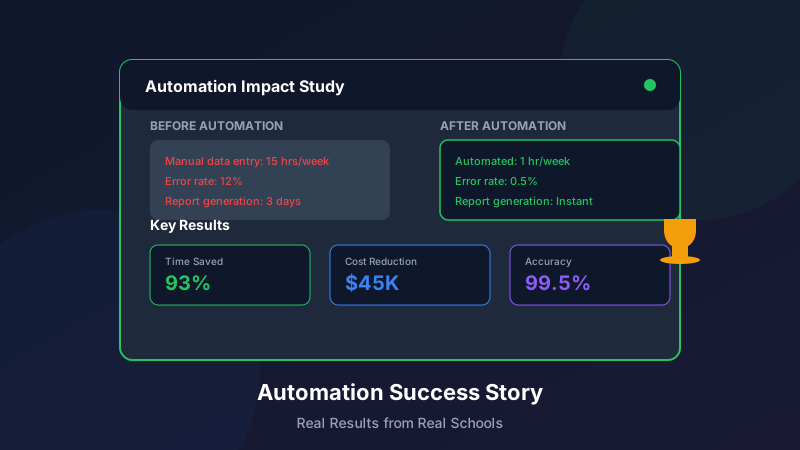
Data entry: 80 hours/week → 15 hours/week (81% reduction)Scheduling: 20 hours/week → 5 hours/week (75% reduction)Billing: 15 hours/week → 3 hours/week (80% reduction)Communication: 25 hours/week → 8 hours/week (68% reduction)Reporting: 10 hours/week → 2 hours/week (80% reduction)Total: 150 hours/week → 33 hours/week (78% reduction)
Quality Improvements
Error Reduction:
Billing errors: 15% → 2%Scheduling conflicts: 8 per week → fewer than 1Data inconsistencies: EliminatedSpeed Improvements:
Enrollment processing: 3 days → same dayPayment posting: 2-3 days → immediateReport generation: 4 hours → 10 minutesFinancial Impact
Direct Savings:
Reduced admin staff from 5 to 3 FTEsEliminated paper and printing costsReduced payment processing feesFaster collections improved cash flowRevenue Impact:
Faster enrollment conversionReduced churn from billing issuesCapacity for more students without more staffTime for growth initiativesROI Calculation:
Annual platform cost: $18,000Annual savings (staff, materials, efficiency): $95,000First-year ROI: 428%Staff and Customer Satisfaction
Staff Impact:
Admin team focuses on high-value activitiesReduced burnout and turnoverHigher job satisfaction scoresProfessional development opportunitiesFamily Impact:
Convenient online accessTransparent communicationEasy payment optionsFewer errors and issuesNPS Score: Increased from 42 to 71
Key Success Factors
1. Leadership Commitment
The executive team:
Allocated resources for implementationSet clear expectations for adoptionModeled use of new systemsCelebrated wins and progress2. Change Management
Successful transition required:
Clear communication of "why"Involvement of staff in decisionsAdequate training and supportPatience during learning curveRecognition of adaptation efforts3. Phased Approach
Rather than changing everything at once:
Started with highest-impact areasProved value before expandingAllowed time for adjustmentBuilt on each success4. Data Quality Focus
Automation only works with good data:
Cleaned legacy data before migrationEstablished data entry standardsCreated validation rulesRegularly audited data quality5. Continuous Improvement
Automation is never "done":
Regular review of workflowsStaff feedback collectionPlatform updates and new featuresOngoing optimizationLessons Learned
What Worked Well
Starting with a pilot location before scalingInvesting in thorough trainingBuilding internal championsCommunicating benefits to familiesCelebrating quick winsWhat They'd Do Differently
Begin data cleanup earlierAllocate more time for staff adjustmentInvolve frontline staff sooner in planningSet more realistic initial timelinesDocument processes more thoroughly upfrontUnexpected Benefits
Insights from data they never had beforeAbility to personalize at scaleCompetitive differentiation in the marketPlatform for future innovationRecommendations for Other Learning Centers
Getting Started
Assess Current State: Document time spent on administrative tasksIdentify Pain Points: Where is time being wasted?Calculate Potential ROI: What could automation save?Research Solutions: Find platforms that fit your needsBuild the Case: Present benefits to decision-makersImplementation Tips
Start small and expandInvest in trainingBe patient with the learning curveMeasure and communicate progressIterate and improve continuouslyCommon Pitfalls to Avoid
Trying to automate before standardizing processesUnderestimating change management needsSkipping data cleanupOver-customizing too earlyNot involving end-users in planningConclusion
Sunrise Learning Centers transformed their operations through strategic automation, reducing administrative workload by 60% while improving quality and customer satisfaction. The key was not just implementing technology, but thoughtfully redesigning processes and supporting people through change.
For learning centers struggling with administrative burden, the message is clear: automation isn't just about efficiency—it's about freeing your team to focus on what really matters: helping students learn and grow. To see how the right platform can transform your operations from day one, book a demo or read our guide on how to increase enrollment at your learning center.