How Schools Are Addressing the Digital Divide in 2025
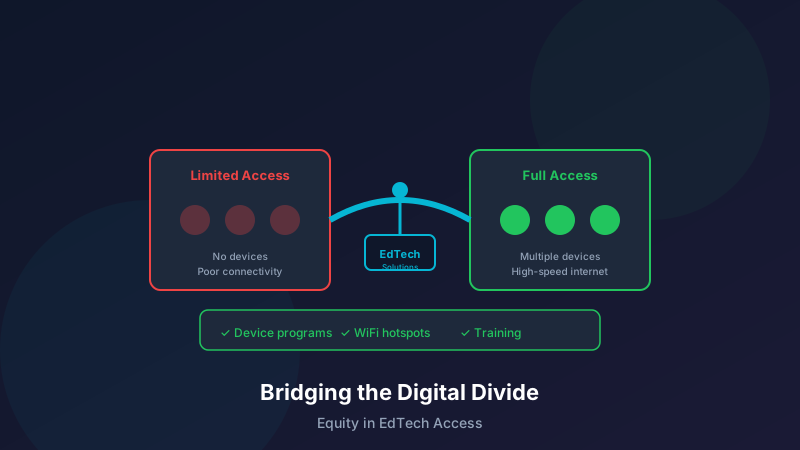
The digital divide—the gap between those with reliable access to technology and those without—remains one of education's most pressing equity challenges. As learning increasingly relies on digital tools, ensuring all students have access is no longer optional but essential. Here's how schools and learning centers are working to close this gap in 2025.
Understanding the Current Digital Divide
The Scope of the Challenge
Despite progress, significant gaps remain:
15% of U.S. households with school-age children lack high-speed internetRural communities face 21% lower connectivity rates than urban areasLow-income families are three times more likely to be offlineEven with devices, many lack adequate bandwidth for video learningBeyond Connectivity
The divide extends past internet access:
Device Access
Outdated or shared devices limit productivityMobile-only access restricts certain activitiesMaintenance and replacement challenges persistDigital Literacy
Students and families vary in technology skillsLanguage barriers affect navigation and usageGenerational gaps in digital comfort levelsSupport Infrastructure
Technical help availability varies widelyAfter-hours support often unavailablePhysical spaces for focused work lackingInnovative Solutions in Action
1. Community Partnership Programs
Schools are looking beyond their walls:
Library Collaborations
Extended hours for student computer accessHotspot lending programsDigital literacy classes for familiesQuiet study spaces with reliable WiFiBusiness Partnerships
Corporate sponsorship of devices and connectivityEmployee volunteer tech support programsAccess to corporate training resourcesWorkspace availability during off-hoursMunicipal Initiatives
City-funded public WiFi expansionCommunity center technology hubsTransportation to connectivity locationsSubsidized internet programs2. Device Programs That Work
Getting technology into students' hands effectively:
One-to-One Initiatives
Chromebook or tablet for every studentTake-home policies that extend learningInsurance and repair programsRefresh cycles to maintain relevanceDevice Lending Libraries
Laptops and tablets available for checkoutHotspot lending for connectivityPeripheral equipment (headphones, chargers)Long-term loans for extended needsBYOD with Support
Bring Your Own Device policiesLoaner devices for those withoutStandardized apps that work across platformsTechnical support regardless of device type3. Connectivity Solutions
Ensuring students can get online:
Mobile Hotspot Programs
Unlimited data devices for familiesLTE-enabled tablets and laptopsBulk carrier partnerships for reduced costsEasy activation and support processesCommunity WiFi Expansion
School bus WiFi for homework during commutesParking lot WiFi zones for after-hours accessNeighborhood antenna installationsSignal boosters for rural areasSubsidized Internet Partnerships
Negotiated low-cost plans with ISPsAffordable Connectivity Program navigation supportApplication assistance for qualifying familiesBundle deals for devices plus connectivity4. Alternative Access Strategies
When home connectivity isn't possible:
Extended Facility Hours
Before and after school computer labsEvening and weekend access programsSummer learning technology accessSafe, supervised environmentsMobile Technology Units
WiFi-equipped buses visiting neighborhoodsPop-up tech labs in community spacesMobile device charging and support stationsRotating schedules to serve all areasOffline-First Design
Curriculum materials that work without internetDownloadable content for offline useSync-when-connected functionalityPaper backup options when neededDigital Literacy for All
Student Skill Building
Ensure students can use technology effectively:
Foundational Skills
Keyboard and basic computer operationsInternet navigation and search skillsFile management and organizationDigital communication etiquetteCritical Digital Literacy
Evaluating online information sourcesUnderstanding privacy and securityRecognizing misinformation and biasResponsible social media useProductivity Tools
Word processing and document creationSpreadsheet and data basicsPresentation software proficiencyCollaboration platform navigationFamily Engagement
Include families in digital literacy efforts:
Parent Technology Classes
Evening sessions on common toolsMulti-lingual offeringsChildcare during classesPractical skill focusFamily Tech Nights
Hands-on learning togetherFood and fellowship alongside technologyTake-home resources and guidesOngoing support connectionsHome Support Resources
Video tutorials in multiple languagesPrinted quick-start guidesHotline and chat support optionsCommunity tech mentor programsEquitable Instructional Design
Creating Accessible Learning
Design for diverse access situations:
Low-Bandwidth Considerations
Text-based alternatives to videoCompressed media optionsAsynchronous over synchronous when possibleMinimal data-intensive featuresDevice Flexibility
Mobile-responsive designTouchscreen and keyboard navigationWorks on older devices and browsersMinimal storage requirementsAccessibility Features
Screen reader compatibilityClosed captions for all videoAlt text for imagesKeyboard navigation throughoutOffline Alternatives
Always have backup plans:
Printable Materials
PDF versions of key contentTake-home packets when neededClear print-friendly formattingDistribution systems that reach all studentsNon-Digital Assignments
Equivalent learning objectivesMaterials students already haveClear instructions without tech dependenciesMultiple submission optionsMeasuring Progress on Equity
Access Metrics
Track who has what:
Device to student ratiosHome connectivity surveysBandwidth adequacy assessmentsTechnical support utilizationUsage Data
Monitor how technology is used:
Platform login patternsAssignment completion rates across groupsEngagement time comparisonsFeature utilization analysisOutcome Equity
Ensure technology improves results for all:
Achievement gap analysisParticipation rate comparisonsStudent satisfaction surveysLong-term success trackingFunding the Effort
Federal and State Programs
Leverage available resources:
E-Rate Program
Discounts on connectivity and equipmentApplication support servicesConsortium approaches for smaller organizationsStrategic planning assistanceEmergency Connectivity Fund
Pandemic-era investments continuingDevice and hotspot fundingSupport for unconnected studentsApplication deadlines and requirementsState Technology Grants
Competitive grant opportunitiesFormula funding allocationsMatching fund programsInnovation pilot fundingPrivate Sector Support
Engage corporate and foundation partners:
Technology company donation programsFoundation grants for digital equityCorporate citizenship initiativesEmployee giving and volunteer programsCreative Financing
Think beyond traditional funding:
Lease versus purchase calculationsRefurbished device programsStudent technology fees with waiversCommunity fundraising campaignsSustainability Considerations
Long-Term Planning
Build for lasting impact:
Refresh Cycles
Planned device replacement timelinesBudgeting for ongoing costsTechnology evolution adaptationInfrastructure maintenance needsStaff Capacity
Technical support staffing levelsTraining and development investmentsVendor relationship managementCommunity partnership coordinationProgram Evaluation
Regular effectiveness assessmentsCost-benefit analysisStudent and family feedbackContinuous improvement processesSuccess Stories
Rural District Connectivity Initiative
A rural school district serving 2,500 students:
Partnered with a local ISP for fiber expansionDeployed mobile hotspots to 400 familiesEstablished six community WiFi hubsResult: 98% of students now have reliable accessUrban Learning Center Device Program
An urban tutoring center network:
Secured grant funding for 1,200 ChromebooksImplemented take-home laptop lendingCreated family tech support hotlineResult: Achievement gap narrowed by 25%Conclusion
Addressing the digital divide requires sustained, multi-faceted effort. There is no single solution—communities need combinations of device access, connectivity solutions, digital literacy support, and equitable instructional design. The good news is that proven strategies exist, funding is available, and the will to achieve digital equity is growing.
For learning centers and schools, the imperative is clear: technology should enhance opportunity for all students, not widen gaps. Solutions like a branded mobile app optimized for low-bandwidth access can help bridge connectivity challenges. By investing in comprehensive digital equity strategies, we create learning environments where every student can succeed, regardless of their family's resources or where they live.