Email Marketing for Tutoring Centers, Dance Studios and Schools
Build branded emails in a drag-and-drop editor, send them to the families of one class or your whole list, schedule monthly newsletters, and see who opened and clicked.
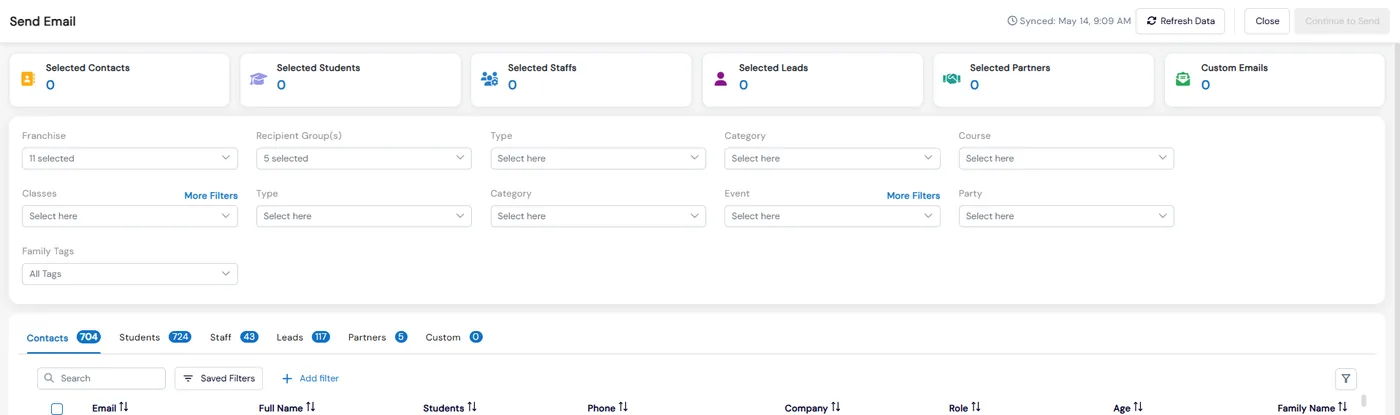
Newsletters, term announcements, recital updates and camp reminders all go to families you already have in Calimatic. Email marketing works from that same data, so you can email the parents of one class, everyone booked on an event, your leads, or your whole list, without exporting a spreadsheet.
Emails are designed in a drag-and-drop builder or a simple editor and personalized with tags such as the parent’s name. Before anything goes out, unsubscribed and bounced addresses are skipped, and afterwards you see deliveries, opens, clicks and bounces for every send.
How it works
- 1
Design the email once
Under CRM > Email/SMS, create a template in the Custom Editor: add columns, then drag in text, images, buttons and social links, or start from a predefined template. Save any block to reuse in other emails. Insert dynamic tags such as {Full Name} or the family name, check the mobile and tablet views, and preview it as families will see it. The Simple Editor is there for quick text emails.
- 2
Choose exactly who gets it
In Compose, Send To opens a picker with quick groups for all contacts, students, staff, leads or partners. Each tab has its own filters for class, course, event, party, tags and active or inactive status, and head office can filter by franchise. Type or paste addresses for people who are not in the system yet.
- 3
Send without emailing the wrong people
The confirmation shows how many people in each group will get the email and lists anyone who will be skipped as suppressed because they unsubscribed or bounced. When several selected students share one parent’s inbox, it sends one email and tells you the real count.
- 1
- 4
Schedule newsletters and birthday emails
Pick a saved template and a recipient group, then send it once on a date and time, or on a repeating schedule: on each person’s birthday, at the start of every month, or on the last day of every month. Repeating schedules can be paused and resumed.
- 4
- 5
See what families opened and clicked
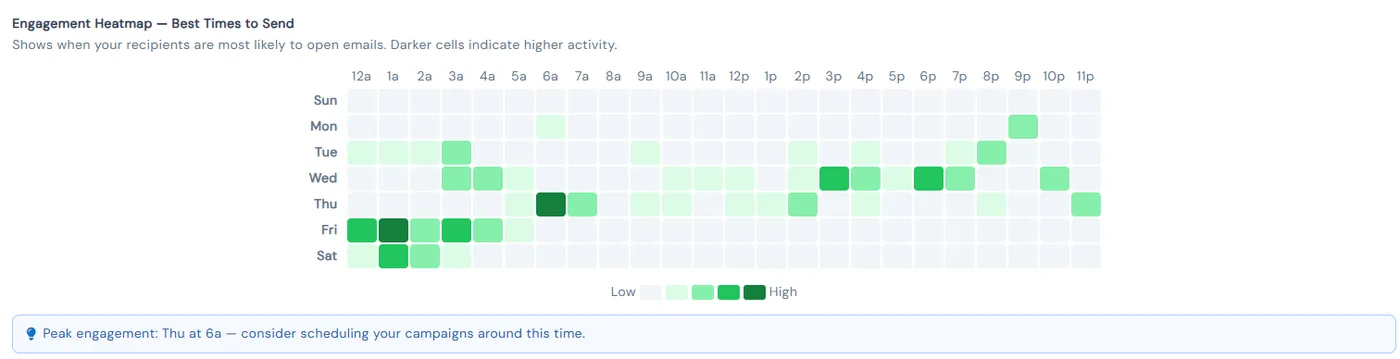
The Sent log shows sends, deliveries, opens, clicks and bounces for each email and who received it. Analytics add open, click and bounce rates, a delivery funnel, spam reports and unsubscribes, which links were clicked, and a heatmap of the best times to send.
What's included
- Drag-and-drop email builder with columns, text, images, buttons and social links
- Predefined templates and saved blocks you reuse across emails
- Dynamic tags such as full name, family name and franchise name
- Image gallery with folders, shared from head office to franchises
- Mobile and tablet preview, Import HTML and view source
- Bulk email to contacts, students, staff, leads and partners, filtered by class, course, event, party and tags
- Custom addresses for people not in the system, and attachments up to 10 MB each
- Suppression check before sending, with one email per shared inbox
- Scheduled sends for a date and time, birthdays, or the start or end of every month
- Opens, clicks, bounces, delivery funnel, link clicks and best time to send
- Unsubscribe list with consent audit and resubscribe
- Email reports for each franchise and across all franchises
Part of Calimatic CRM, in one white-labeled platform with enrollment, billing and the parent app.
Who uses it
Tutoring centers
Schedule a newsletter template for the start of every month and send it to the parents of students in each course.
Dance studios
Email recital details to the parents of one class, and send birthday greetings to dancers automatically.
Summer camps
Email everyone booked on a camp event, then check the heatmap to see when families open your emails before the next send.
Franchise networks
Share approved images with every location and compare open, click and bounce rates across franchises in one report.
See Email Marketing in a live demo
Get a personalized demo. We'll show Calimatic running your programs, under your brand.
- 14-day free trial, no credit card
- White-labeled under your brand
- Live product walkthrough
Email Marketing: FAQs
Common questions about Email Marketing in Calimatic.
From the Blog
How Dance Studios, Swim Schools & Martial Arts Centers Streamline Operations
Activity centers waste 15+ hours weekly on admin tasks. Discover proven strategies dance studios, swim schools, and martial arts centers use to automate operations and increase revenue.
Read articleHow to Manage Memberships, Drop-ins, and Class Packs at Your Activity Center
Learn proven strategies to handle multiple pricing models, reduce administrative headaches, and maximize revenue at your enrichment center.
Read articleActivity Center Marketing: Local SEO & Community Strategies That Work
Discover proven local SEO tactics and community engagement strategies that help activity centers fill classes, increase enrollments, and build lasting relationships with families in their neighborhoods.
Read article