QR Codes for Class Registration, Events and Forms
Turn any class, event, enrollment form or contact form into a branded QR code. Change where it points after you print it, and see how often it gets scanned.
Flyers, banners, front-desk signs and event tables all point families somewhere: a class to sign up for, a camp form, a free trial, your contact form. Calimatic builds the QR code for each of those links inside the same platform that runs the registration, so the code opens the right form and every scan is counted.
Each code carries its own short link. When the session fills up or the form changes, edit the code and every copy you have already printed follows the new destination.
How it works
- 1
Start from any link in your portal
Open a class or event and choose QR code from its actions menu, and the designer opens with that enrollment link filled in. The same QR icon sits next to enrollment form links, calendar views, franchise forms, contact forms and the Event Hub widget, or you can paste any website or app store link.
- 2
Brand it, and know it will scan
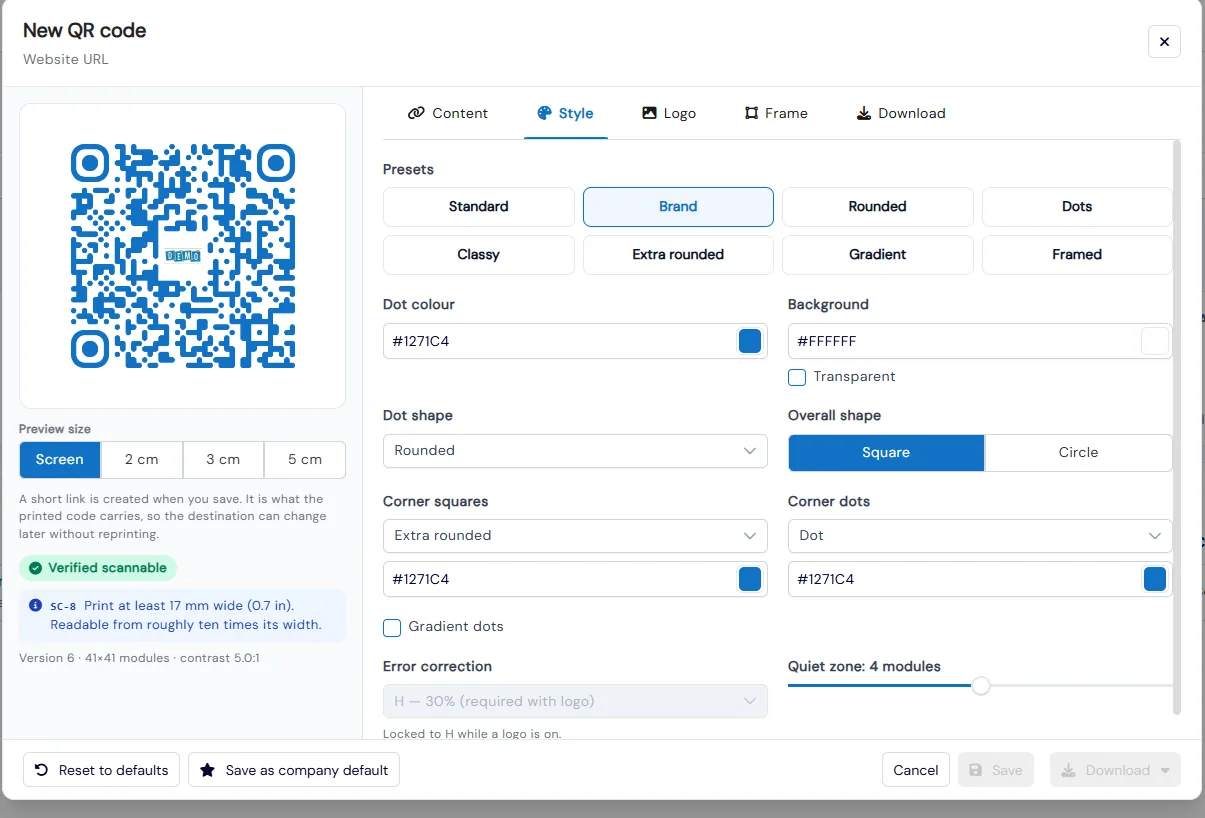
Pick a preset or set your own colors, dot and corner shapes, logo and a frame with a call to action like "Scan to book". Every change is test-decoded and checked for contrast, logo size, clear space and print size, and the designer tells you the smallest size to print it.
- 1
- 3
Download for print or screen
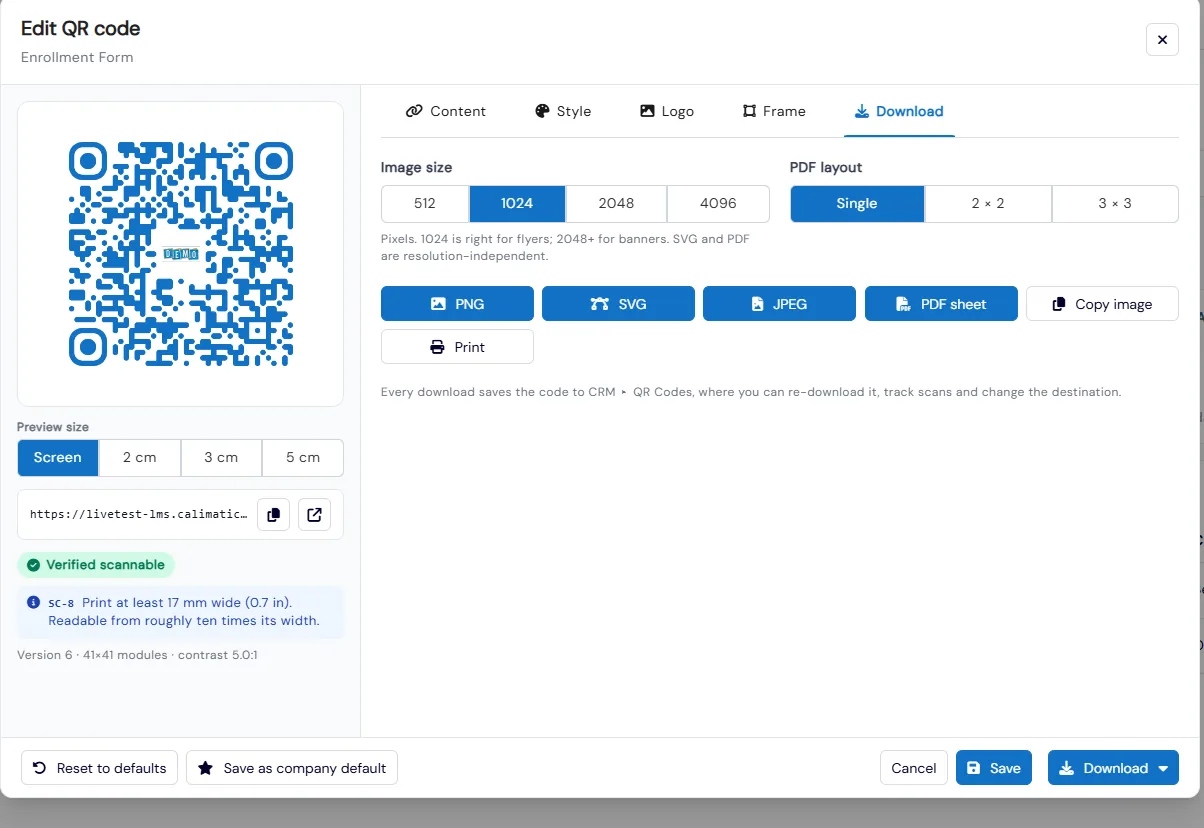
Download PNG, SVG or JPEG from 512 to 4096 pixels, or a PDF sheet of one, four or nine codes. SVG and PDF stay sharp on banners; a 1024 pixel PNG suits flyers.
- 4
Change the destination without reprinting
The printed code carries a short link, not the final address. Point it somewhere new at any time, pause it, or set an expiry date. Paused or expired codes show a branded page with your phone and email instead of an error.
- 4
- 5
Track every scan
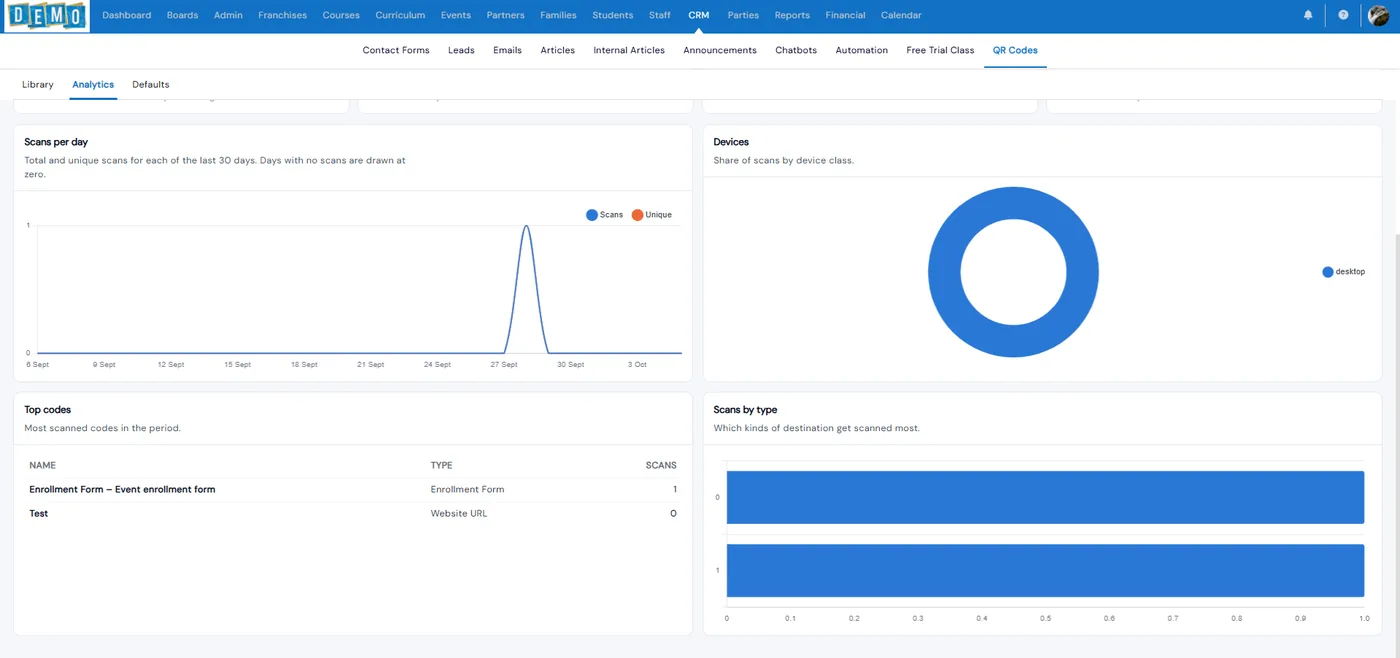
Analytics show scans and unique scans per day, devices, your most-scanned codes and which kinds of destination get scanned most, over 7, 30 or 90 days. Export any single code’s scans to CSV.
What's included
- QR codes for any class, event, enrollment form, contact form, article or website link
- One-click enrollment QR code from a class or event’s actions menu
- Style presets, colors, dot and corner shapes, logo and call-to-action frames
- Automatic scannability check with minimum print size
- Editable destination after printing, through each code’s short link
- Pause, resume, expiry dates and archive
- Branded fallback page when a code is paused or expired
- PNG, SVG, JPEG and multi-code PDF sheets
- Scans, unique scans, devices and top codes, with CSV export
- Company default design, and franchise filters for head office
Part of Calimatic CRM, in one white-labeled platform with enrollment, billing and the parent app.
Who uses it
Summer camps
Put a code for each camp week on flyers and school posters, then swap it to next season’s form without reprinting.
Swim schools and studios
Front-desk signs that open the free trial or waitlist form, with scans counted so you know which sign works.
After-school programs
Codes on take-home flyers that open enrollment for the exact class, with your logo in the middle.
Franchise networks
Set one company default design so every location’s codes look on-brand, and filter scans by franchise.
See QR Codes in a live demo
Get a personalized demo. We'll show Calimatic running your programs, under your brand.
- 14-day free trial, no credit card
- White-labeled under your brand
- Live product walkthrough
QR Codes: FAQs
Common questions about QR Codes in Calimatic.
From the Blog
Building a Referral Program That Grows Your Enrichment Center Enrollment
Learn how to design and implement a referral program that turns satisfied parents into your most powerful enrollment channel.
Read articleScheduling Software for Activity Centers: Eliminate Double-Bookings and No-Shows
Learn how modern scheduling systems help activity centers eliminate double-bookings, cut no-shows, and increase revenue through better resource utilization.
Read articleGrowing Your STEM Program: From After-School Club to Full Activity Center
Learn the exact steps successful STEM educators took to transform small after-school programs into thriving full-time activity centers generating 6-figure annual revenue.
Read article