Text Message Parents with Bulk and Two-Way SMS
Send a mass text to a class, a list or every family, then answer replies in a shared inbox. Opt-outs, quiet hours and reply alerts are built in.
Parents read texts faster than email, so class cancellations, payment reminders and open spots often go out by SMS. Calimatic sends texts from your own Twilio number to the same parents, students, staff, leads and partners you already keep in the platform, and logs every message on their record.
Replies come back into a two-way inbox your team works from, and you can have the owner emailed or texted when someone writes back. Anyone who texts STOP is kept off future sends until they resubscribe.
How it works
- 1
Connect your own Twilio number
Under CRM, SMS, Settings, enter your Twilio Account SID, Auth Token and phone number, plus an optional sender name. Choose whether to add help and stop instructions to your messages. Head office can apply one Twilio setup to several franchises and check each franchise’s inbound webhook.
- 1
- 2
Write the message once, as a template
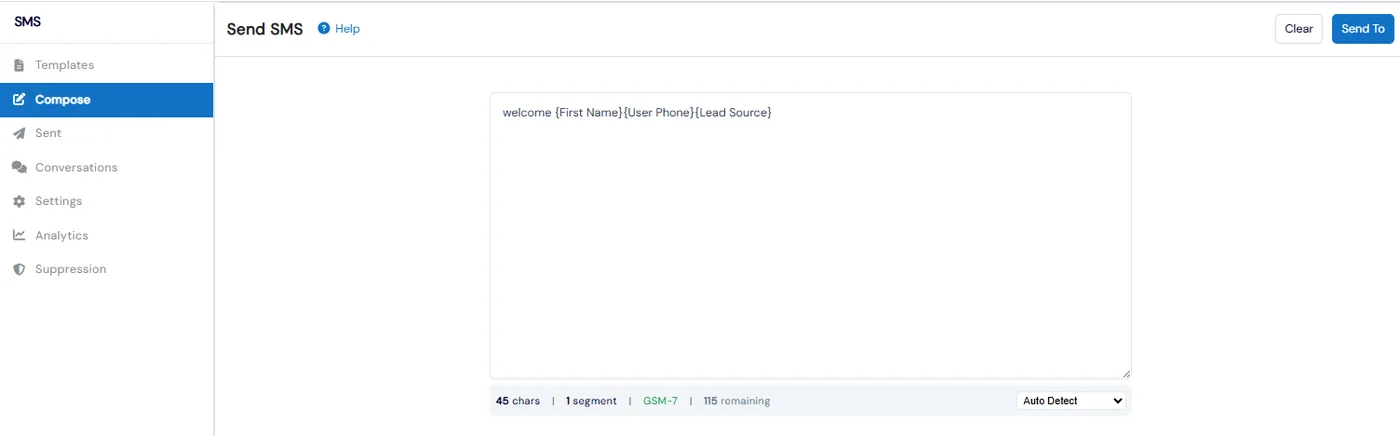
Save templates for reminders and announcements and personalize them with dynamic tags like {First Name} or {Franchise Name}. While you write, a live counter shows characters, segments and encoding, and Convert to GSM swaps smart quotes and similar characters so a message uses fewer segments.
- 3
Pick who gets it and send
Choose recipients with the same groups and filters as email, or use Send SMS straight from a class, a family or a partner. Before sending, Calimatic checks the suppression list and tells you who will be skipped, and warns you about cost when a message runs past three segments.
- 4
Answer replies in one inbox
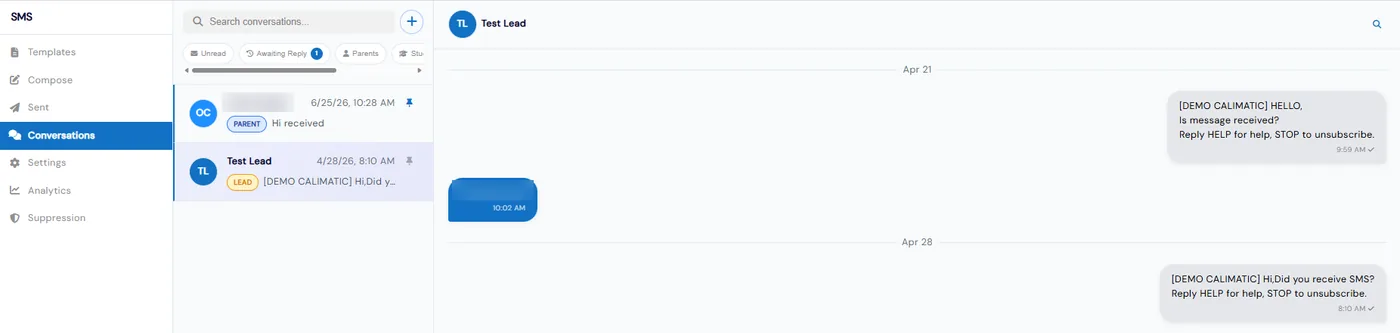
Conversations is a live two-way inbox. Filter by Unread, Awaiting Reply, Parents, Students, Leads or Pinned, search across people and messages, and start a new chat with any contact. Turn on reply alerts and the owner gets an email, a text, or both when a parent, student or lead writes back.
- 3
- 5
Keep texts to sensible hours
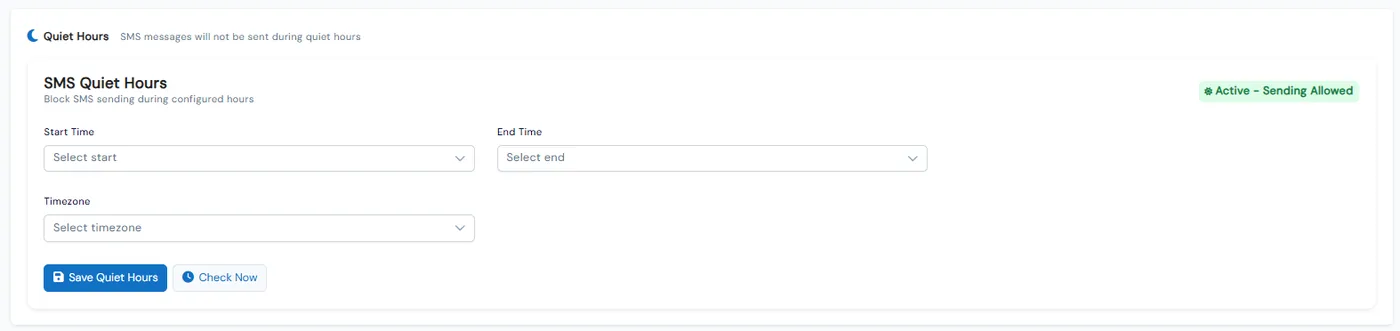
Set quiet hours with a start time, end time and timezone, and SMS sends stop during that window. A status tag shows whether sending is allowed right now.
What's included
- Bulk and one-off SMS to contacts, students, staff, leads and partners
- Send SMS to everyone enrolled in a class, or from a family or partner record
- SMS templates with dynamic tags
- Live character, segment and encoding counter with Convert to GSM
- Suppression check and cost warning before every bulk send
- STOP handling with an SMS suppression list, plus optional help and stop instructions
- Two-way conversations inbox with unread and awaiting-reply filters, pinning and search
- Email or text alerts to the owner when someone replies
- Quiet hours by timezone
- Your own Twilio number, with one setup shared across franchises and a webhook audit
- SMS analytics with delivery and failure rates, segments sent, incoming texts and failure reasons
Part of Calimatic CRM, in one white-labeled platform with enrollment, billing and the parent app.
Who uses it
Dance studios
Send a mass text to one class about a schedule change and answer parents’ questions from the same inbox.
Tutoring centers
Text new leads and see their replies under Awaiting Reply so no inquiry sits unanswered.
Swim schools
Send a weather closure to every family at once, with opted-out numbers skipped automatically.
Franchise networks
Apply one Twilio setup to several locations and check each location’s inbound webhook from head office.
See Text Messaging in a live demo
Get a personalized demo. We'll show Calimatic running your programs, under your brand.
- 14-day free trial, no credit card
- White-labeled under your brand
- Live product walkthrough
Text Messaging: FAQs
Common questions about Text Messaging in Calimatic.
From the Blog
How Dance Studios, Swim Schools & Martial Arts Centers Streamline Operations
Activity centers waste 15+ hours weekly on admin tasks. Discover proven strategies dance studios, swim schools, and martial arts centers use to automate operations and increase revenue.
Read articleHiring Your First Front-Desk Manager: What to Delegate and Keep
Ready to stop answering every call and email yourself? Learn which tasks to hand to your first front-desk manager and which decisions you should keep.
Read articleHow to Manage Memberships, Drop-ins, and Class Packs at Your Activity Center
Learn proven strategies to handle multiple pricing models, reduce administrative headaches, and maximize revenue at your enrichment center.
Read article