Free Trial Class Booking for Your Website
Add a Book a Free Trial widget to your website. Families pick a date and time, every booking lands in your CRM as a lead, and your team marks who showed up.
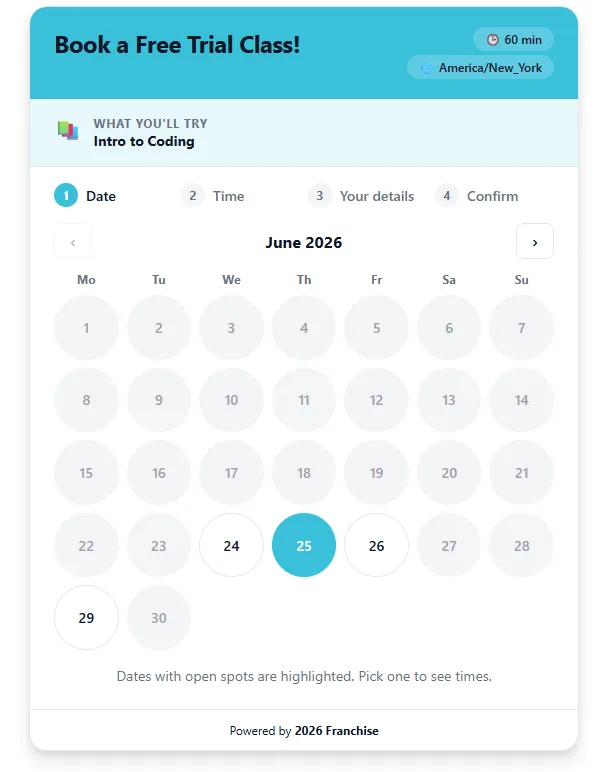
For most kids programs the free trial is the step between an inquiry and an enrollment. Calimatic puts the booking on your website, so a parent can pick a time without calling, and the booking arrives in your CRM as a lead with the child’s details and their answers to your questions.
Confirmation, reminder, reschedule and cancellation emails go out on their own. Trials booked online and trials your staff book over the phone sit in one list, so you can see who came, who didn’t, and who needs a follow-up.
How it works
- 1
Set up a trial schedule
Go to CRM, Free Trial Class and create a new trial schedule. A six-step wizard covers the public title, what’s offered (description, course, instructor, duration and location) and availability, with a live preview of exactly what visitors will see.
- 1
- 2
Choose days, times and seats
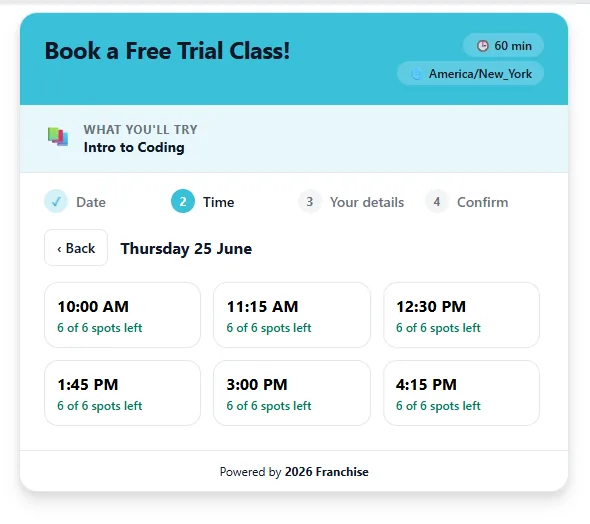
Set the available days and hours, seats per slot, slot interval, booking window and blackout dates. Each weekday can have its own hours, more than one time window and its own number of seats, and bookings are only accepted for slots that still have seats.
- 3
Ask what you need to know
Add standard contact fields, your own questions and consent checkboxes. Answers are saved to the lead’s notes and included in the confirmation email.
- 4
Brand it and embed it
Set colors, fonts and which course and instructor details show, then copy the embed code into your website. The widget needs no iframe, resizes to fit the page and works without page reloads. Families go from date to time to their details to confirm, in their own timezone.
- 3
- 5
Track every trial
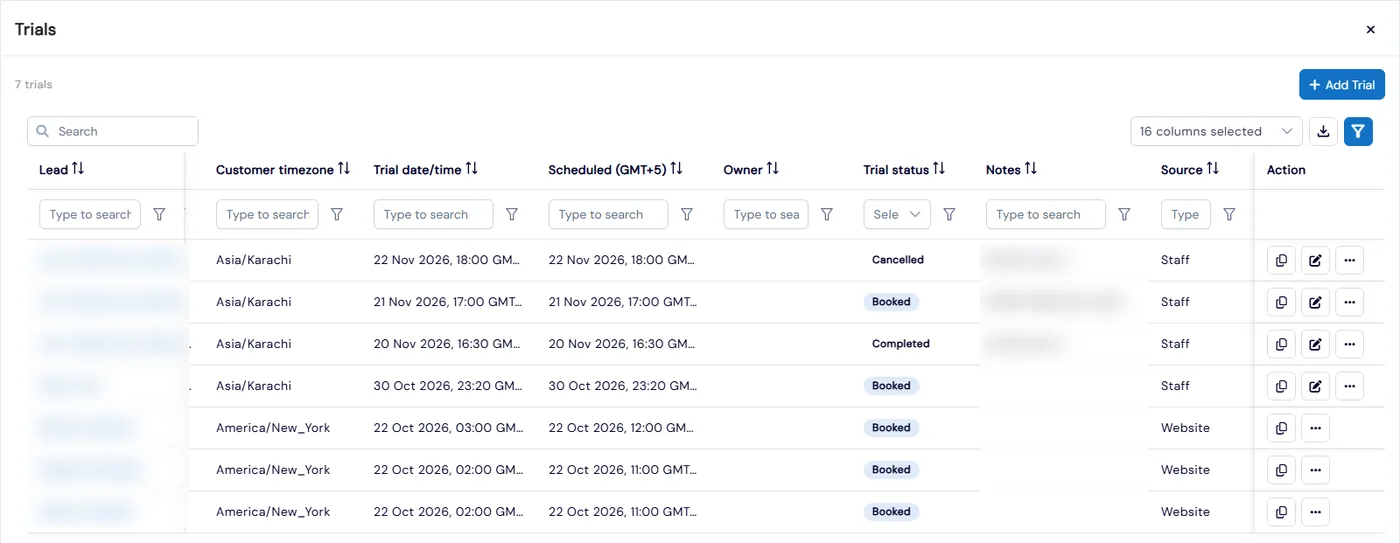
Each booking creates a lead with the source Free Trial and appears in the Trials list next to trials your staff add. Mark each one completed, no-show or cancelled, and a cancelled booking frees its seat right away. The Leads grid shows how many trials each lead has and how many were completed.
What's included
- Embeddable Book a Free Trial widget with no iframe that resizes to fit your page
- Six-step setup wizard with a live preview
- Hours and seats per weekday, multiple time windows, booking window and blackout dates
- Custom intake questions and consent checkboxes
- A CRM lead for every booking, with the child’s details and answers
- Automatic confirmation, reminder, reschedule and cancellation emails
- Reschedule and cancel links for families in their confirmation email
- Staff-booked trials with course, instructor, meeting link and the family’s timezone
- Completed, no-show and cancelled statuses, plus a Trials count on every lead
- Ready-made Free-trial nurture automation that stops when the lead replies
Part of Calimatic CRM, in one white-labeled platform with enrollment, billing and the parent app.
Who uses it
Swim schools
Cap seats per slot for trial lessons so a busy Saturday never gets overbooked, with different hours on weekdays and weekends.
Music schools
Parents pick a trial lesson time online, and the instructor assigned to the schedule gets the booking alert.
Tutoring centers
Book online trial sessions with a meeting link, shown in the family’s timezone and in yours so the tutor knows when to join.
Martial arts schools
Run trial classes on set days, and mark no-shows so your team knows which families to call back.
See Free Trial Booking in a live demo
Get a personalized demo. We'll show Calimatic running your programs, under your brand.
- 14-day free trial, no credit card
- White-labeled under your brand
- Live product walkthrough
Free Trial Booking: FAQs
Common questions about Free Trial Booking in Calimatic.
From the Blog
How to Increase Enrollment at Your Learning Center: 12 Proven Strategies
Fix follow-up first, then add lead sources. 12 proven strategies to increase learning center enrollment, with funnel math, sample scripts, ad budgets, and a 90-day plan.
Read articleMarketing Your Online Tutoring Business: SEO, Ads, and Word-of-Mouth
Learn proven strategies to attract more students through search engine optimization, paid advertising, and referral programs that actually convert.
Read articleScheduling Software for Activity Centers: Eliminate Double-Bookings and No-Shows
Learn how modern scheduling systems help activity centers eliminate double-bookings, cut no-shows, and increase revenue through better resource utilization.
Read article