Online Registration Forms for Classes, Camps and Events
Build the form families fill out to enroll, with your own questions, an e-signature and payment in the same step. Use one form for everything or a different one for each program.
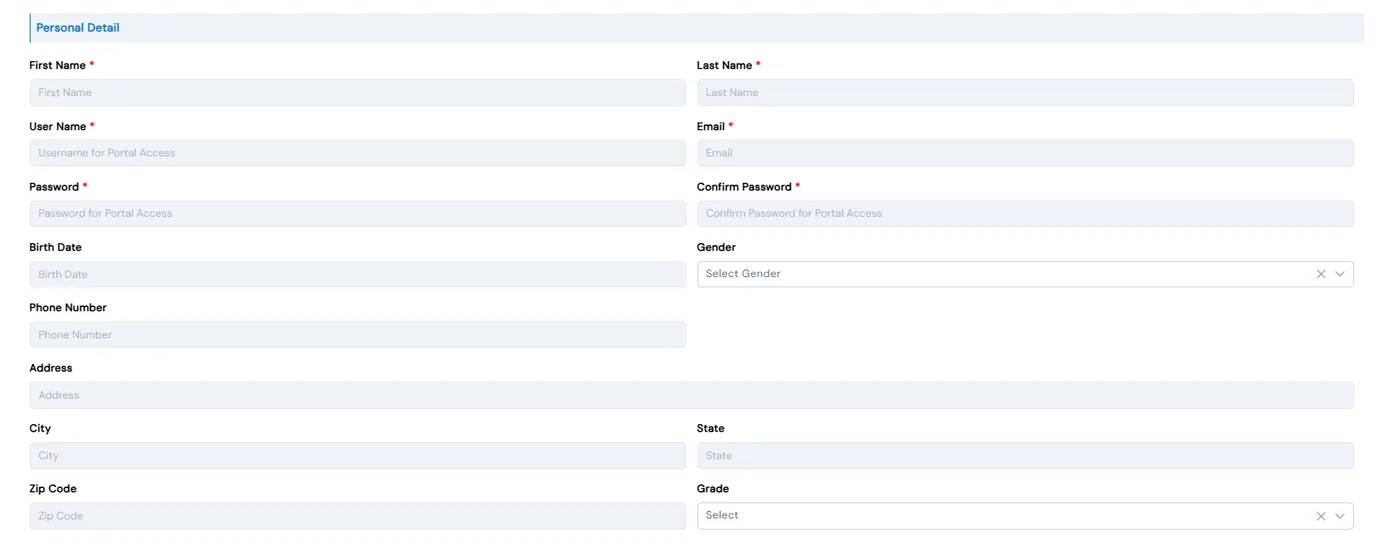
Every class, camp and event needs the same things from a family: who the child is, who to call, anything you need to know about them, and payment. Calimatic’s registration forms collect all of it on one form, tied to the class or event the family picked, so nothing has to be retyped from a PDF or a separate form tool.
Keep one default form, or build a separate form for each class or event type. Add your own questions, an e-signature, file uploads and your policies, and decide whether payment is charged when the family submits.
How it works
- 1
Create a form for each type of program
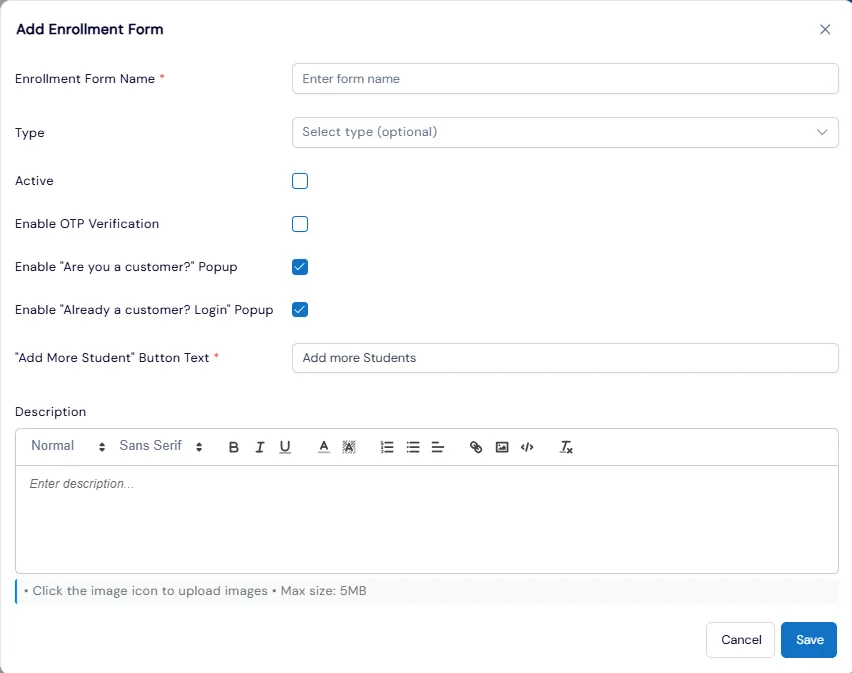
Open Enrollment Forms Setup under Courses or Events and add a form. Name it, assign it to a type such as Camps or Programs, and set it active. Any type without its own form uses the Default Enrollment Form.
- 2
Build your questions
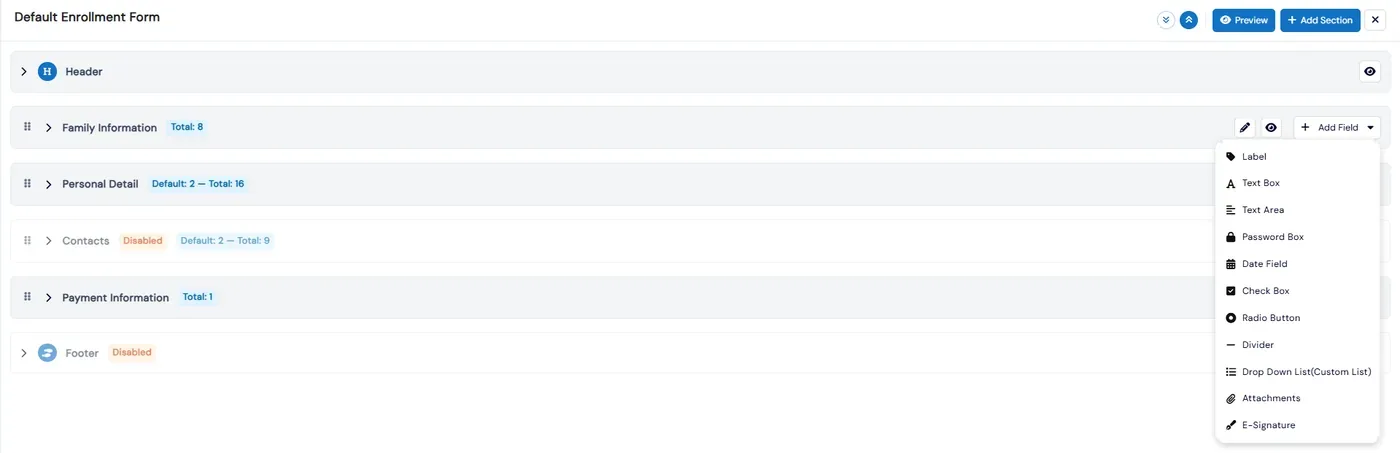
The builder is a stack of sections between a rich-text header and footer. Add sections, drag them into order, and add fields from eleven types: label, text box, text area, password, date, checkbox, radio button, divider, drop-down list, attachments and e-signature. Make a field required with your own error message, set it full or half width, or hide it without deleting it. Every change saves immediately.
- 1
- 3
Make it quick for returning families
Turn on OTP verification and the "Already a customer? Login" popup. A parent who logs in gets the form filled in from their profile, so they only check it and submit. You can also rename the Add More Students button that families use to register siblings.
- 4
Choose how payment works
The Payment Information section sets the charge option. Charge Immediately takes payment as soon as the family picks a payment method. Don’t Charge lets you collect later from the Student Payments page. Classes can also be set to take a deposit, or only the registration fee, at enrollment.
- 4
- 5
Preview and share it
Preview shows the form exactly as families will see it. Each event form has its own registration URL and embed snippet, and Copy Embedded Link on any class gives you a direct link to that class’s enrollment form to send to parents.
What's included
- A registration form for each class or event type, with a default form as the fallback
- Custom sections, drag-and-drop ordering and a rich-text header and footer
- Eleven field types, including date, drop-down, attachments and e-signature
- Required fields with your own error messages, and hide-without-delete
- OTP verification and "Already a customer? Login" prefill for returning families
- Charge Immediately or Don’t Charge payment options
- Several classes and siblings in one checkout, with live pricing for proration, sibling discounts and coupons
- Waivers and policies tied to specific enrollment forms
- Registration URLs, embed code and direct links to one class’s form
- Copy forms to franchises, or keep them in sync automatically
Part of Calimatic Admissions & Enrollments, in one white-labeled platform with enrollment, billing and the parent app.
Who uses it
Summer camps
A camp form that asks for allergies, special needs and emergency contacts, collects an e-signature and takes payment at signup.
Gymnastics gyms
Add an e-signature field to the class form and tie your liability waiver policy to it.
After-school programs
Parents register several children and classes in one checkout, with sibling discounts worked out as they go.
Franchise networks
Build the form once at head office and sync it to every location, so families see the same questions everywhere.
See Registration Forms in a live demo
Get a personalized demo. We'll show Calimatic running your programs, under your brand.
- 14-day free trial, no credit card
- White-labeled under your brand
- Live product walkthrough
Registration Forms: FAQs
Common questions about Registration Forms in Calimatic.
From the Blog
Growing Your STEM Program: From After-School Club to Full Activity Center
Learn the exact steps successful STEM educators took to transform small after-school programs into thriving full-time activity centers generating 6-figure annual revenue.
Read articleHow to Increase Enrollment at Your Activity Center During Off-Peak Seasons
Discover proven strategies to fill classes and maintain revenue during slow months at your enrichment center, from flexible programming to targeted retention campaigns.
Read articleHow to Manage Memberships, Drop-ins, and Class Packs at Your Activity Center
Learn proven strategies to handle multiple pricing models, reduce administrative headaches, and maximize revenue at your enrichment center.
Read article