Tuition Autopay Software for Recurring Monthly Billing
Charge tuition on a schedule from a saved card or bank account, adjust any single billing cycle, and let sibling and multi-class discounts apply on their own.
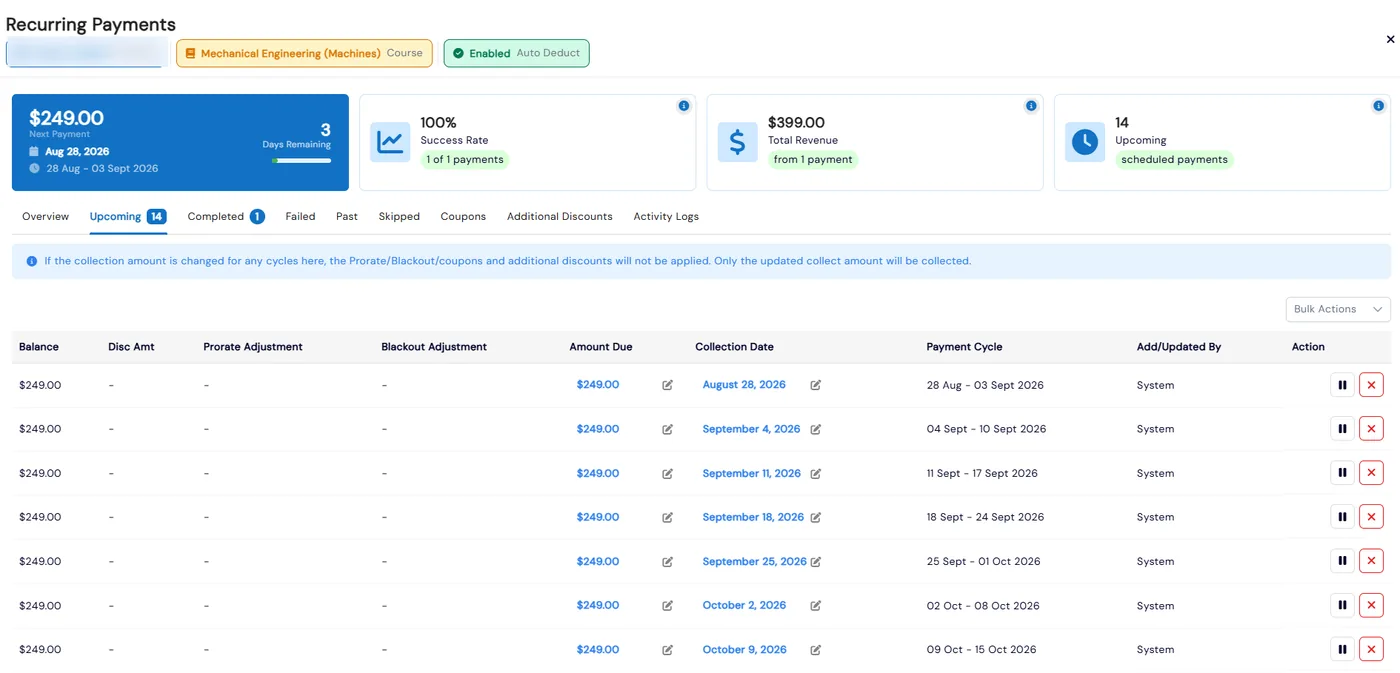
Most studios and centers bill the same families every week or month. Calimatic sets up the recurring plan when a student enrolls, collects each cycle from the family’s default payment method, and shows every cycle in one place: what is coming up, what was collected, what failed and what was skipped.
Real schedules change, so every cycle can be edited on its own. Push a due date back, change one month’s amount, hold payments over a break, or skip holidays with blackout dates, without touching what families have already paid.
How it works
- 1
Set the price and billing cycle on the class
In the class’s Manage Pricing, set the price, billing cycle (weekly, monthly or another preset interval), and recurring start and end dates. With Auto Deduct on, cycles are collected automatically; with it off, they wait for staff to collect. You can also have every enrollment follow the class’s recurring start date instead of the day the student enrolled.
- 1
- 2
Prorate late enrollments and skip holidays
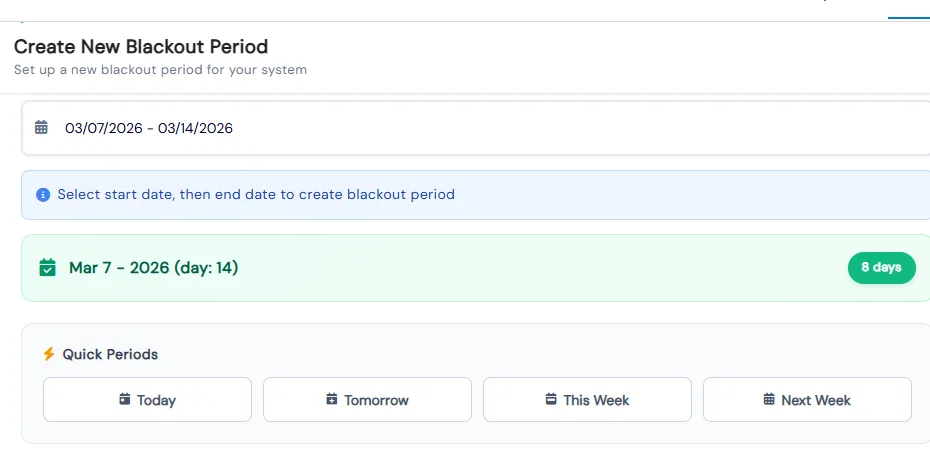
Turn on proration and a student who joins mid-cycle pays for the classes or days left in that interval. Add blackout dates for holidays and breaks, and future recurring charges leave out those sessions. If every class in a billing period is blacked out, that period is skipped.
- 3
Let family discounts apply on their own
Mark a coupon as a sibling coupon and it applies when several students from the same family enroll through your website. Set "Apply automatic coupon if more than" on a class coupon and the discount applies once a student has that many classes or camps in the cart, split evenly across them. Recurring coupons stay on every future payment.
- 4
Adjust any cycle without disturbing the rest
Open Recurring Payments on an enrollment or fee to see the next payment, success rate, total revenue and upcoming cycles. Edit a cycle’s date or amount in place, hold or cancel a single cycle or a date range, or select several cycles and shift their dates, set one amount, hold or cancel them together. Undo reverts a mistaken edit, and the activity log records every change.
- 5
Collect what is late or failed
Failed cycles appear in their own tab with a Collect Payment option. Past-due cycles can be collected, and failed or pending payments can be marked Collected by Other Ways or No Longer Needed. The Pending Payments/Fees report lists unpaid, failed and missed items, and an optional email tells your franchise each time a payment fails.
- 3
What's included
- Scheduled (auto deduct) and manual recurring plans for tuition and fees
- Weekly, monthly and other preset billing cycles with start and end dates
- Per-cycle date and amount edits, hold, cancel and undo
- Bulk date shifts with a live preview, bulk amounts, holds and cancels
- Proration by classes left or days left in the billing interval
- Billing blackout dates that skip holiday sessions in future charges
- Automatic sibling discounts and multi-class or multi-camp discounts
- Recurring coupons, one-use-per-family coupons and additional discounts
- Invoices with Stripe payment links, installments, reminders and credit notes
- Pay Now and saved payment methods in the parent portal, on Stripe or NMI
Part of Calimatic Billing & Payments, in one white-labeled platform with enrollment, billing and the parent app.
Who uses it
Dance studios
Bill monthly tuition automatically, skip recital and holiday weeks with blackout dates, and discount families with two dancers.
Summer camps
Give a discount automatically when a camper is booked into several weeks, with no coupon code to type.
Music schools
Collect weekly lesson fees on a schedule and prorate students who start partway through the month.
Tutoring centers
Hold a family’s payments while they are away, then pick the plan back up without rebuilding it.
See Tuition Autopay & Discounts in a live demo
Get a personalized demo. We'll show Calimatic running your programs, under your brand.
- 14-day free trial, no credit card
- White-labeled under your brand
- Live product walkthrough
Tuition Autopay & Discounts: FAQs
Common questions about Tuition Autopay & Discounts in Calimatic.
From the Blog
How Dance Studios, Swim Schools & Martial Arts Centers Streamline Operations
Activity centers waste 15+ hours weekly on admin tasks. Discover proven strategies dance studios, swim schools, and martial arts centers use to automate operations and increase revenue.
Read articleHow to Automate Billing and Reduce Late Payments in Education
Education businesses lose thousands monthly to late payments and manual billing errors. Learn how automation can recover that revenue and save hours each week.
Read articleHow to Forecast Monthly Revenue for a Learning or Activity Center
Stop guessing at next month's income. Learn a step-by-step method to forecast revenue for your learning or activity center using enrollment, churn, and pipeline data.
Read article