Website Contact Form That Creates Leads in Your CRM
Start from a ready-made inquiry form, put it on your website with a link, embed code or QR code, and every answer lands in your CRM as a lead your team and your automations can follow up.
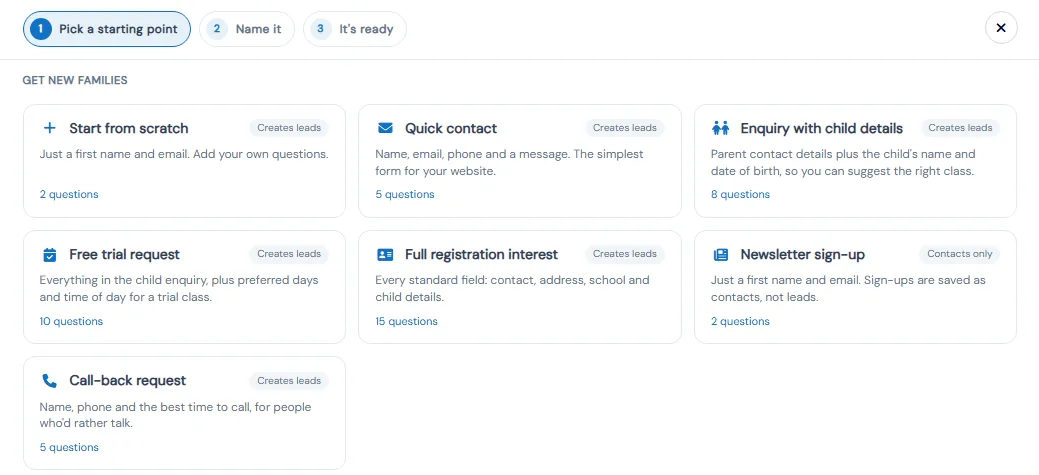
Contact Forms in Calimatic are inquiry forms you build under CRM, Contact Forms and place on your website. When a form is set to create a lead, each submission becomes a lead in the CRM with the parent's details and answers, ready for your team to call and for your automations to follow up. Forms can also just collect contacts, for example newsletter sign-ups, without adding them to your leads.
You can start from scratch or from a ready-made form such as Quick contact, Enquiry with child details, Free trial request or Call-back request. Share a form by link, embed code or QR code, see submissions and counts on the Contact Forms page, and send new leads to other apps such as Zapier or GoHighLevel with a webhook.
How it works
- 1
Pick a starting point
Click Create Form and choose a ready-made form under Get new families: Quick contact (name, email, phone and a message), Enquiry with child details (adds the child's name and date of birth), Free trial request (adds preferred days and time of day), Full registration interest, Newsletter sign-up or Call-back request. Or start from scratch with just a first name and email.
- 2
Decide what happens with each answer
In Form settings, under What happens with answers?, choose Create a lead so each answer becomes a lead in the CRM, or Just collect the details to save people as contacts only. Turn on multiple students if parents should be able to add more than one child in one submission. The choice is locked once the form has answers.
- 1
- 3
Build the questions and brand the form
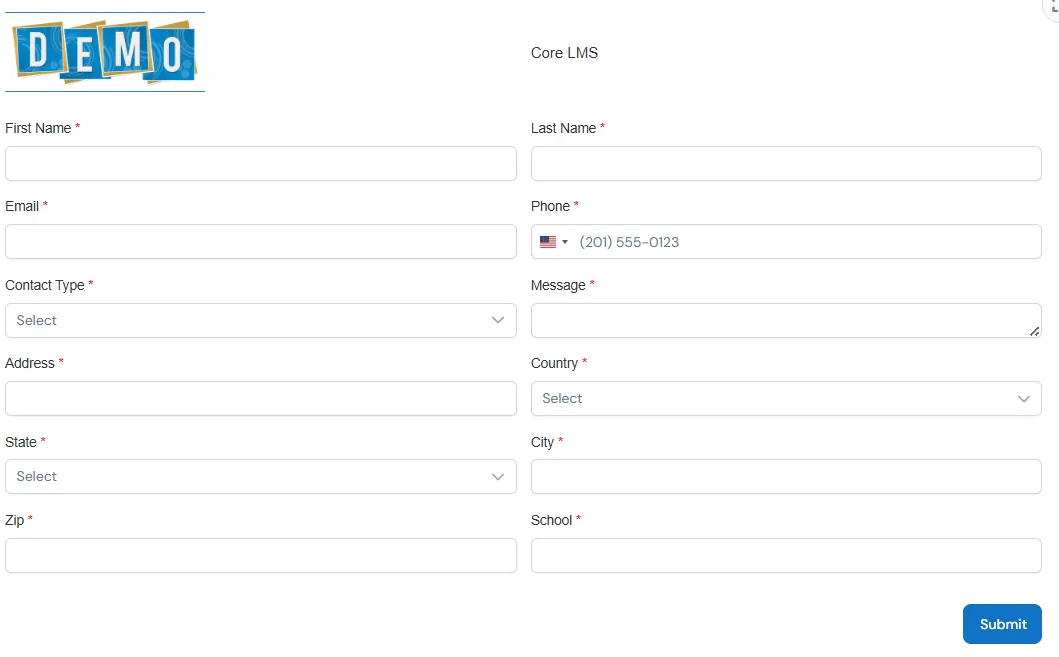
Drag questions into order, switch off built-in questions you do not need instead of deleting them, add pages and "show if" rules, and add fields such as phone, file upload or a signature. Design & Preview adds your logo and heading, your colors and fonts, the submit button text and a page to send people to after they submit.
- 4
Put it on your website
Changes save as you go, and visitors see them once you click Publish changes. Use the embed option to place the form on your website, or copy its link to share anywhere. A Generate QR Code action on the form makes a QR code for flyers and signs. Turn on spam protection so visitors pass an "I'm not a robot" check.
- 5
Follow up on every submission
Each lead keeps the form's custom fields in its Additional Information tab, and you can get an email about each new answer. Lead Created workflows in Automation Studio can filter on those custom fields to send the right follow-up. Under Contact Forms, Webhooks, paste a web address and Calimatic sends each new lead to that app, retries if it is down, and keeps a delivery log.
- 4
What's included
- Ready-made lead forms: Quick contact, Enquiry with child details, Free trial request, Full registration interest, Newsletter sign-up and Call-back request
- Create a lead or just collect contact details, chosen per form
- Several students in one submission, switched on or off per form
- Drag-and-drop questions, pages, "show if" rules and switched-off fields kept for later
- Draft changes, Publish changes and version history
- Close a form on a date or after a set number of answers
- Your logo, heading, colors, fonts, submit button text and a thank-you page
- Embed code, a shareable link and a QR code for each form
- Spam protection and an email about each new answer
- Totals for forms, lead forms, submissions this month and today
- Webhooks that send new leads and later changes to Zapier, GoHighLevel or your own system
- Copy forms to franchises, with franchise-level branding
Part of Calimatic CRM, in one white-labeled platform with enrollment, billing and the parent app.
Who uses it
Tutoring centers
Use Enquiry with child details to collect the parent's contact details with the child's name and date of birth, so you can suggest the right class when you call back.
Swim schools
Put a Free trial request form on your website to collect preferred days and times, and let a Lead Created workflow reply and alert your front desk.
Dance studios
Add a Call-back request form for parents who would rather talk, and a Newsletter sign-up that saves people as contacts without filling your lead list.
Learning center franchises
Build the inquiry form once at head office, copy it to every franchise, and let each location show its own branding on the form.
See Contact Forms in a live demo
Get a personalized demo. We'll show Calimatic running your programs, under your brand.
- 14-day free trial, no credit card
- White-labeled under your brand
- Live product walkthrough
Contact Forms: FAQs
Common questions about Contact Forms in Calimatic.
From the Blog
CRM for Education: Converting Inquiries Into Enrolled Students
Learn how education businesses use CRM systems to track leads, automate follow-ups, and convert more inquiries into paying students.
Read articleMarketing Your Online Tutoring Business: SEO, Ads, and Word-of-Mouth
Learn proven strategies to attract more students through search engine optimization, paid advertising, and referral programs that actually convert.
Read articleActivity Center Marketing: Local SEO & Community Strategies That Work
Discover proven local SEO tactics and community engagement strategies that help activity centers fill classes, increase enrollments, and build lasting relationships with families in their neighborhoods.
Read article