Parent Satisfaction Survey Software with NPS and Review Requests
Ask families how you are doing with ready-made NPS and feedback surveys, send them automatically, follow up on low scores the same day, and ask your happiest parents for a Google or Facebook review.
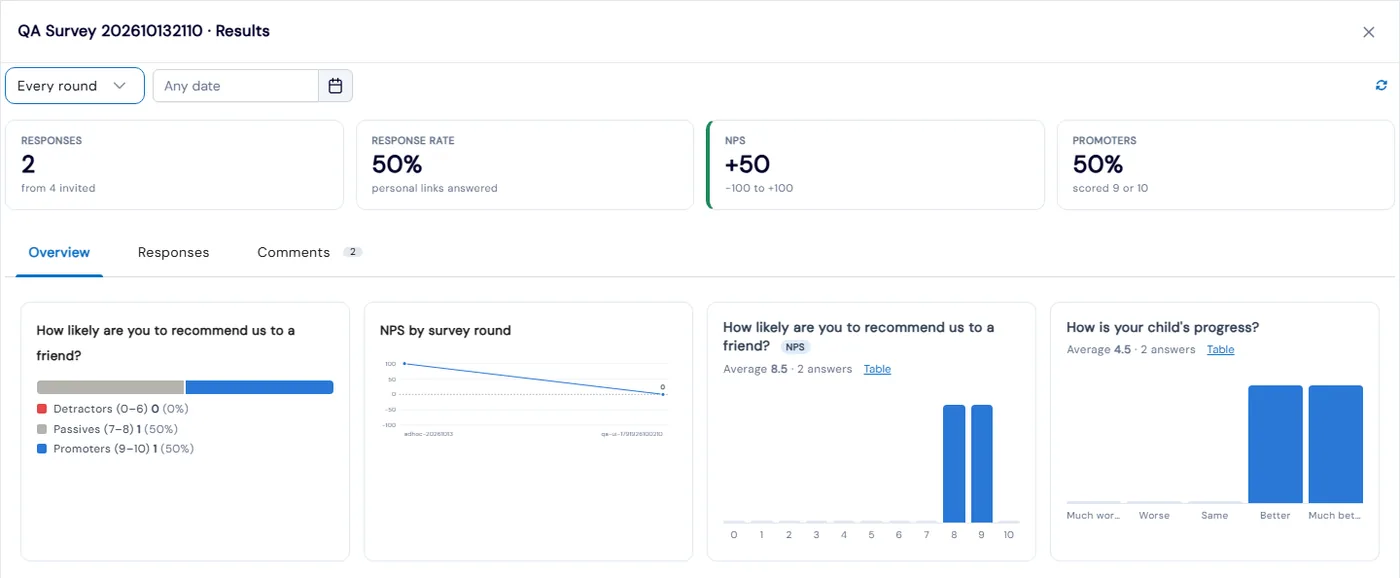
Feedback Surveys in Calimatic let you ask parents how you are doing and turn the answers into a Net Promoter Score (NPS), satisfaction and effort scores, and a short AI summary of their comments. Each parent gets a personal link by email or text, sees the survey in the parent portal, or answers from an open link or QR code.
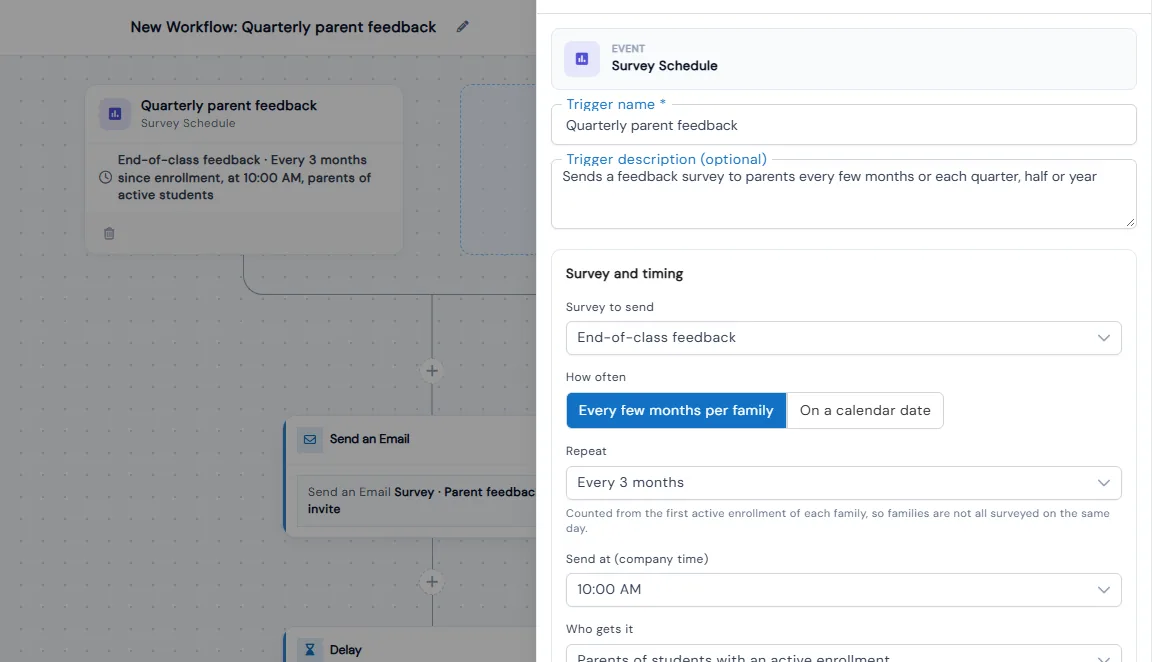
Survey automations do the asking for you. A Survey Schedule sends the survey every few months or each quarter, skips parents who were asked recently, and reminds the ones who haven’t answered. When a parent answers, a Survey Answered workflow can alert your team about a low score or thank a promoter and ask for a review with your Google or Facebook link.
How it works
- 1
Start from a ready-made survey
In CRM, Contact Forms, click Create Form and pick a survey under Ask for feedback: Parent feedback (NPS), First-month check-in, End-of-class feedback, or Event or party feedback. Give it a name only you see, and nothing changes on your website until you share it. Any form can be turned into a survey, so answers become scores and NPS instead of leads.
- 1
- 2
Add rating questions and logic
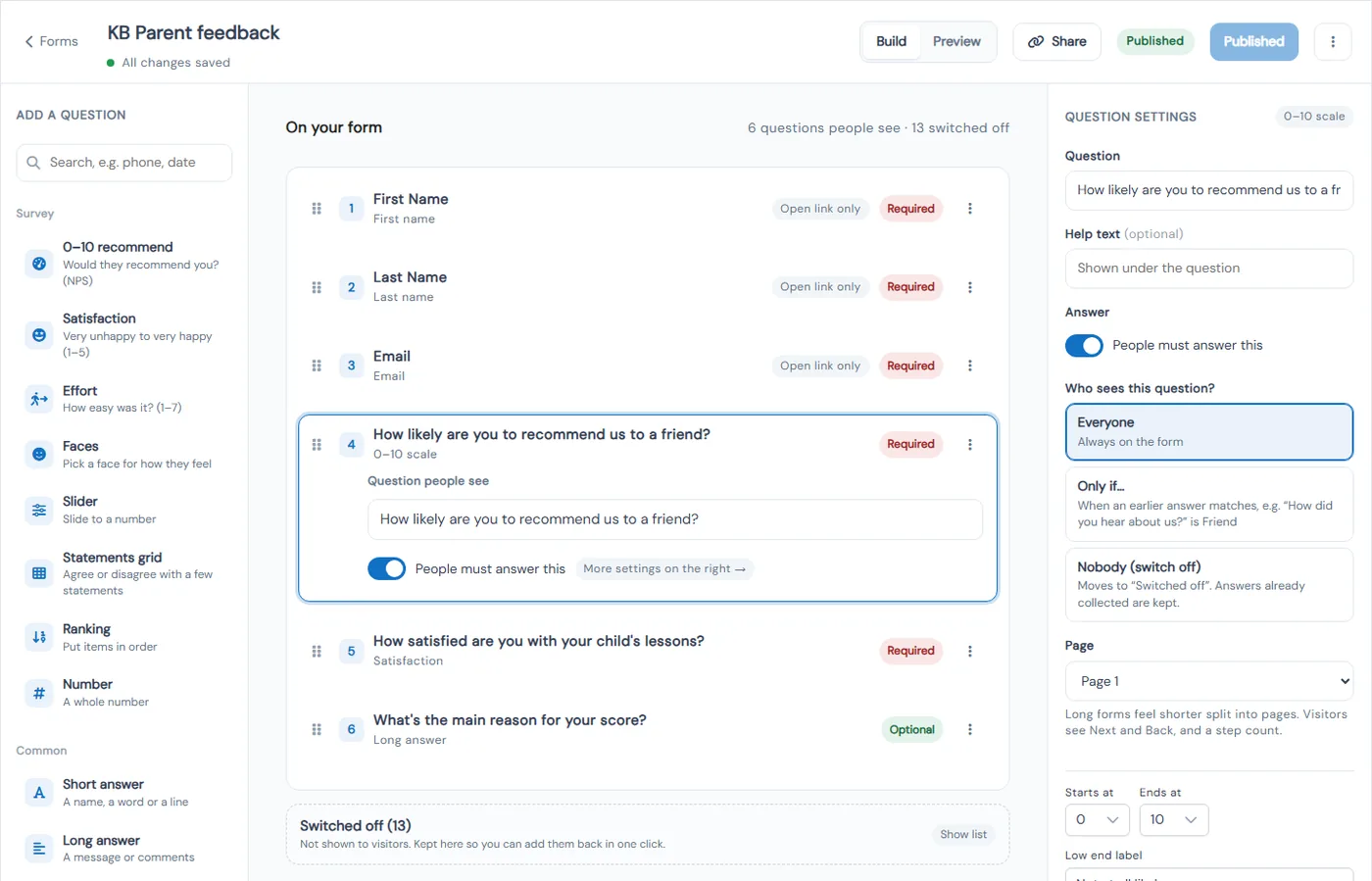
Add 0–10 recommend, satisfaction, effort, faces, stars, slider, statements grid, ranking and number questions, plus short and long answers and choices. Show a question only when an earlier answer matches, such as asking what you could do better when the score is 6 or lower, and split a long survey into pages. Survey Look sets the brand line, logo, colors and thank-you screen, and Preview shows it on a phone or computer.
- 3
Get it to parents
A personal link already knows who the parent is, so they don’t type a name or email, and they can change their answers for the number of days you set. Share also gives you an open link, code for your website and a QR code. Parents see a Surveys to answer card in the parent portal, and staff can email a survey to the families of a class, event or party.
- 3
- 4
Send surveys and act on answers automatically
Ready-made automations in the Feedback group cover quarterly parent feedback with a text reminder a week later, a first-month check-in, end-of-class feedback, alerts to your team when a parent scores 0–6, and a thank-you with a review request when a parent scores 9–10. Survey Answered can filter on the NPS group, other scores or any single answer.
- 5
Read your NPS and what parents are saying
Survey results show responses, response rate, NPS and promoters, NPS by survey round, a chart for every question and results by location. The Comments tab has a short AI summary, and the Responses table can be filtered and exported. Add the Parent NPS widget to your dashboard, and see each family’s answers on the Surveys tab of their record.
- 5
What's included
- Ready-made parent NPS, first-month check-in, end-of-class and event or party surveys
- 0–10 recommend, satisfaction (CSAT), effort, faces, stars, slider, statements grid and ranking questions
- Questions that show only when an earlier answer matches, and surveys split into pages
- Personal links, open links, website code, QR codes and a Surveys to answer card in the parent portal
- Anonymous answers, an answer window, closing dates and response limits
- Survey Look with your logo, colors, card style and thank-you screen
- Survey Schedule that sends surveys every few months per family or each quarter, half-year or year
- Skip rules so parents aren’t asked too often, and reminders only to parents who haven’t answered
- Survey Answered trigger with filters on NPS score, NPS group and any answer
- Staff alerts for low scores and review requests to promoters with your Google or Facebook link
- Results with NPS by round, results by location, an AI summary of comments and export
- Parent NPS dashboard widget and a Surveys tab on every family record
Part of Calimatic CRM, in one white-labeled platform with enrollment, billing and the parent app.
Who uses it
Tutoring centers
Send a first-month check-in to every new family and a quarterly NPS survey after that, so you hear about a problem before the family stops coming.
Dance studios
Thank parents who score 9 or 10 and ask them for a short Google review, while parents who score 6 or lower get a call from the studio that week.
Summer camps
Email the event or party feedback survey to the families of a camp week, then read the star ratings and what families enjoyed most and what you could improve.
Franchise networks
Run one parent NPS survey across every location and compare results by location, with a short AI summary of what parents are saying.
See Parent Surveys & Reviews in a live demo
Get a personalized demo. We'll show Calimatic running your programs, under your brand.
- 14-day free trial, no credit card
- White-labeled under your brand
- Live product walkthrough
Parent Surveys & Reviews: FAQs
Common questions about Parent Surveys & Reviews in Calimatic.
From the Blog
How Test Prep Companies Can Deliver Mock Exams and Track Scores Online
Transform your test prep business with digital mock exams that automatically track student progress, identify weak areas, and prove your value to parents.
Read articleFranchise Owner Guide: Key Metrics to Track for Each Location
Master the essential KPIs that separate thriving franchise locations from struggling ones. Learn exactly what to measure and why it matters.
Read articleHow Dance Studios, Swim Schools & Martial Arts Centers Streamline Operations
Activity centers waste 15+ hours weekly on admin tasks. Discover proven strategies dance studios, swim schools, and martial arts centers use to automate operations and increase revenue.
Read article