Parent Portal for Learning Centers, with a Parent App for Kids Activities
Give every family one place to enroll their children, pay what they owe, check the calendar, message your staff and find your resources, on the web and in the Calimatic mobile app.
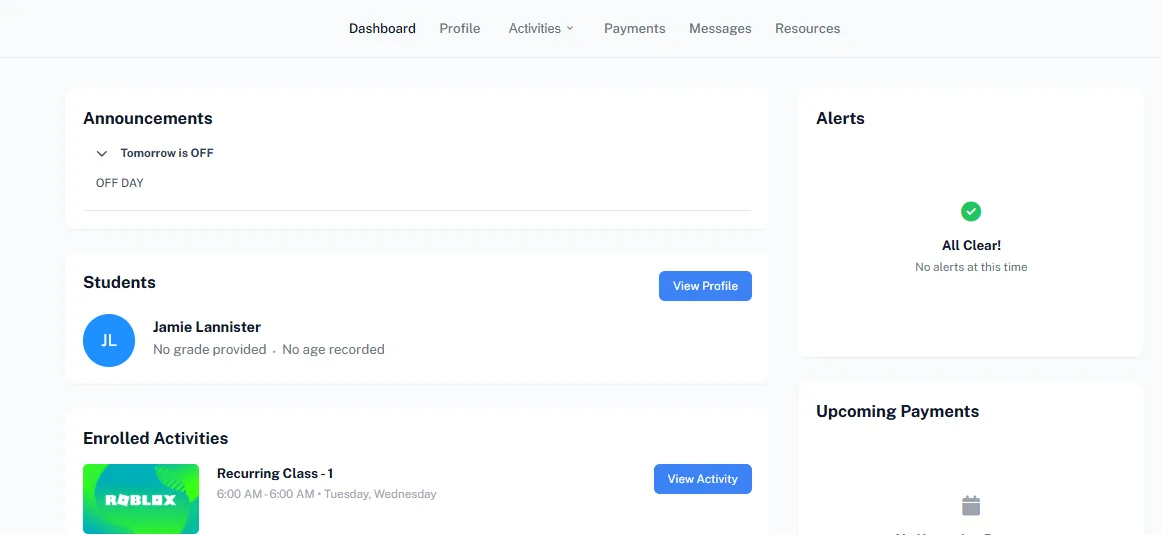
The Calimatic parent portal is a self-service website for families. Parents see announcements, their children’s activities and upcoming payments on one dashboard, enroll in new classes and events, pay invoices, manage saved cards, message your staff and open the resources you share. Students get their own portal for their activities, schedules and resources.
Parents can also use the Calimatic mobile app, or your own branded app if you have one, to see open and paid invoices, payment history and how many prepaid classes each child has left. You choose which dashboard widgets, quick links, menu items and screens each role sees in the app, and which portal permissions each franchise has.
How it works
- 1
Invite families to the portal
Portal access emails can go out automatically when a family enrolls in a class or event, or signs up from the portal, and staff can resend one if a family needs a new link. You can also give portal access to only the first contact in a family. Parents land on a dashboard with your announcements, their students, enrolled and upcoming activities, alerts, upcoming payments and loyalty points.
- 2
Let parents enroll without calling you
Parents use Register Now on the dashboard or the Activity Finder to browse classes, camps and events. They can add several classes, and different children, to one cart and enroll together, pick add-ons, and choose to pay only the deposit or the full amount for deposit classes. The Calendar shows every scheduled activity, and parents can request a cancellation or a make-up for eligible one-on-one classes.
- 1
- 3
Bills, payments and statements in one place
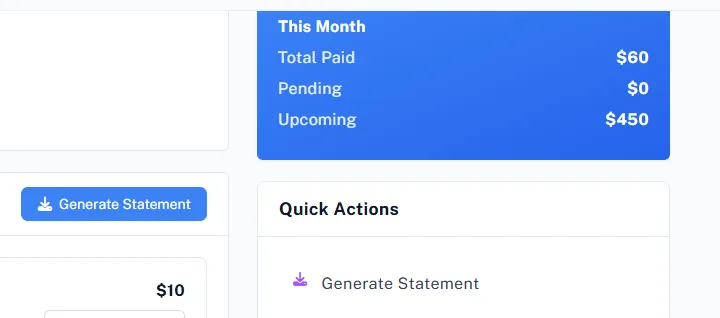
The Payments page lists pending invoices, upcoming payments with this month’s paid, pending and upcoming totals, and payment history. Parents pay with Pay Now, download invoice PDFs, generate their own statement, add cards and choose a default. If you sell classes in advance, they see the classes remaining for each child and what has been used.
- 4
Keep the conversation and paperwork in the portal
Messages lets parents write to instructors and staff and send attachments and voice messages. Resources holds the articles and documents you publish, and Drive lets parents view and upload documents. Parents can complete assigned assessments, answer surveys waiting for them, update family and student profiles, and keep their list of approved pick-up and drop-off contacts current.
- 5
Set up the app for each role
In System Config, Mobile, pick a role and choose which widgets appear on its app dashboard, which quick links and side-menu items it gets, and which screens it can open. In the app, parents see open and paid invoices with what is due, their payment history, and each student’s prepaid class balance. Parent portal permissions can be set for all franchises at once or for one franchise.
- 4
What's included
- Dashboard with announcements, students, enrolled and upcoming activities, alerts, upcoming payments and loyalty points
- Register Now and the Activity Finder for enrolling in classes, camps and events
- Cart for enrolling several children in several classes at once, with add-ons and a deposit or full payment choice
- Calendar of every child’s activities, with cancellation and make-up requests for eligible one-on-one classes
- Pending invoices, upcoming payments, payment history, Pay Now and self-service statements
- Saved payment methods with a default card
- Prepaid classes remaining for each child
- Messages with attachments and voice messages, plus Resources and Drive for documents
- Assessments and surveys parents complete inside the portal
- Store purchases, including with loyalty points
- Family and student profiles, contacts and approved pick-up and drop-off contacts
- Mobile app with invoices, payment history and class balance, configured screen by screen per role
Part of Calimatic Mobile App, in one white-labeled platform with enrollment, billing and the parent app.
Who uses it
Tutoring centers
Parents see how many prepaid classes each child has left, pay the next invoice with Pay Now and download their own statement without asking the front desk.
After-school programs
Parents keep their approved pick-up and drop-off contacts up to date in the portal, so staff only release children to someone on the list.
Summer camps
Families add several camp weeks for more than one child to one cart, choose deposit or full payment, and see every week on the portal calendar.
Franchise networks
Set parent portal permissions for every franchise at once or for one location, and give families your own branded mobile app.
See Parent Portal & App in a live demo
Get a personalized demo. We'll show Calimatic running your programs, under your brand.
- 14-day free trial, no credit card
- White-labeled under your brand
- Live product walkthrough
Parent Portal & App: FAQs
Common questions about Parent Portal & App in Calimatic.
From the Blog
How to Manage Memberships, Drop-ins, and Class Packs at Your Activity Center
Learn proven strategies to handle multiple pricing models, reduce administrative headaches, and maximize revenue at your enrichment center.
Read articleHow Dance Studios, Swim Schools & Martial Arts Centers Streamline Operations
Activity centers waste 15+ hours weekly on admin tasks. Discover proven strategies dance studios, swim schools, and martial arts centers use to automate operations and increase revenue.
Read articleParent Communication Tools That Improve Satisfaction and Reduce Churn
Discover how modern communication strategies and technology can transform parent relationships, improve retention, and turn satisfied families into your best marketing asset.
Read article