Class Registration Widget for Your Website
Put your classes, camps, events and parties on your own website in one tabbed widget. Families browse by list or calendar, pick add-ons, and enroll and pay without leaving your site.
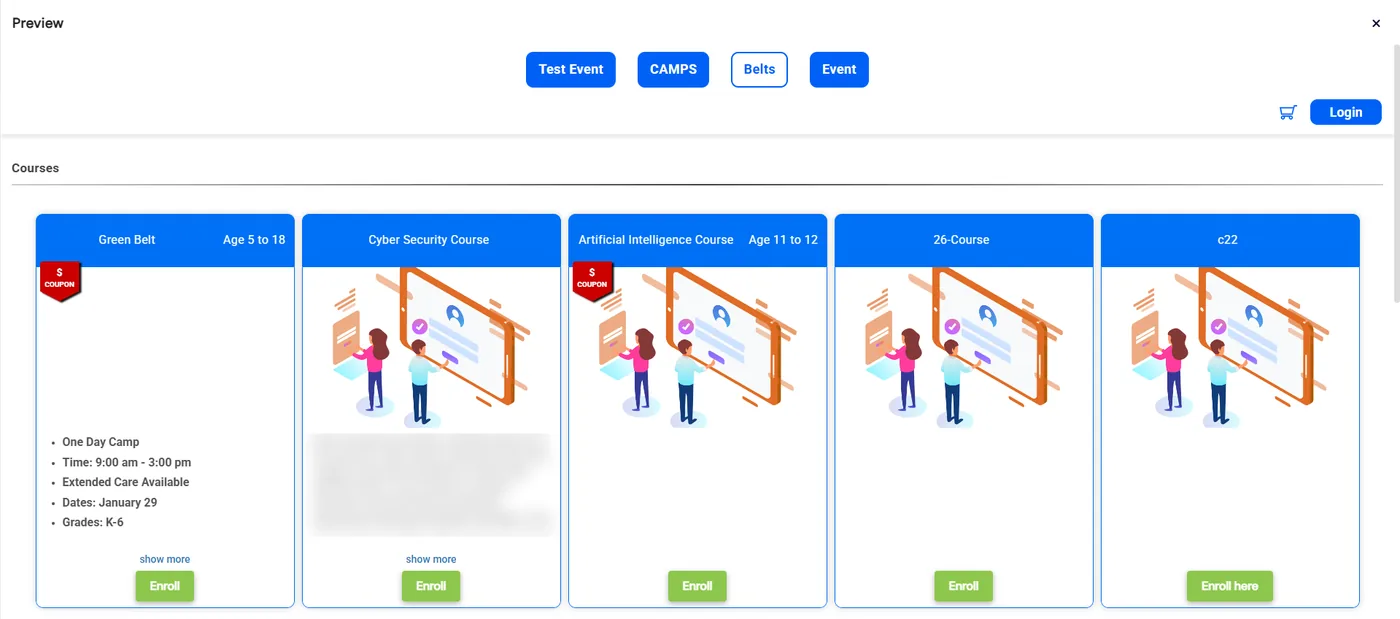
The registration widget, called Activity Finder in Calimatic, is a tabbed catalog of your classes and events that you embed on your own website with a copy-and-paste code snippet. Families browse each tab in a list or calendar view, open the enrollment form for the class they want, and enroll and pay there. The same widget also appears inside the parent portal.
You decide what goes on each tab by type, category and partner, and how each card looks. Every class type and category also has its own enrollment link, calendar link and embed code, and a Parties tab lets families book a party next to your classes. Business admins can push the same setup to every franchise, and each location can still edit its own copy.
How it works
- 1
Build the tabs families will see
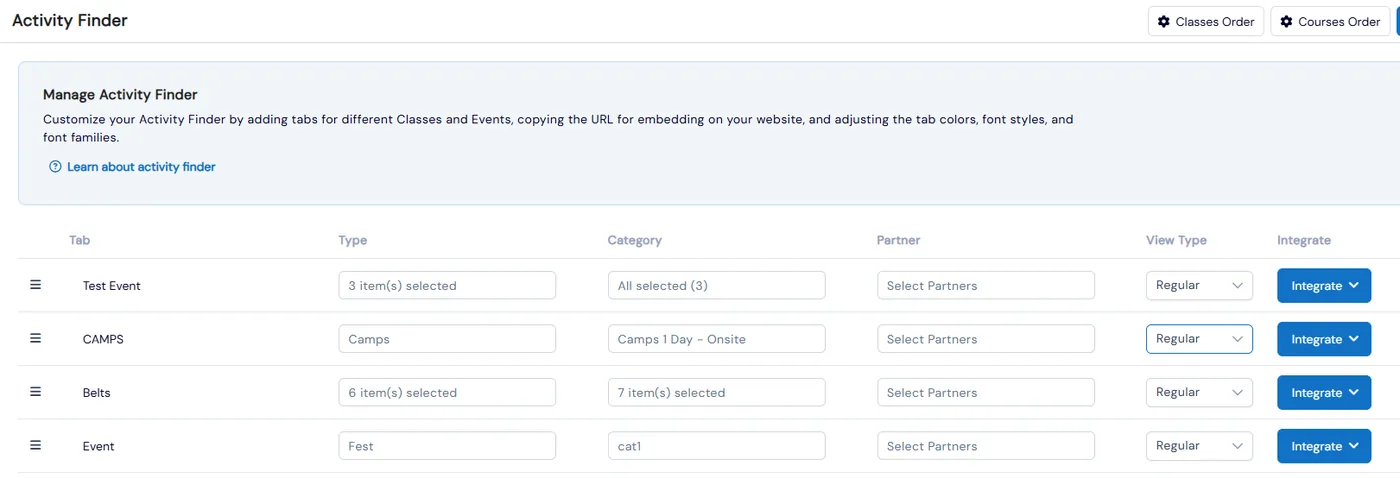
In Admin, Activity Finder, choose Add tab and give it a name. Then pick the class or event types, categories and partners that belong on that tab, and set its view to Regular, a plain list, or one of the calendar views. Drag tabs to reorder them, hide a tab without losing its setup, and turn on Hide Empty Tabs so a tab with nothing in it stays out of the widget.
- 2
Style the tabs and the class cards
Manage tabs sets the border radius, background and font colors, font style, size and family for the whole tab strip. Activity template settings decide what each card shows: number of days, unavailable days, instructor info, class cycle and class dates, which you can limit to chosen types or categories. Set the Enroll button colors with a live preview, and use Classes Order and Courses Order to put them in the order you want.
- 2
- 3
Copy the code onto your website
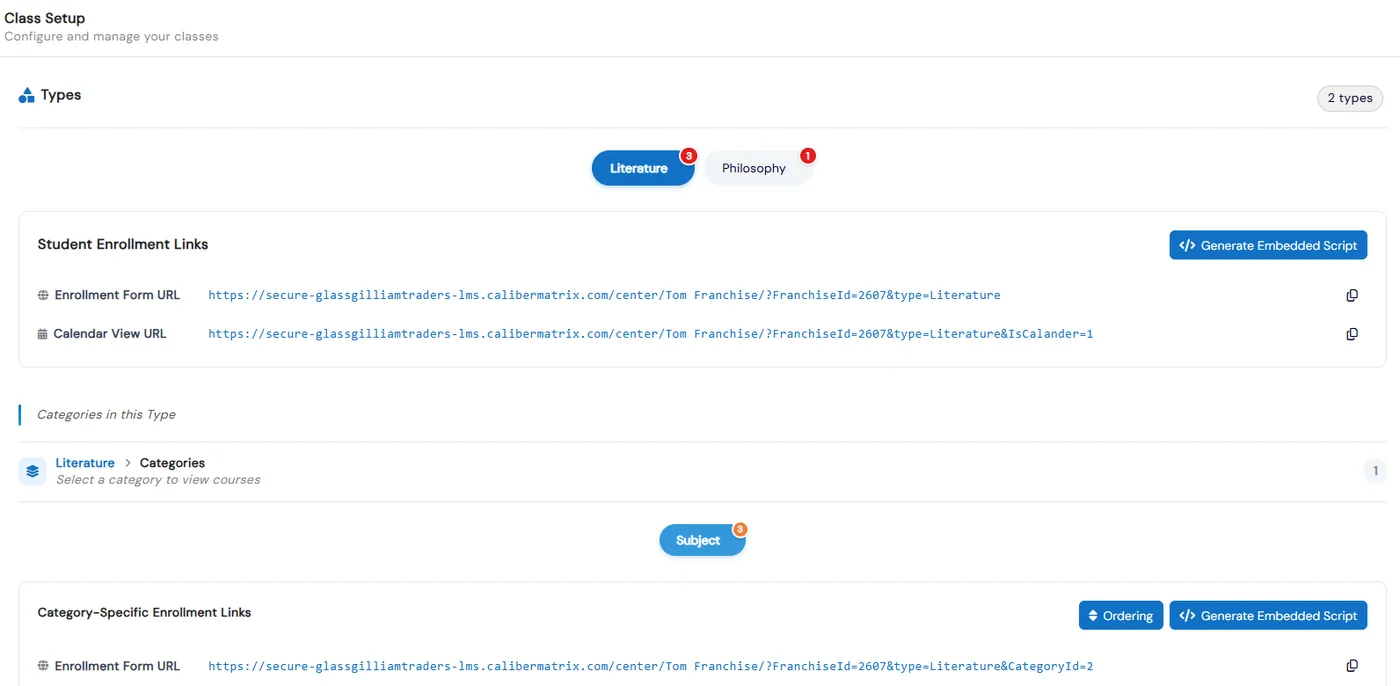
Integrate to website gives you a ready-to-paste snippet for the whole widget. Each tab has its own Integrate button for just that tab in a calendar, regular or all view, and Class Setup has an enrollment form URL, a calendar view URL and Generate Embedded Script for every class type and category. Preview shows the widget full screen exactly as families will see it.
- 4
Add a Parties tab for party bookings
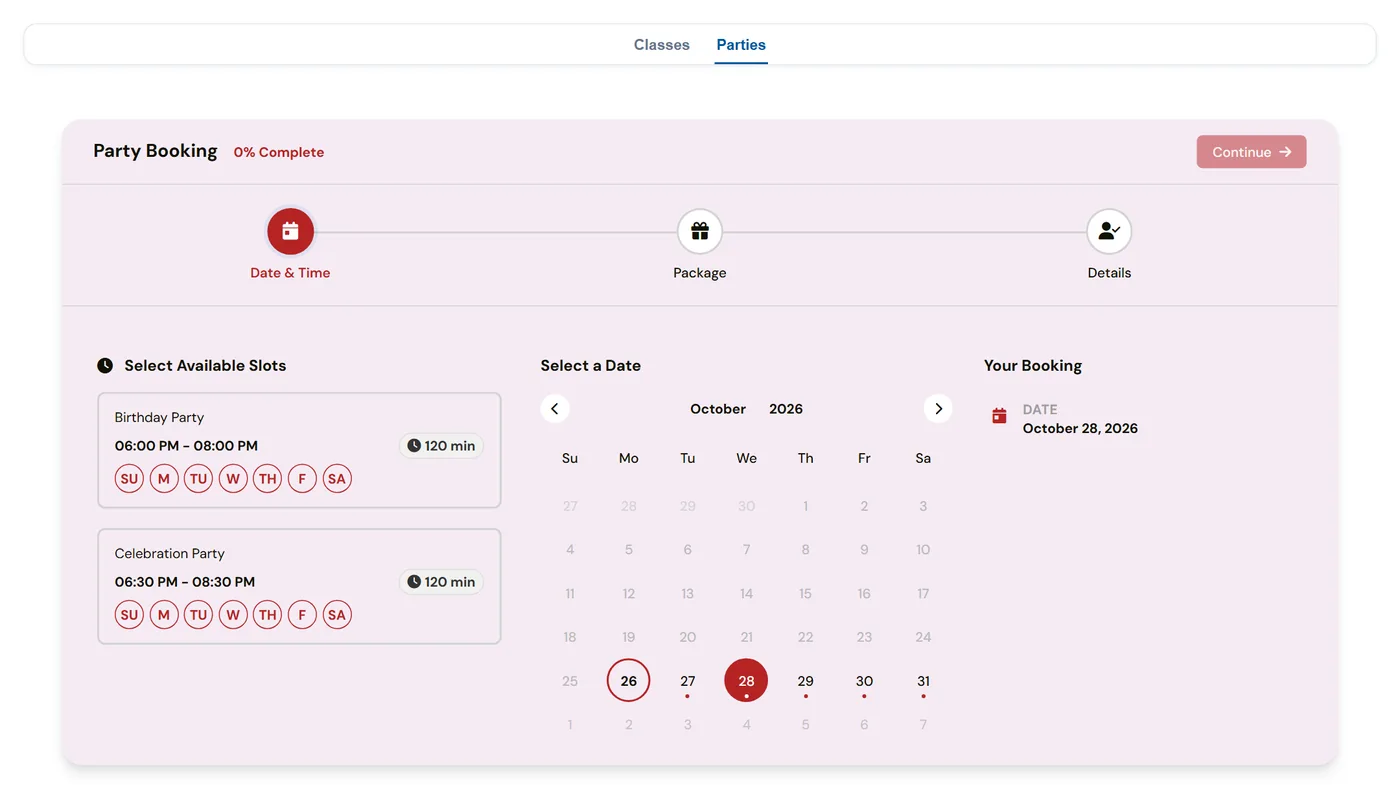
Add a tab and choose Parties. It shows the time slots, packages and add-ons you set up in Parties, Configuration, and parents pick a date, package and add-ons, then book and pay. Every franchise you add the tab to shows its own parties, and if online booking isn’t available, visitors see your contact details instead.
- 5
Roll it out to every location
Business admins use Add to Franchise to choose which franchises get which tabs, and the setup is copied down to them. Each franchise can then change its own tabs. Header, footer, cart icon, calendar colors, age filter and the Most Popular and Almost Full badge colors are set in External Pages (Website) Configuration, with Apply to all Franchise to push a setting everywhere.
- 5
What's included
- Tabbed widget for classes, events and parties, embedded with one code snippet
- Separate embed code for a single tab and its view
- Regular list view and calendar views for each tab
- Tabs filled by class or event type, category and partner
- Tab colors, fonts, corner radius and automatic hiding of empty tabs
- Card settings for days, unavailable days, instructor, class cycle, class dates and Enroll button colors
- Enrollment form URL, calendar view URL and embed script for every class type and category
- Most Popular and Almost Full badges, coupon badges and deposit amounts on the cards
- Add-ons chosen per student during enrollment and charged with it
- Cart icon you can show or hide separately in the regular and calendar views
- Parties tab where parents pick a date, package and add-ons, then book and pay
- Add to Franchise to push tabs to locations, which can still edit their own copy
Part of Calimatic Admissions & Enrollments, in one white-labeled platform with enrollment, billing and the parent app.
Who uses it
Summer camps
Give each camp week or age group its own tab. Families see all available dates for a camp, add lunch or a T-shirt as an add-on, and enroll from your website.
Martial arts schools
Put belt programs, trial classes and events on separate tabs, and add a Parties tab so parents can book a birthday party on the same page.
Swim schools
Show lessons in a calendar view so parents pick a day and time that suits them, with Almost Full badges on the busy slots.
Learning center franchises
Build the widget once at head office and push it to every location. Each center’s website shows its own classes, and the franchise can still adjust its tabs.
See Registration Widget in a live demo
Get a personalized demo. We'll show Calimatic running your programs, under your brand.
- 14-day free trial, no credit card
- White-labeled under your brand
- Live product walkthrough
Registration Widget: FAQs
Common questions about Registration Widget in Calimatic.
From the Blog
Scheduling Software for Activity Centers: Eliminate Double-Bookings and No-Shows
Learn how modern scheduling systems help activity centers eliminate double-bookings, cut no-shows, and increase revenue through better resource utilization.
Read articleHow Dance Studios, Swim Schools & Martial Arts Centers Streamline Operations
Activity centers waste 15+ hours weekly on admin tasks. Discover proven strategies dance studios, swim schools, and martial arts centers use to automate operations and increase revenue.
Read articleActivity Center Marketing: Local SEO & Community Strategies That Work
Discover proven local SEO tactics and community engagement strategies that help activity centers fill classes, increase enrollments, and build lasting relationships with families in their neighborhoods.
Read article