Instructor Scheduling Software with a Staff Time Clock
Build shifts on a weekly or monthly calendar, publish them when they are ready, and let instructors ask for cover or trade shifts. Staff clock in on the same kiosk students use, and their hours feed wage totals.
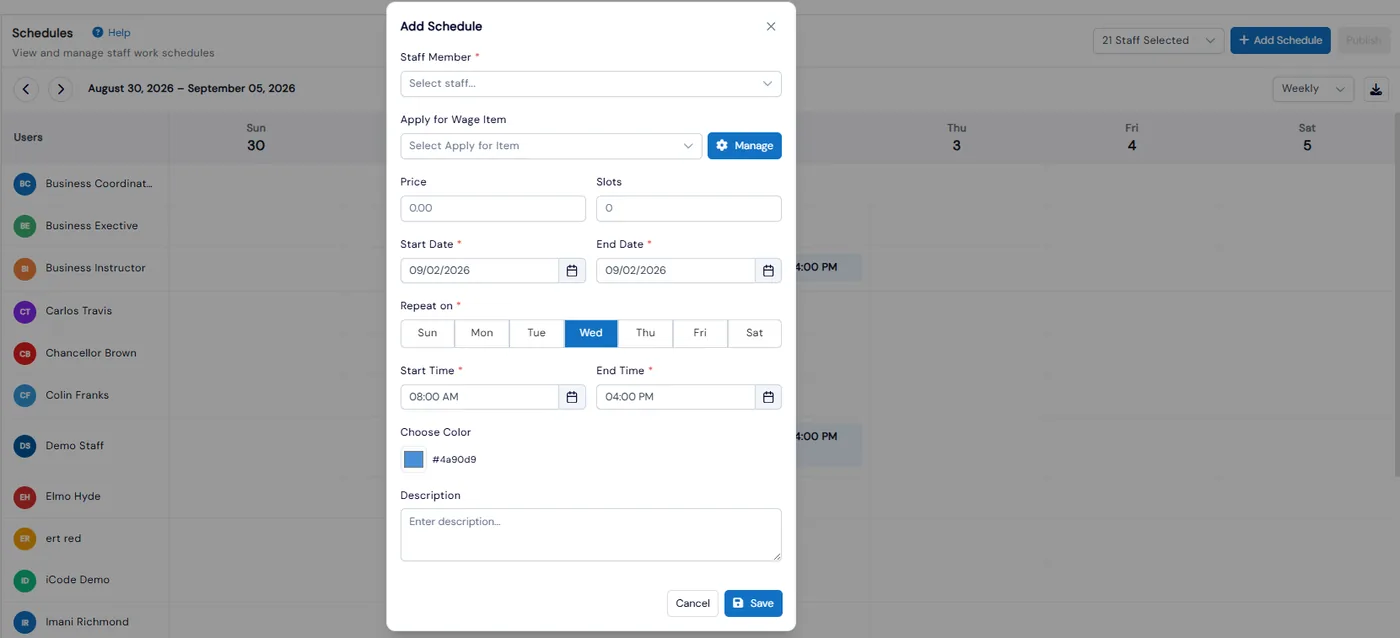
Instructor schedules usually live in a spreadsheet, a group chat and someone’s memory. Calimatic’s Time Tracker puts every staff member’s shifts on one calendar, keeps changes as drafts until you publish them, and sends cover and trade requests for approval.
Staff clock in and out with a PIN on the Calimatic mobile kiosk, and those check-in times, timesheets or fixed hours become the source for each person’s wage. Wage Details then shows total hours and total wage for every staff member.
How it works
- 1
Build shifts on the calendar
Open Time Tracker, then Schedules, for a weekly or monthly calendar of every staff member’s shifts. Click Add Schedule or an empty cell, pick the staff member, wage item, dates, repeat days and start and end times.
- 2
Publish when the schedule is ready
New or edited shifts stay drafts. Drafts are hidden from the staff member and cannot be covered or traded until you click Publish, and an Attention Needed banner shows anything still unpublished.
- 1
- 3
Let staff ask for cover or a trade
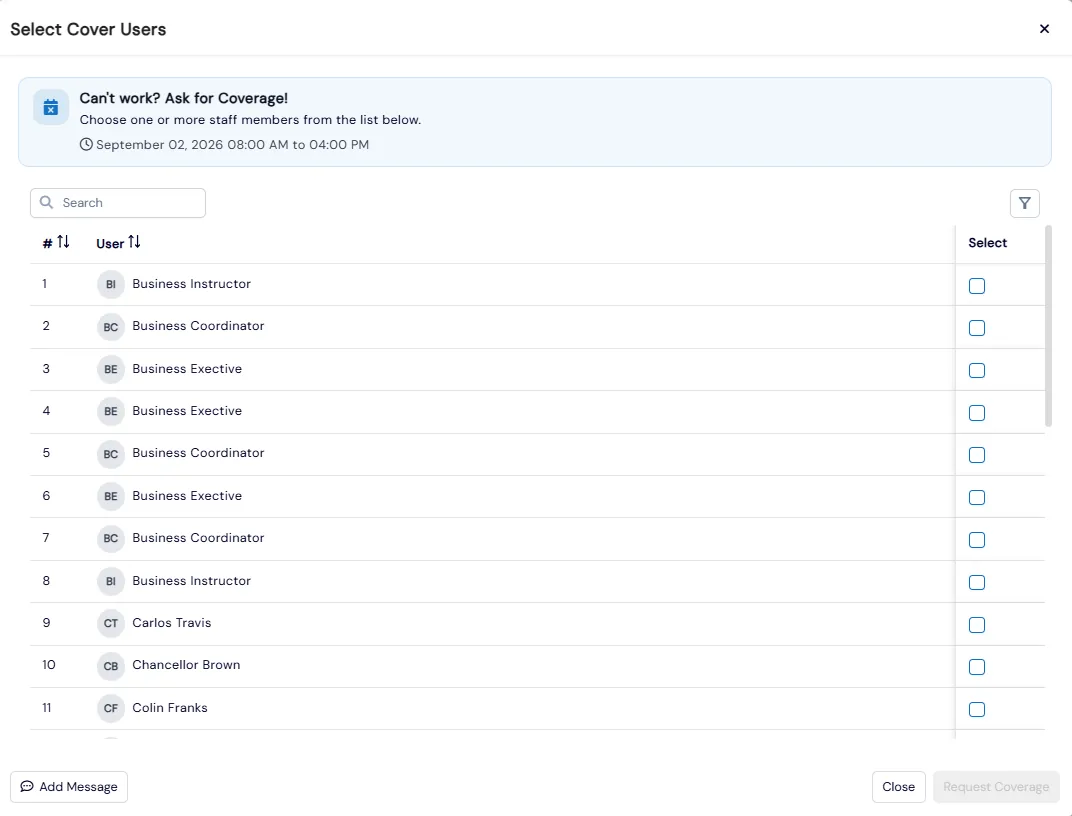
Each shift has Cover, Trade, Edit and Delete actions. A staff member who cannot work picks one or more colleagues to cover the shift, and the cover or trade request waits for sign-off in the Approvals inbox.
- 4
Clock in on the kiosk with a PIN
Staff check in on the Calimatic mobile kiosk with their PIN. A counter shows their check-in time and total time logged, with Pause and Continue for breaks. Admins can edit staff check-in and check-out times afterward.
- 4
- 5
Approve hours and see wage totals
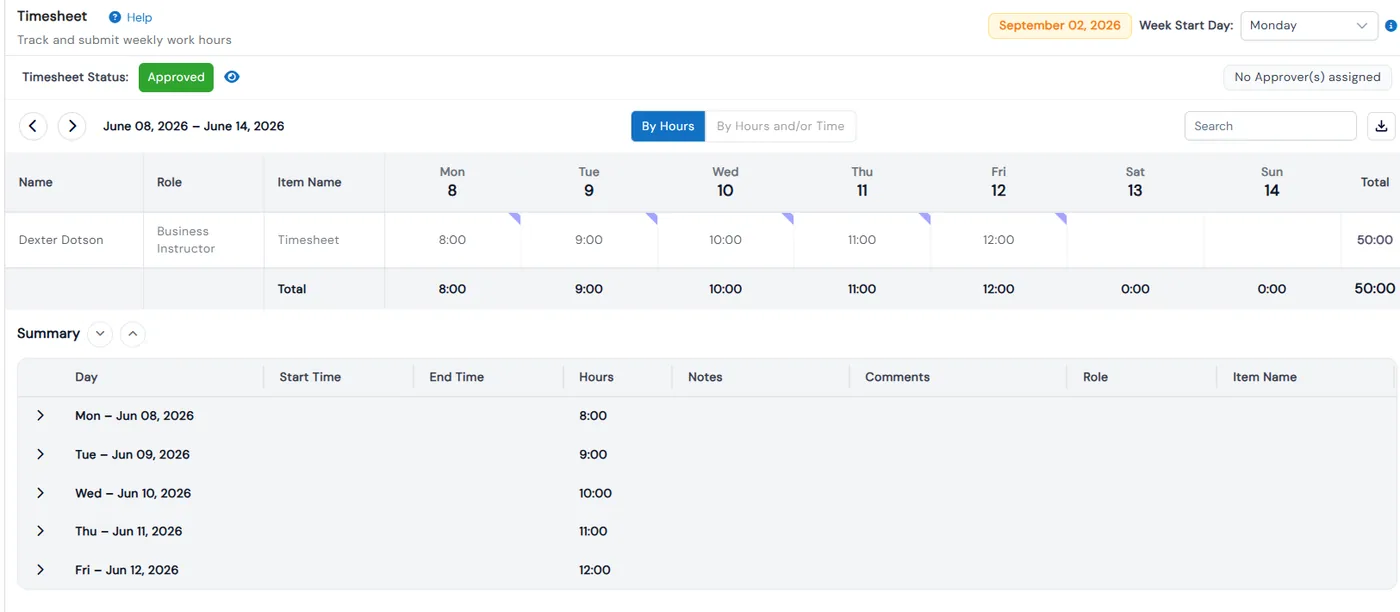
Approvals is one inbox for timesheets, expenses, time off, cover and trade requests, with bulk Approve and Reject. Each wage item takes its hours from Check In/Out, Timesheet or Fixed Hours, and Wage Details shows total hours and total wage per staff member.
What's included
- Weekly and monthly shift calendar for every staff member
- Draft shifts that stay hidden until you publish, with an Attention Needed banner
- Cover and Trade requests on each shift, signed off in Approvals
- Staff time clock on the mobile kiosk with a PIN, time-logged counter, and Pause and Continue
- Admin editing of staff check-in and check-out times
- Weekly timesheets entered by hours or by clock times, with a status for each week
- Time off calendar and expense submission with receipts
- One Approvals inbox for timesheets, expenses, time off, cover and trade requests, with bulk actions
- Wage items sourced from Check In/Out, Timesheet or Fixed Hours, with wage type and effective date
- Wage Details with total hours and total wage per staff member, and email notifications for each request type
Part of Calimatic Staff Management, in one white-labeled platform with enrollment, billing and the parent app.
Who uses it
Swim schools
Publish next week’s instructor shifts in one go, and let an instructor who is out ask colleagues to cover.
Sports complexes
Schedule coaches across the week, approve trade requests in one inbox, and see hours for every coach.
Tutoring centers
Tutors clock in on the front-desk kiosk with a PIN, and their check-in times can be the hours their wage is based on.
Dance studios
Draft the season’s teaching schedule, check it, then publish so teachers only see the final version.
See Staff Scheduling & Time Clock in a live demo
Get a personalized demo. We'll show Calimatic running your programs, under your brand.
- 14-day free trial, no credit card
- White-labeled under your brand
- Live product walkthrough
Staff Scheduling & Time Clock: FAQs
Common questions about Staff Scheduling & Time Clock in Calimatic.
From the Blog
Staff Scheduling and Payroll: Simplifying Workforce Management for Education
Education business owners struggle with scheduling conflicts, payroll errors, and staff communication. Learn how to streamline workforce management and reduce administrative headaches.
Read articleHow Dance Studios, Swim Schools & Martial Arts Centers Streamline Operations
Activity centers waste 15+ hours weekly on admin tasks. Discover proven strategies dance studios, swim schools, and martial arts centers use to automate operations and increase revenue.
Read articleScheduling Software for Activity Centers: Eliminate Double-Bookings and No-Shows
Learn how modern scheduling systems help activity centers eliminate double-bookings, cut no-shows, and increase revenue through better resource utilization.
Read article