Make-Up Class Tracking and Scheduling for Missed Lessons
Add a make-up from the attendance page or the calendar, cancel a single session without touching the rest of the class, and see which students still owe a make-up.
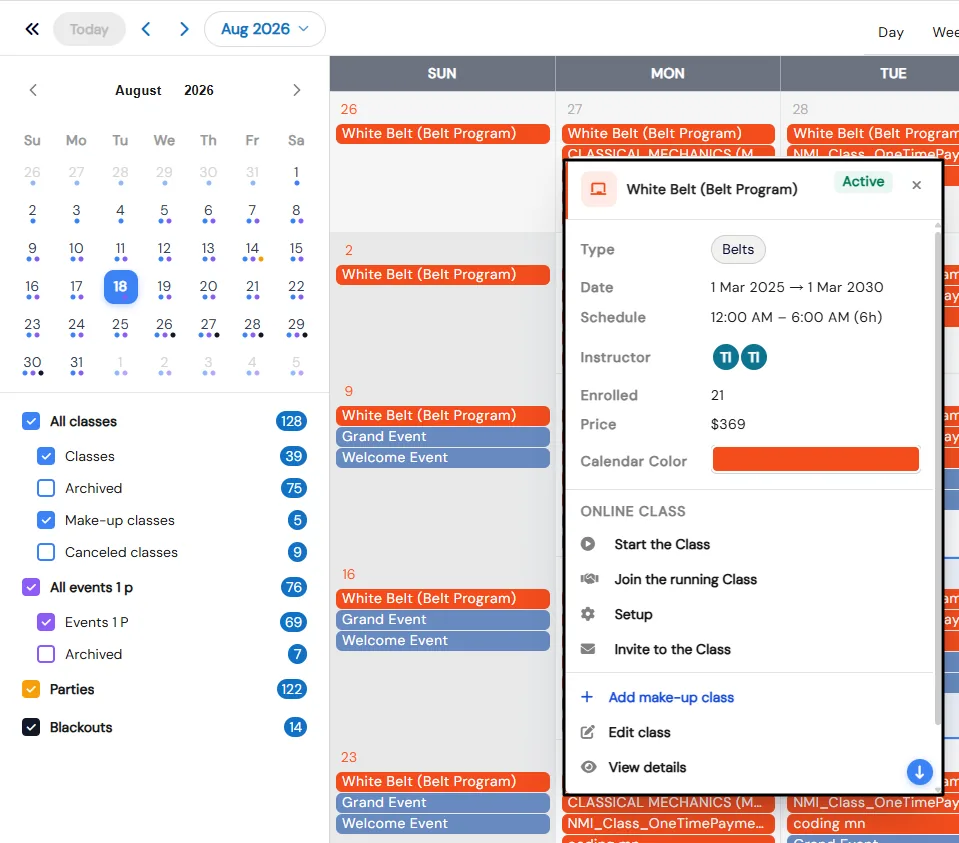
Missed lessons turn into phone calls and handwritten lists of who is owed what. In Calimatic, make-ups live next to attendance: the same page where an instructor marks a student absent has an Add Make-up button, and every make-up shows on the calendar with the rest of your schedule.
Parents of one-on-one students can ask for a make-up themselves from the calendar, and your class reports count each student’s absences against the make-ups they have attended, so nobody has to keep a separate list.
How it works
- 1
Mark the absence
Take attendance By Date, By Class, By Course or By Student and mark the student Absent or another status, with a note if you need one. Make-up is one of the attendance statuses, so make-up visits are recorded too.
- 1
- 2
Add the make-up from attendance or the calendar
Click Add Make-up in any class, course or student attendance view, or open a class on the calendar and choose Add make-up class. Only instructors assigned to that class can be picked, and only roles with the Add Makeup Class permission can create one.
- 3
Cancel a single session when you need to
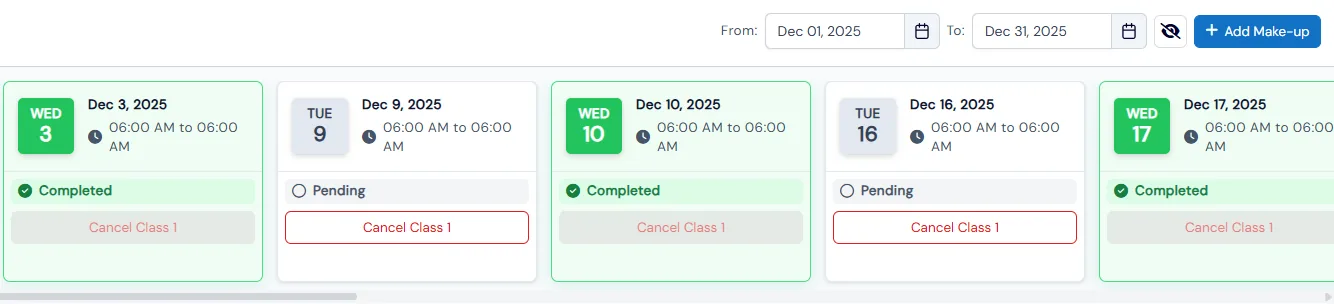
Click the eye icon to see a class’s date slots, each marked Pending or Completed, and use Cancel Class on the one that is not happening. Make-up classes already scheduled stay on the calendar when a regular session is canceled.
- 4
Let parents request make-ups
On the calendar, parents see Request Cancel and Request Make-Up on eligible one-on-one classes, with a status pill showing whether the request is pending or approved. Staff get direct controls to edit, cancel, confirm sessions and add make-ups.
- 5
Track who is still owed a lesson
The Makeups Report shows each student’s absence count and make-up count across all their classes. The Makeup Classes Report lists every rescheduled one-on-one session, and the Cancelled Classes Report shows who canceled, when, and the make-up class that replaced it.
- 3
What's included
- Add Make-up from attendance by class, course or student
- Add make-up class from a class’s details on the calendar
- Make-up as an attendance status alongside Present, Absent, Trial, Left Early and Arrived Late
- Cancel a single class date from its date slots, without affecting existing make-ups
- Parent Request Make-Up and Request Cancel for eligible one-on-one classes, with pending and approved status
- Instructor choice limited to the instructors assigned to the class
- Add Makeup Class permission to control who can create make-ups
- Make-up and canceled classes as calendar filters with live counts, and make-ups on the dashboard calendar
- Makeups Report, Makeup Classes Report and Cancelled Classes Report
- Automatic emails to enrolled families when a class’s unavailable days or a blackout date are set
Part of Calimatic Classes & Events, in one white-labeled platform with enrollment, billing and the parent app.
Who uses it
Swim schools
Book a make-up lesson from the attendance page when a swimmer misses class, and check the Makeups Report before families ask.
Music schools
Parents of private students request a make-up or a cancel from the calendar, and staff approve it without a phone call.
Dance studios
Cancel one class date for a recital rehearsal and add make-ups with the class’s own instructors.
Gymnastics centers
Compare each athlete’s absences with the make-ups they have attended across every class they take.
See Make-Up Classes in a live demo
Get a personalized demo. We'll show Calimatic running your programs, under your brand.
- 14-day free trial, no credit card
- White-labeled under your brand
- Live product walkthrough
Make-Up Classes: FAQs
Common questions about Make-Up Classes in Calimatic.
From the Blog
The Makeup Class That Eats Your Margin: Rethinking Missed Sessions
Generous makeup policies feel like good service, but unmanaged they quietly erode capacity, staff pay, and your bottom line.
Read articleHow Dance Studios, Swim Schools & Martial Arts Centers Streamline Operations
Activity centers waste 15+ hours weekly on admin tasks. Discover proven strategies dance studios, swim schools, and martial arts centers use to automate operations and increase revenue.
Read articleScheduling Software for Activity Centers: Eliminate Double-Bookings and No-Shows
Learn how modern scheduling systems help activity centers eliminate double-bookings, cut no-shows, and increase revenue through better resource utilization.
Read article