Student Progress Report Software for Tutoring and Learning Centers
See how each student is doing across courses, challenges, homework, assessments and attendance, spot who needs attention, and pull up one student’s scores over time before you talk to their parents.
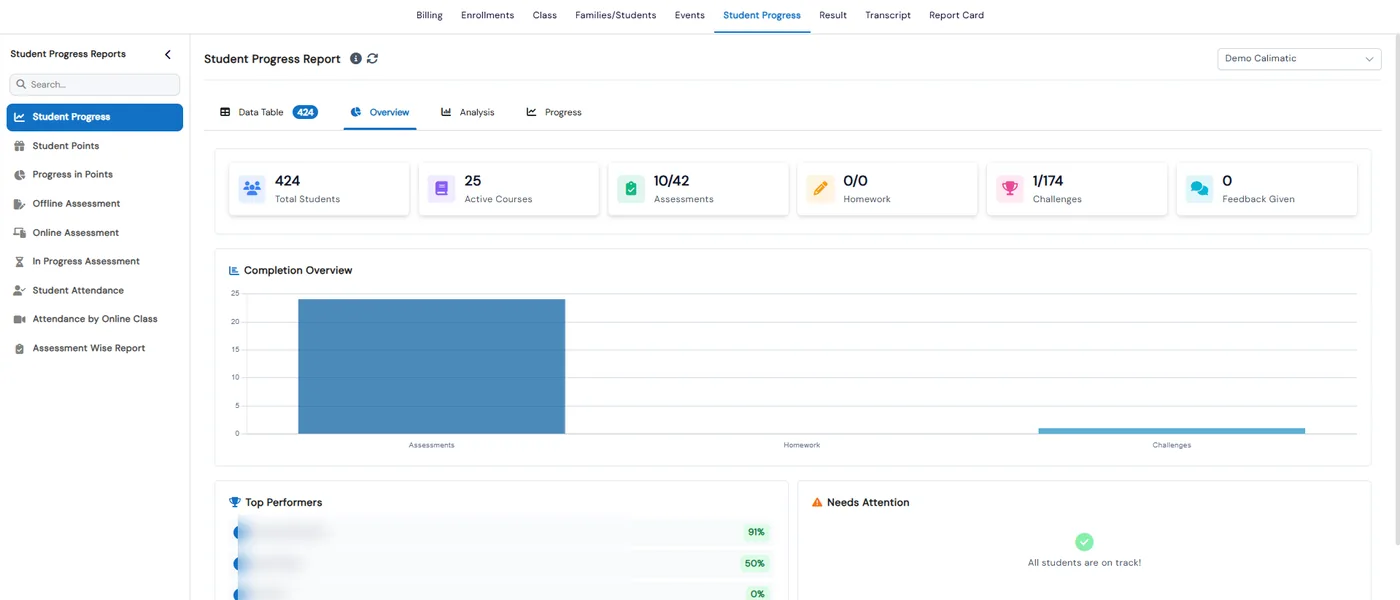
Student progress reports in Calimatic are nine ready-made reports under Reports → Student Progress that show how each student is doing on courses, challenges, homework, points, online and offline assessments and attendance. Most have a data table plus chart tabs, so you can read the numbers for every student or look at the trends.
The reports draw on the courses, assessments and attendance you already run in Calimatic, so there is nothing to type up. Before a parent meeting you can open one student’s course and level breakdown, their score history across assessments and their attendance, and export the assessment details as a PDF.
How it works
- 1
Start with the Student Progress overview
The Student Progress report has one row per student with their assessments, homework, challenges, courses and feedback. Its Overview tab adds six summary cards, a completion chart and Top Performers and Needs Attention lists. The Progress tab drills into one student’s breakdown by course and level.
- 2
See points and challenge completion
Student Points lists every point transaction by type: challenge, manual, social media, transaction, referral and party points, with redeemed and balance points. Progress in Points shows total and completed challenges and levels for each student, with an expandable level and challenge view for one student and course.
- 3
Read assessment results question by question
Offline Assessment shows completed, pending review and graded counts and each student’s score by assessment type. Online Assessment shows what needs manual grading and what is assigned but not done. Its Assessment Details tab gives a correct, wrong and skipped chart for each assessment, a breakdown by question category and its own PDF export.
- 1
- 4
Follow one student’s scores over time
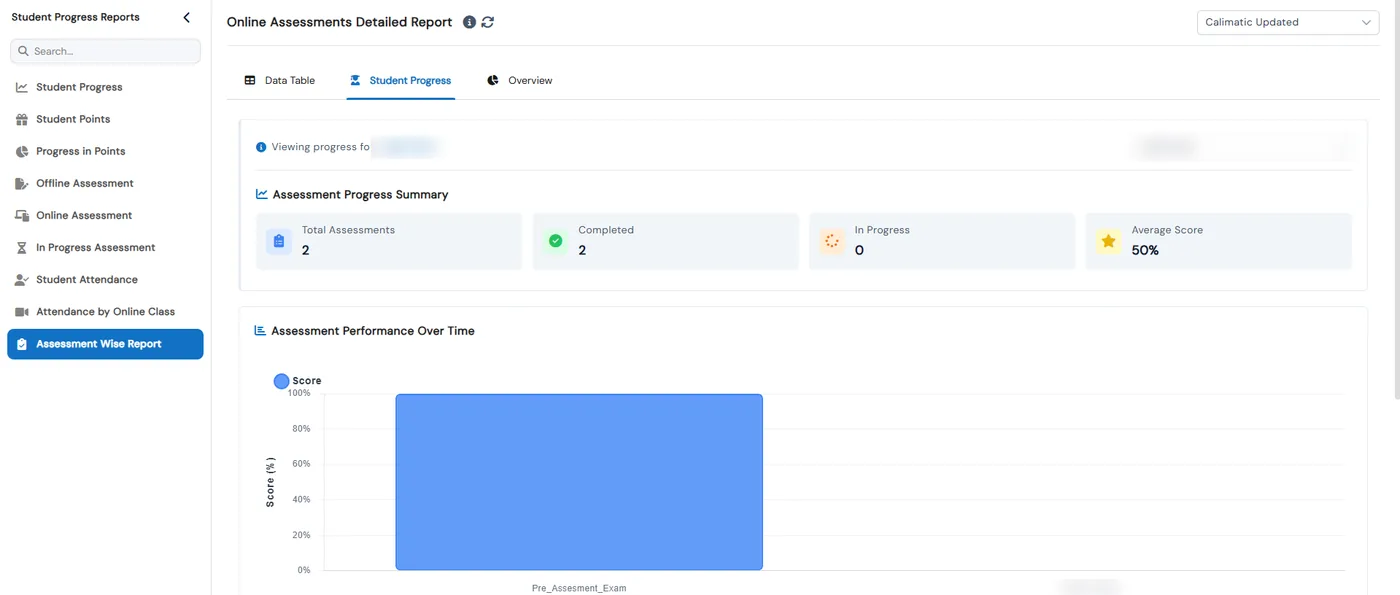
Assessment Wise Report works both ways. Its Data Table picks one assessment and lists every student’s marks, percentage and status. Its Student Progress tab picks one student and shows total, completed and in-progress assessments, their average score and a chart of scores across assessments.
- 5
Check attendance and exams that are still open
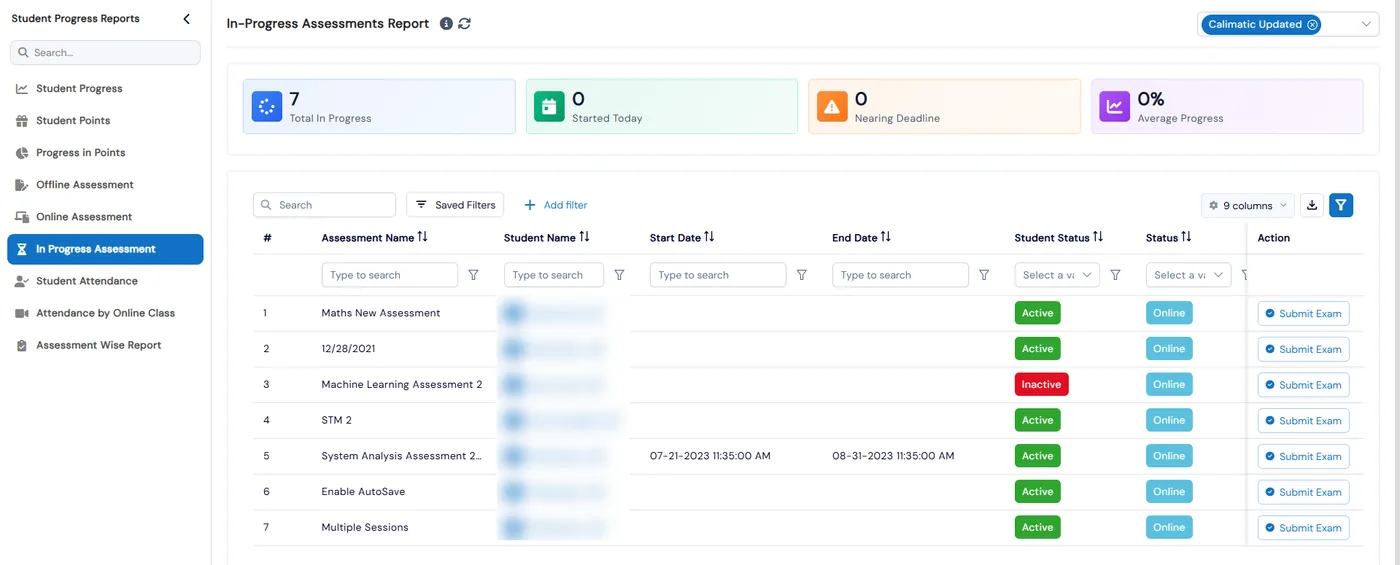
Student Attendance counts present, absent, late and excused by course and class over a date range. Attendance by Online Class shows each student’s online time and opens the class recording or analytics link. In Progress Assessment lists exams still underway, flags those within 7 days of their deadline, and Submit Exam ends a session early.
What's included
- Nine reports under Reports → Student Progress
- Per-student counts of assessments, homework, challenges, courses and feedback
- Top Performers and Needs Attention lists
- Course and level breakdown for one student
- Point history by type with redeemed and balance points
- Challenge and level completion for each student
- Online and offline assessment results, including work waiting for manual grading
- Correct, wrong and skipped answers and a question-category breakdown per assessment
- One student’s score history across assessments, with average score
- Present, absent, late and excused counts by course and class
- Online class attendance with time in class and a recording or analytics link
- PDF export of online assessment details
Part of Calimatic Assessments, in one white-labeled platform with enrollment, billing and the parent app.
Who uses it
Tutoring centers
Open a student’s score history and attendance before a parent conference, and bring the assessment details as a PDF.
Test prep programs
Compare every student on the same practice test in the Assessment Wise Report, then see which question categories each one missed.
Learning center franchises
Pick a franchise on the report and see its top performers, the students who need attention and how far each one is through the curriculum.
Online tutoring
Check how long each student spent in the online class and open the recording, next to their online assessment results.
See Student Progress Reports in a live demo
Get a personalized demo. We'll show Calimatic running your programs, under your brand.
- 14-day free trial, no credit card
- White-labeled under your brand
- Live product walkthrough
Student Progress Reports: FAQs
Common questions about Student Progress Reports in Calimatic.
From the Blog
How to Record and Track Student Progress (and Showcase Achievements)
Learn proven methods to monitor student growth, communicate progress to parents, and celebrate achievements that boost retention and referrals at your activity center.
Read articleHow Test Prep Companies Can Deliver Mock Exams and Track Scores Online
Transform your test prep business with digital mock exams that automatically track student progress, identify weak areas, and prove your value to parents.
Read articleMulti-Location Management: Keeping Quality Consistent Across Franchises
Running multiple education locations? Learn proven strategies franchise owners use to maintain teaching quality, standardize operations, and scale successfully.
Read article