Franchise Development CRM, from First Inquiry to Grand Opening
Collect franchise inquiries from your website, send promising prospects your application, move every franchise across a pipeline board, and track onboarding, agreements and documents until the doors open.
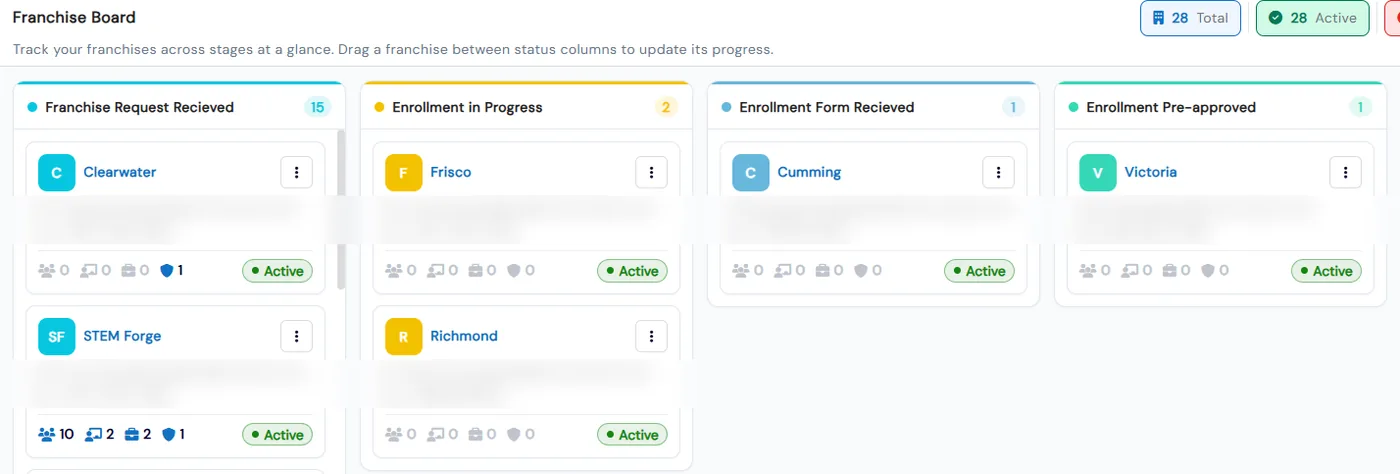
Franchise development in Calimatic covers the path from a prospect’s first inquiry to an operating location. A franchise contact form on your website collects inquiries into a contacts list, you send chosen prospects your franchise enrollment form, and a board tracks every franchise through the stages you define, such as Agreements Signed, Site Selection and Training in Progress.
Once a franchise is created, the same system carries its onboarding. Each franchise works through one shared checklist when it logs in, agreements and documents are shared by franchise status, and head office sees completed and remaining items for every franchise on one page.
How it works
- 1
Put a franchise inquiry form on your website
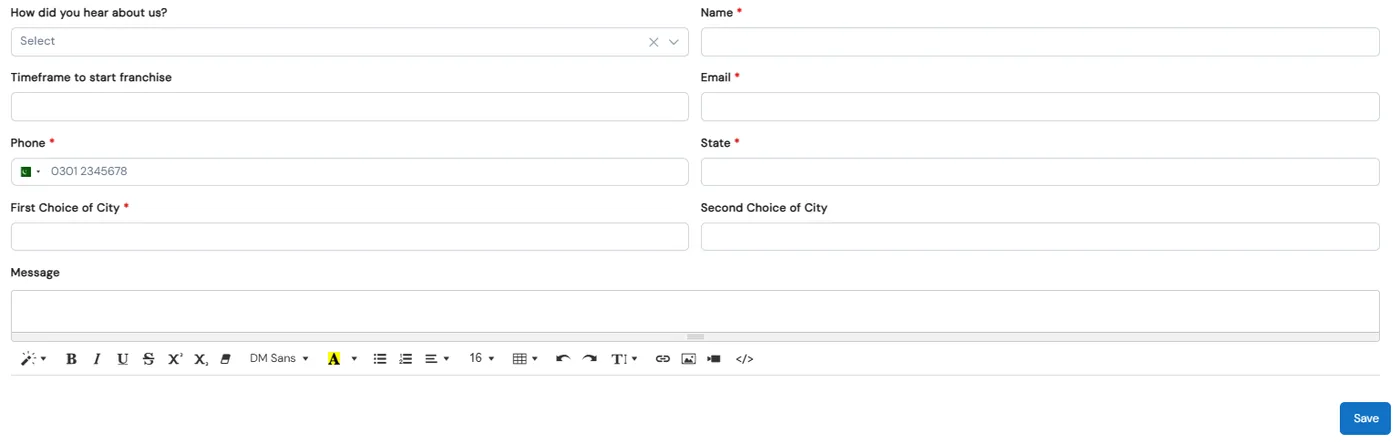
Under Franchises → Setup → Contact Form Setup, edit the form fields, preview it, copy its link or generate an embed script for your website. Fields can include how they heard about you, their timeframe to start, state and first and second choice of city. Every submission lands in Franchises → Contacts.
- 2
Work each inquiry
The Contacts grid shows each prospect’s name, email, phone, state and first choice of city. Tick Select to start Franchise to mark your chosen prospects and filter by Selected or Not Selected. Send a prospect your franchise enrollment form with one click, or convert a contact into a lead with the lead type you pick.
- 3
Send a full application
Build the franchise enrollment form in a drag-and-drop builder with text, date, drop-down, check box, attachment and e-signature fields, plus a Payment Information section with charge options. Share it by link or embed it on your site. Every change saves as you make it.
- 2
- 4
Track every franchise on a pipeline board
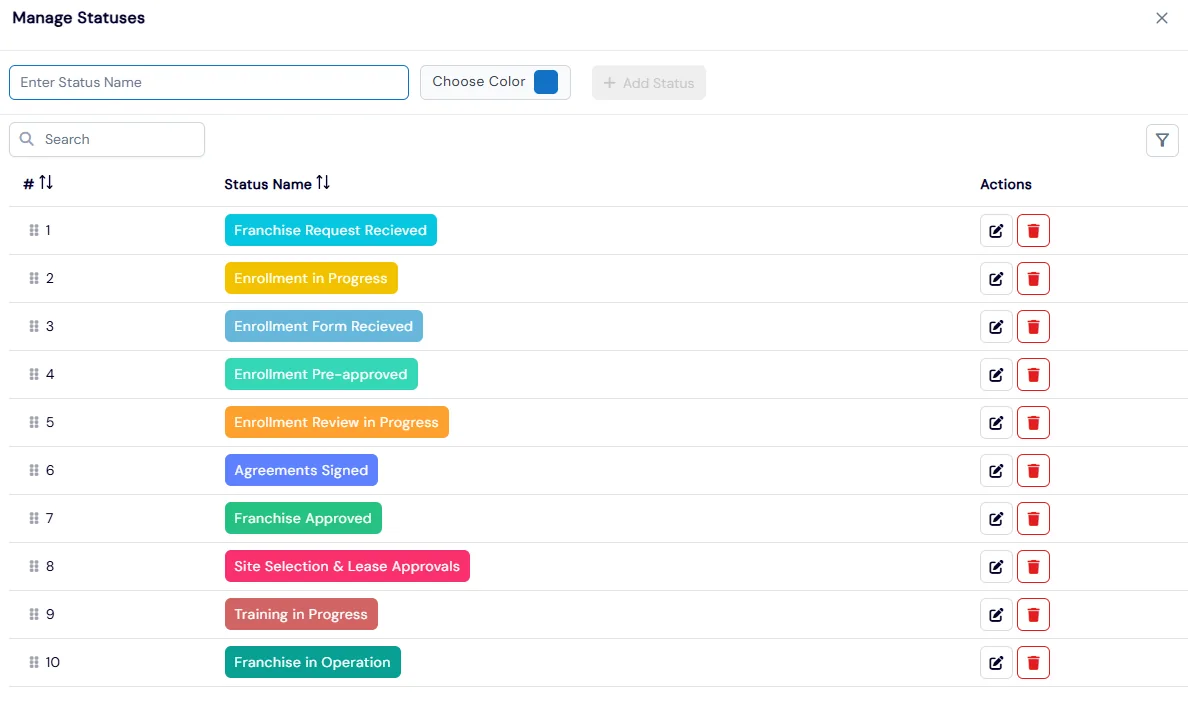
Create your stages with names and colors, and they become the columns of the Franchise Board. Business admins drag a card to the next stage and it saves instantly. Add a franchise with its type, time zone, contact and address, then send its admin portal access when you are ready.
- 5
Onboard with checklists, agreements and documents
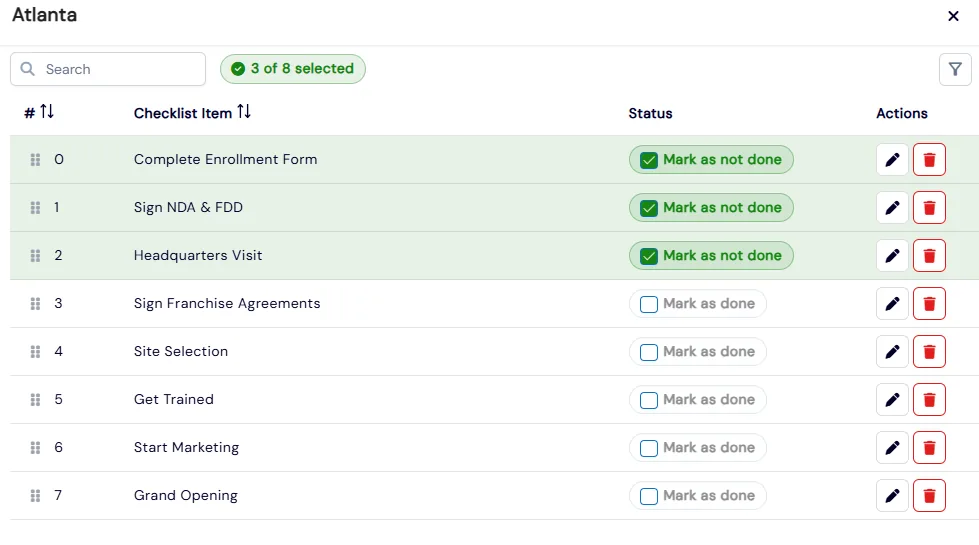
Build one onboarding checklist, such as signing agreements, site selection, training and grand opening. Franchises check off their own items when they log in, and Franchises → On-Boarding shows completed and remaining items for each one. Agreements and document folders are shown to franchises by their status.
What's included
- Franchise contact form with a shareable link, preview and website embed script
- Contacts list of every inquiry, with Selected and Not Selected filters
- One-click Send Franchise Enrollment Form to prospects who have not applied yet
- Convert a franchise contact into a lead with a lead type
- Enrollment form builder with attachment, e-signature and payment sections
- Franchise Board with your own colored stages and drag-to-update status
- Cards with student, instructor, coordinator and admin counts and an Active or Inactive toggle
- Shared onboarding checklist with completed and remaining items per franchise
- Agreement templates with tags, statuses, discussion, attachments and visibility by franchise status
- Document library with folders, Google Drive and Dropbox uploads and visibility by franchise status
- Send Portal Access to a new franchise’s admin from its card
- Each setup section controlled by its own role permission
Part of Calimatic Franchise Management, in one white-labeled platform with enrollment, billing and the parent app.
Who uses it
Learning center franchises
Embed the franchise inquiry form on your “Own a franchise” page, then send the prospects you want to pursue your full application with attachments and an e-signature.
Education franchise networks
Set stages like Agreements Signed, Site Selection & Lease Approvals and Training in Progress, and see how many franchises sit in each one on the board.
Franchise LMS
Keep operations manuals and training files in document folders that only franchises at the right status can see, so new owners get them when they reach that stage.
Multi-location operators
Track each new location against the same opening checklist, from headquarters visit to grand opening, and see what is left for every one from a single page.
See Franchise Development in a live demo
Get a personalized demo. We'll show Calimatic running your programs, under your brand.
- 14-day free trial, no credit card
- White-labeled under your brand
- Live product walkthrough
Franchise Development: FAQs
Common questions about Franchise Development in Calimatic.
From the Blog
Technology Stack Every Education Franchise Needs to Scale Efficiently
Growing an education franchise beyond 3-5 locations? Here's the exact tech infrastructure you need to maintain quality, track revenue, and scale without chaos.
Read articleCreating a Franchise Operations Manual for Your Education Business
A section-by-section guide to writing an operations manual for an education franchise: what to include, how to make standards measurable, and how to keep franchisees actually using it.
Read articleHow to Handle Territory Management for Education Franchise Networks
How to choose a territory model, size territories with real data, route leads fairly, handle online classes, and resolve disputes before they damage your education franchise network.
Read article