Franchise Reporting Software to Compare Every Location
See revenue, enrollments and marketing results for every franchise side by side, roll them up into one business-wide view, and narrow it to the locations you care about. Every report runs on the data your franchises already keep in Calimatic.
Franchise reporting in Calimatic lets head office compare how each franchise location is doing on revenue, enrollments, drop-offs and email marketing, from the same system the locations use to run classes and take payments. Billing and enrollment reports share a multi-select franchise picker, several have a By Franchise chart that ranks locations against each other, and the business dashboard can roll up revenue, new enrollments and active enrollments for all franchises or just the ones you pick.
Every number on the dashboard opens the data behind it in a grid you can sort, filter, save and download, and franchise owners use the same drill-downs for their own centers. Corporate Reports adds an email view across franchises, so you can see which locations’ messages get opened and which bounce.
How it works
- 1
Roll the dashboard up for the whole network
On the business dashboard, Revenue Generated, New Enrollments and Active Enrollments roll up all franchises into one view with a date range. Select specific franchises to narrow it to just those locations, and use the paid-enrollment indicator to leave $0 enrollments out of the numbers. The Top Franchises widget has a View All Franchises button that opens revenue for every franchise over the last 12 months, or any range you choose.
- 1
- 2
Compare revenue location by location
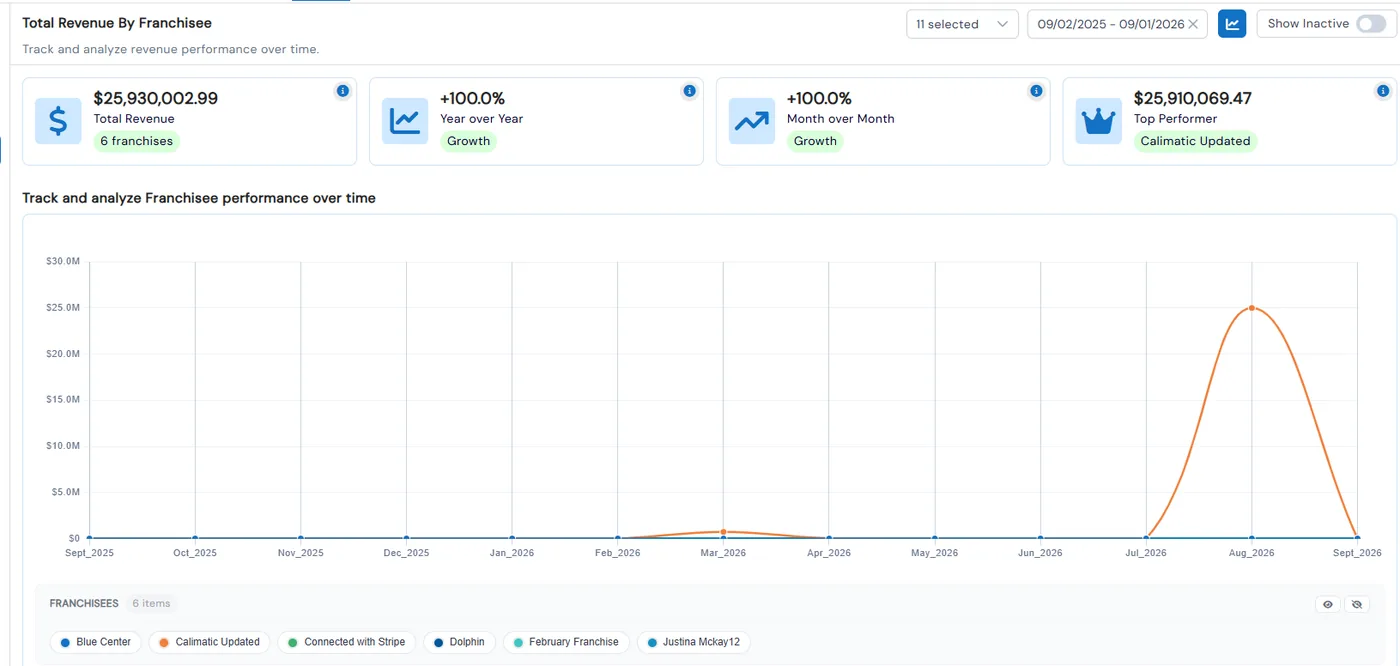
Under Reports → Billing, Total Revenue By Franchise charts one line or bar per franchise, with cards for total revenue, year-over-year and month-over-month change, and your top performer. Total Revenue Comparison charts monthly revenue year against year. Pending Payments/Fees collects unpaid, on hold, overdue and failed amounts across the franchises you select.
- 3
Rank franchises on enrollments and drop-offs
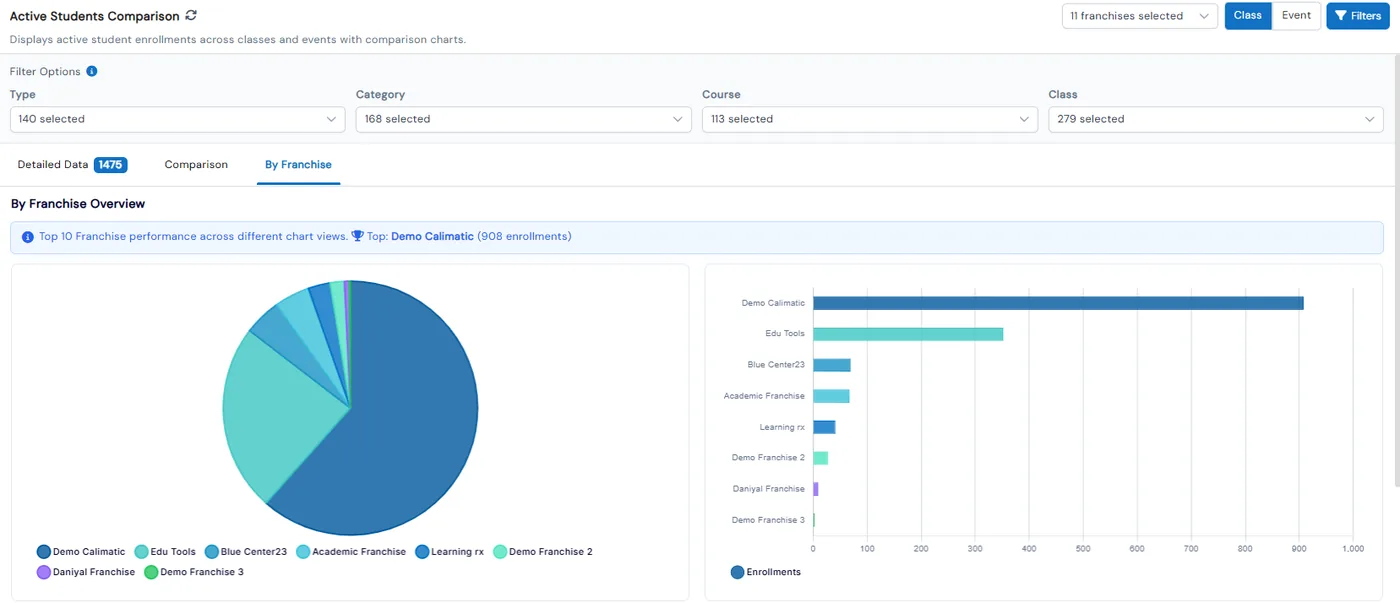
Active Students Comparison has a By Franchise tab with pie and bar charts for your top 10 franchises. De Enrollments charts drop-outs by franchise, Enrollments Summary shows each franchise’s class and event split in a stacked bar, and Class Details, Referral, Coupon Usage and Enrollment Survey reports each break their results down by franchise.
- 3
- 4
See which locations’ emails land
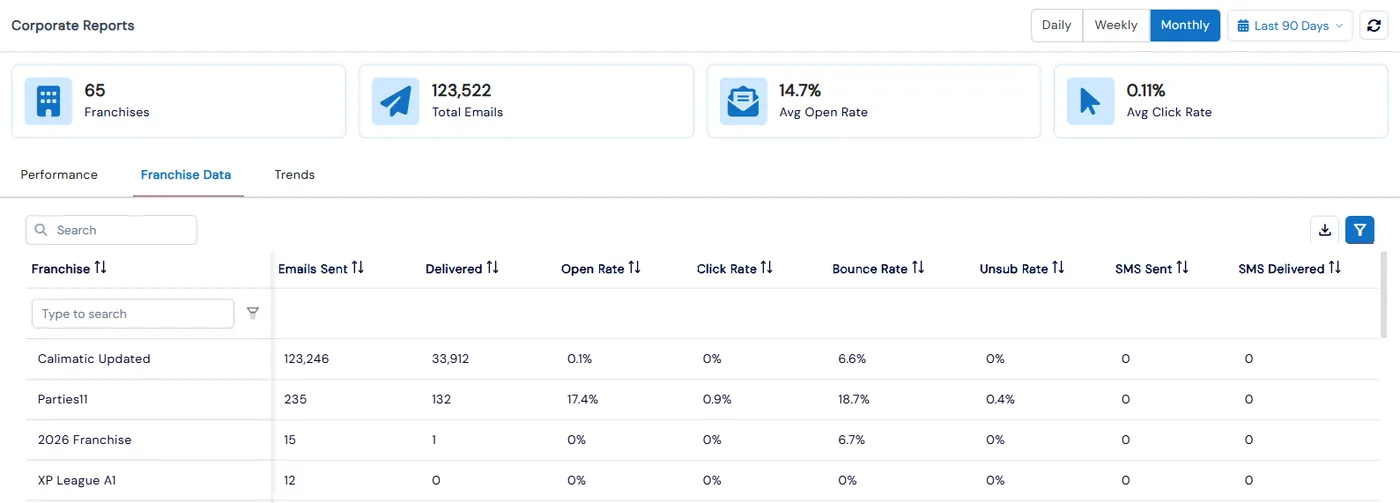
Corporate Reports shows the number of franchises, total emails sent and average open and click rates across the network. The Performance tab compares open, click and bounce rates for the top 10 franchises, Franchise Data lists each franchise’s sent, delivered, open, click, bounce and unsubscribe figures, and Trends charts franchises against each other over time.
- 5
Drill into the rows and export them
Click any dashboard counter or chart to open its data in a grid, filter it by date, instructor or location, save the filter for next time and download the results. Revenue Generated and All Payments/Fees export to CSV, PDF or XLSX with your active filters printed at the top of the file.
- 5
What's included
- Business dashboard roll-up of revenue, new enrollments and active enrollments across all franchises
- Pick specific franchises to narrow the dashboard, with date-range filtering
- Top Franchises widget with a View All Franchises revenue view
- Total Revenue By Franchise chart with line or bar view, year-over-year and top performer
- Multi-select franchise picker on every billing report, plus Show Inactive Franchises for Business Admins
- Outstanding payments and fees across franchises by status: unpaid, on hold, overdue, missed and failed
- By Franchise charts for active students, de-enrollments, enrollment summary, class details, referrals and coupon usage
- Daily Summary widget listing each franchise’s classes, events and parties with enrolled, checked-in and no-show counts
- Email open, click and bounce rates compared across franchises, with trends over time
- Franchise grid with student, instructor, coordinator and admin counts for every location
- Click-through drill-downs with saved filters and downloads
- CSV, PDF and XLSX export with active filters printed on the file
Part of Calimatic Franchise Management, in one white-labeled platform with enrollment, billing and the parent app.
Who uses it
Learning center franchises
Open Total Revenue By Franchise each month to see which locations grew year over year and which one is your top performer, then check Pending Payments/Fees for the locations falling behind on collections.
Multi-location operators
Roll the dashboard up across every center for the big picture, then select two or three locations to compare their new and active enrollments for the same date range.
Tutoring franchises
Use the De Enrollments franchise chart and Active Students Comparison to spot locations where students are dropping out faster than they are joining.
Education franchise networks
Check Corporate Reports to see which franchises’ emails get opened and which bounce, and use the Daily Summary widget to see what every location is running today.
See Franchise Reporting in a live demo
Get a personalized demo. We'll show Calimatic running your programs, under your brand.
- 14-day free trial, no credit card
- White-labeled under your brand
- Live product walkthrough
Franchise Reporting: FAQs
Common questions about Franchise Reporting in Calimatic.
From the Blog
How to Maintain Brand Consistency Across 10+ Education Franchise Locations
Discover proven strategies and systems that successful education franchises use to maintain uniform quality, branding, and student experience across multiple locations.
Read articleMulti-Location Management: Keeping Quality Consistent Across Franchises
Running multiple education locations? Learn proven strategies franchise owners use to maintain teaching quality, standardize operations, and scale successfully.
Read articleFranchise Owner Guide: Key Metrics to Track for Each Location
Master the essential KPIs that separate thriving franchise locations from struggling ones. Learn exactly what to measure and why it matters.
Read article