Online Waiver Software for Kids Classes, Gyms and Camps
Write your liability waiver and family policies once, attach them to the right registration forms, and see for every family who accepted, who rejected and when.
Gyms, swim schools, martial arts schools and camps need a parent’s consent before a child takes part, and a binder of paper waivers is hard to check when you need it. In Calimatic, waivers and policies live in the same system as enrollment, tied to the class and event forms they belong to, with each family’s answer saved on their record.
You decide which policies are required and which ones a family must accept before they can continue. Families who haven’t answered see the policy when they log in, and your staff can check any student’s status from the Policies tab on their record.
How it works
- 1
Write each policy
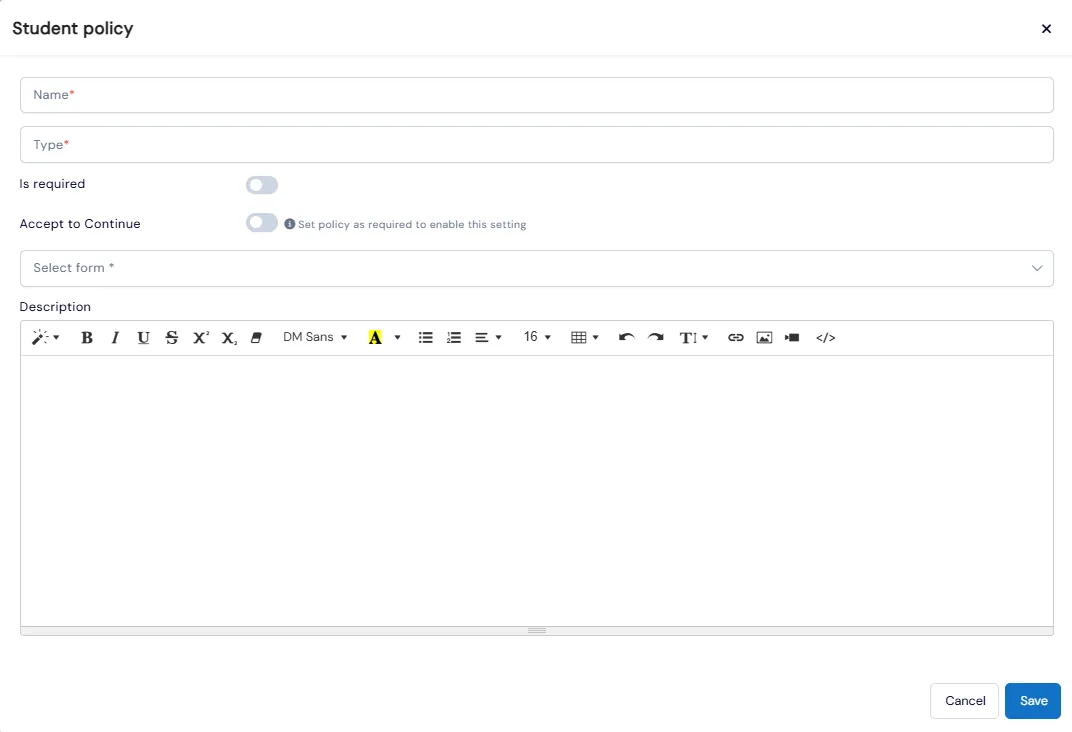
Go to Admin, System Config, Enrollments, Students & Families Policies. Student and family policies sit on separate tabs. Add a name, a type in your own words, such as Waiver or Photo Consent, and the full text in a rich-text editor.
- 2
Attach it to the right forms and set enforcement
Choose which class and event enrollment forms each policy applies to. Turn on Is Required, then Accept to Continue for any policy a family must accept before going further. Enforcement is set on each policy, not site-wide.
- 2
- 3
Families accept in the portal
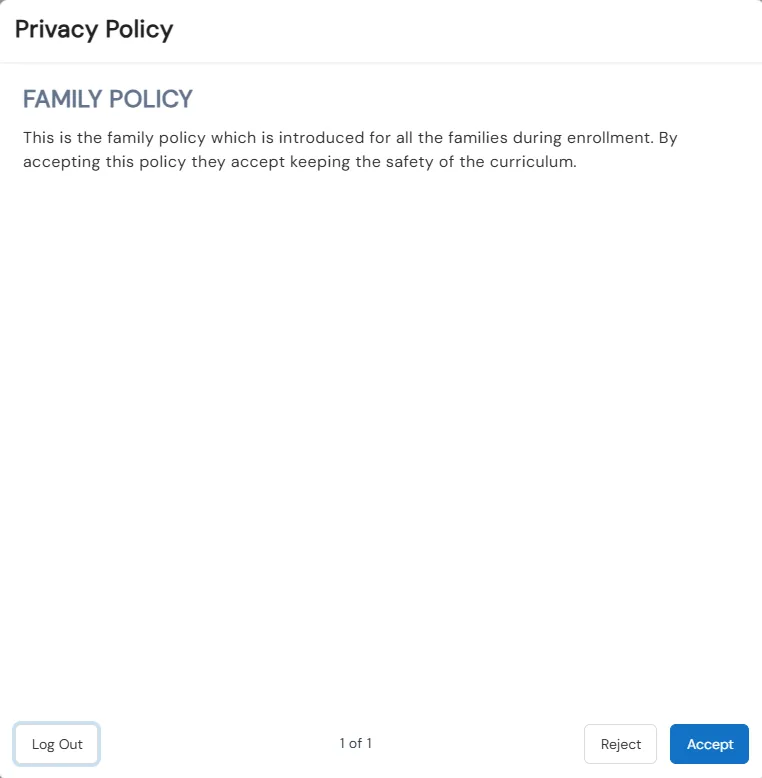
Any unanswered required policy pops up when a parent or student logs in, one policy at a time, with Accept and Reject. Rejecting a required policy logs them out, after a warning. Parents can also go back later and reject a policy they had accepted.
- 4
See who accepted, and when
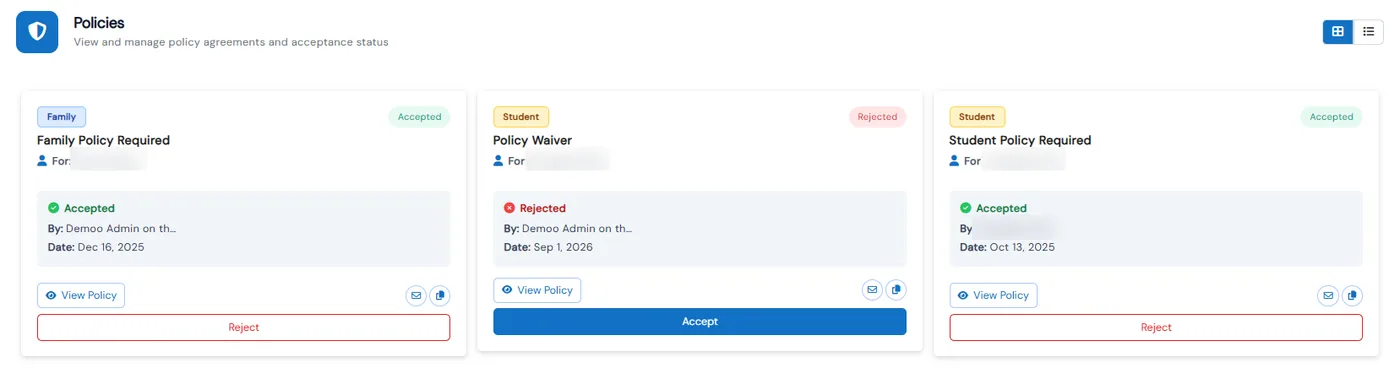
Every student and family has a Policies tab, in card or list view, with each response’s status, who responded and the date. A family’s tab includes their students’ responses too. Staff can accept on a family’s behalf, email a policy to a parent, or copy a link to it, and the franchise admin is emailed whenever a policy is accepted or rejected.
- 5
Report on consent across locations
The Policies report lists consent status by student, policy and enrollment form, with accepted and rejected totals and a monthly trend. Business admins copy or sync policies to their franchises, and policies sent before are updated instead of duplicated.
- 4
What's included
- Separate student and family policies, written in a rich-text editor
- Policies tied to specific class and event enrollment forms
- Is Required and Accept to Continue, set on each policy
- Accept or reject popup at portal login for unanswered required policies
- Policies tab on every student and family record, showing who responded and when
- Staff can accept on a family’s behalf, email a policy or copy its link
- Email to the franchise admin on every acceptance or rejection
- Parents can withdraw consent by rejecting a policy they accepted earlier
- Policies report with consent status, totals and filters by franchise and form
- Copy and sync policies to franchises, with a history of what was sent
Part of Calimatic Student Information System, in one white-labeled platform with enrollment, billing and the parent app.
Who uses it
Gymnastics gyms
Make the liability waiver required on every class form and check a gymnast’s status on their record before practice.
Summer camps
Attach a camp waiver and a photo consent policy to the camp form, then use the Policies report to see who accepted and who rejected.
Martial arts schools
Keep a student code of conduct and a family liability waiver as separate policies, each tracked on its own.
Franchise networks
Write the waiver once at head office and sync it to every location, so an update reaches all of them without being recreated.
See Digital Waivers & Policies in a live demo
Get a personalized demo. We'll show Calimatic running your programs, under your brand.
- 14-day free trial, no credit card
- White-labeled under your brand
- Live product walkthrough
Digital Waivers & Policies: FAQs
Common questions about Digital Waivers & Policies in Calimatic.
From the Blog
How to Run Summer Camps Alongside Year-Round Activity Programs
Learn proven strategies to successfully operate profitable summer camps while maintaining your year-round enrichment programs without overwhelming your staff or resources.
Read articleHow Dance Studios, Swim Schools & Martial Arts Centers Streamline Operations
Activity centers waste 15+ hours weekly on admin tasks. Discover proven strategies dance studios, swim schools, and martial arts centers use to automate operations and increase revenue.
Read articleHow to Manage Memberships, Drop-ins, and Class Packs at Your Activity Center
Learn proven strategies to handle multiple pricing models, reduce administrative headaches, and maximize revenue at your enrichment center.
Read article