
Student Information System

Student Information System for Learning Centers and Studios

Manage all student information in one place. From enrollment to graduation, track academic records, attendance, and communications efficiently.

yourbrand.com/families/shah

Family Center

Shah family · Downtown campus

Search families, classes…

Overview

Classes

Medical

Payments

Policies

Activity

PS

Priya & Raj Shah

priya.shah@email.com · (512) 555-0148 · Autopay on

Active family

Aarav Shah

Age 8 · Grade 3

Robotics L2Chess Club

Medical: Peanut allergy

Attendance96%
Points120
Next classToday 4:30 PM · Robotics L2

Anaya Shah

Age 5 · Kindergarten

Little Movers
Attendance92%
Points45
Next classThu 3:30 PM · Little Movers
Liability waiver and photo policy signed Aug 143 messages this week
Powerful Features

Key Capabilities

Everything you need to make the most of Student Information System.

Student and family records

  • Family accounts that link parents, guardians and siblings
  • Comprehensive student profiles with custom fields
  • Medical information, allergies and staff notes
  • Academic records, transcripts and gradebook integration
  • Report cards with grades, attendance and comments
  • Document management and storage

Attendance and check-in

  • Attendance tracking with digital roll sheets
  • Self check-in kiosk with PIN or QR code, plus group check-in
  • Make-up classes and class cancellations from the attendance screen
  • Printable sign-in sheets and bulk PIN distribution

Compliance and data quality

  • Digital waivers and policy acceptance tracking
  • Activity audit trail on every record
  • Merge duplicate families
  • Merge duplicate student records, carrying over enrollments, payments and history
  • Data import and export
  • Role-based access to student data

Family engagement

  • Parent and student portal for self-service enrollment and payments
  • Portal messaging between families and staff
  • Complete email and SMS communication history
  • Automated alerts and notifications
  • Parents pay invoices online, download PDFs and see each child's prepaid classes remaining
What's inside

A closer look at Student Information System

One record for the whole family

Enrollments, medical information, payments, policies, notes, attachments and a full activity audit trail for every family and student, in one place.
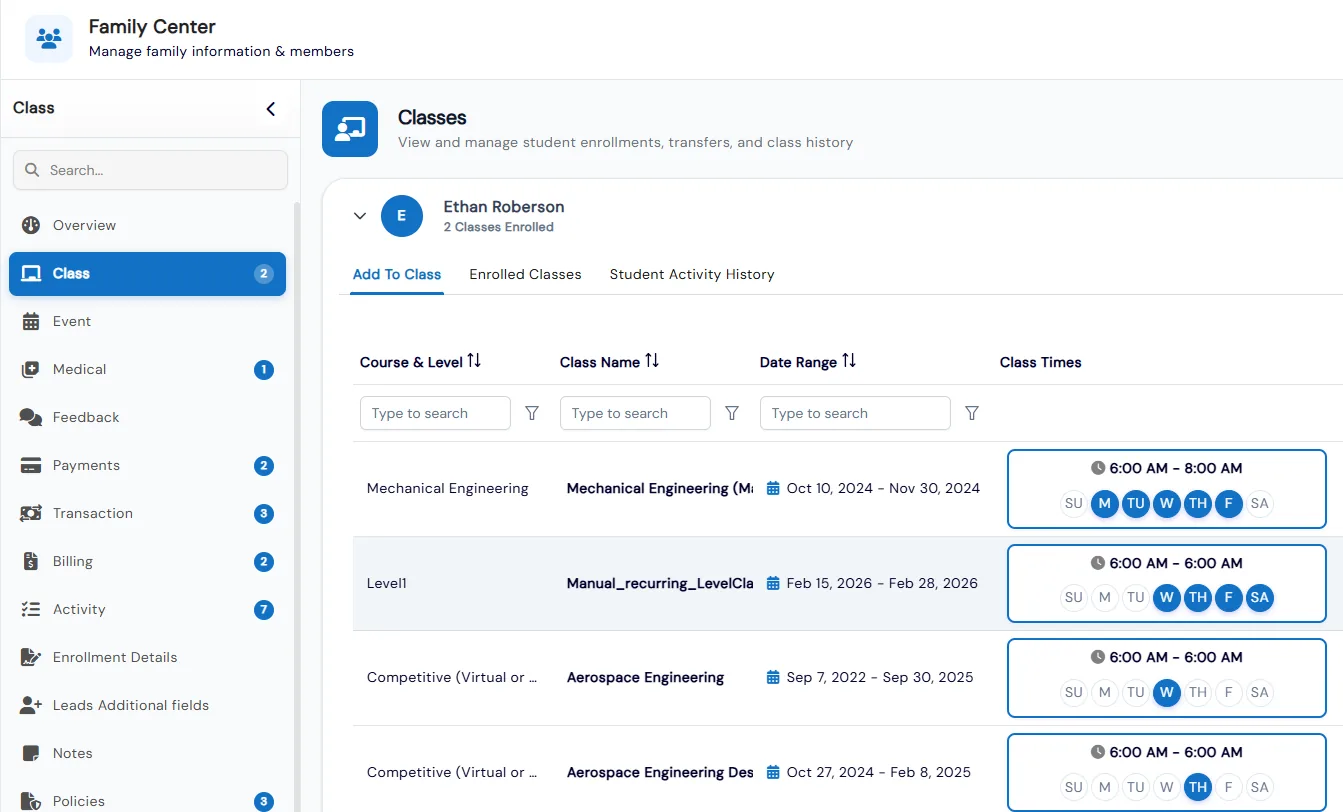
  • Enroll, Enroll and Pay, or Enroll and Invoice a student, including enrollment on a future date
  • Transfer or drop students from classes and events, with transfer and drop history kept
  • Keep student, admin and internal notes, with internal notes hidden from parents
  • Families converted from leads keep their lead fields, so history runs from lead to enrolled student
Family Center record with tabs for class, event, medical, payments, billing, activity and policies, showing a student's class enrollment options

Complete communication history

Every email and SMS a family has received, from any part of the platform, shown in one inbox-style view with SMS replies grouped into threads.
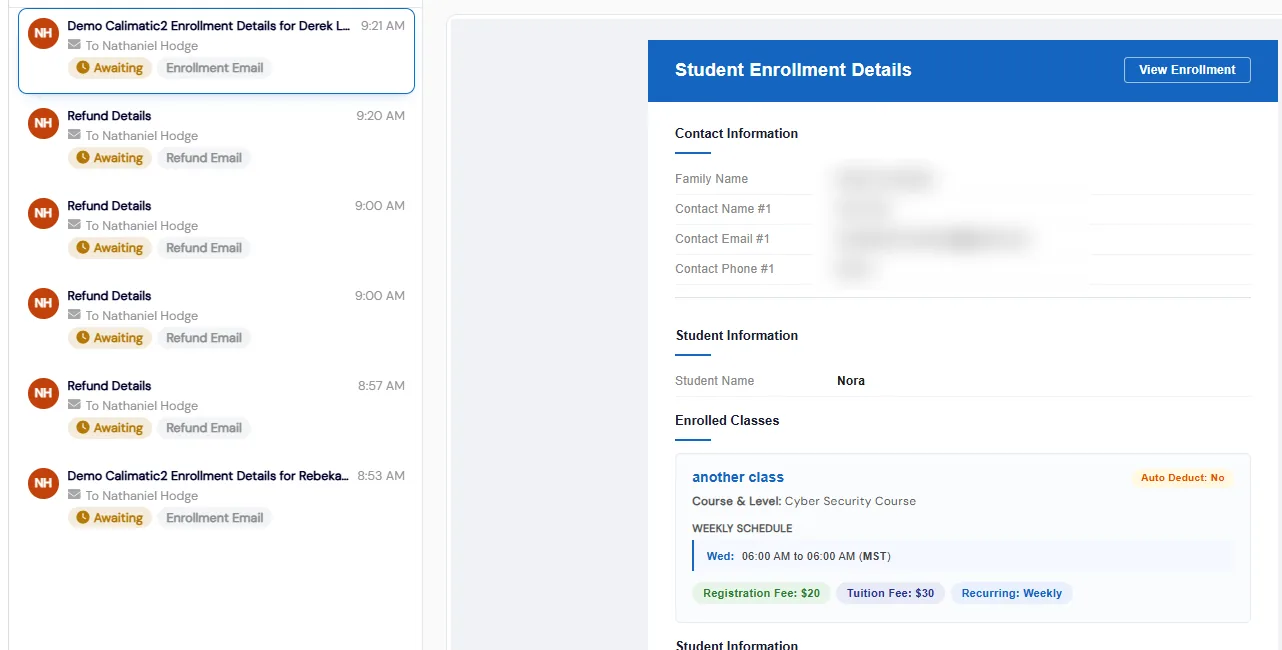
  • Email a family's contacts from their record using templates and Dynamic Tags like Business Name
  • Filter by All, Email or SMS, by family member, by date range, or search subject, body and sender
  • Each row shows subject, time, recipient and delivery status, grouped under Today and Yesterday
  • Full emails render in the reading pane, with an option to open the complete email in a new tab
Communication History tab listing enrollment and refund emails to a family, with an enrollment email open in the reading pane

QR and PIN check-in kiosk

Turn any phone or tablet into a check-in kiosk. Students scan a QR code or enter a PIN, a class PIN checks in a whole group at once, and staff can print sign-in sheets for offline records.
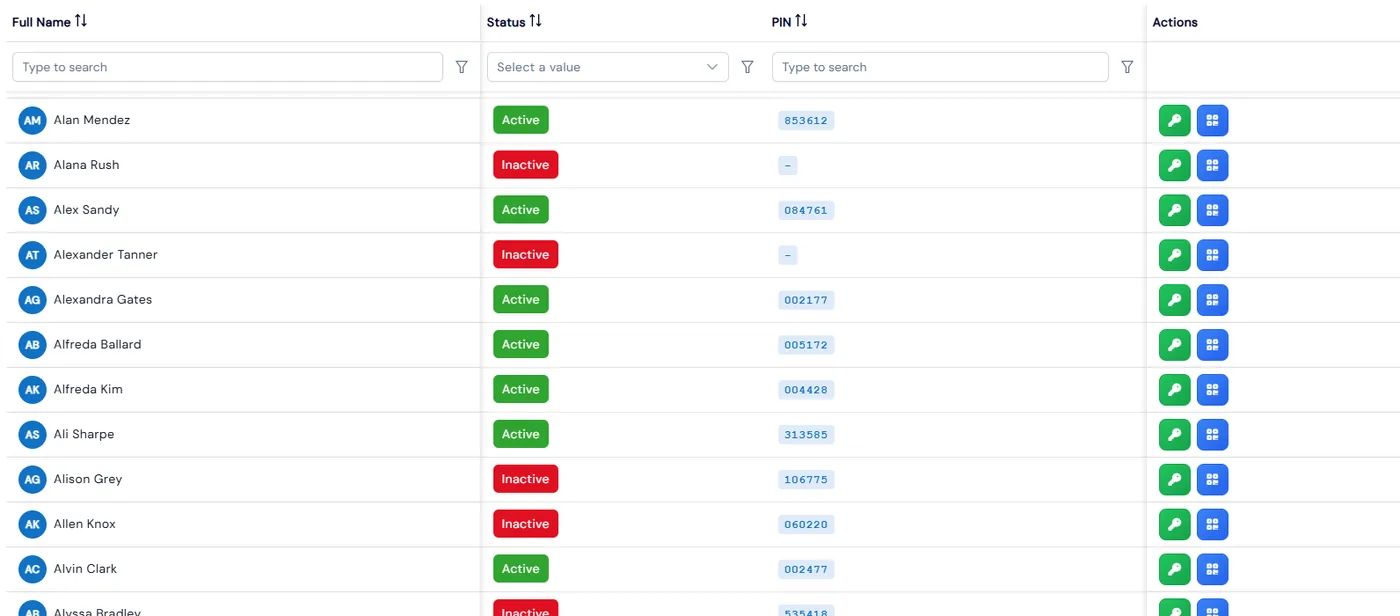
  • Students, Group and Staff tabs list every assigned PIN and QR code in one place
  • Send PINs to many students at once, skipping anyone who already received one that day
  • After scanning in, students pick their class and subject, and a confirmation shows the check-in time
  • Staff check-ins show check-in time and total time logged, with pause and continue controls
Manage PINs grid listing students with status, PIN and QR code and PIN actions

Policy and waiver tracking

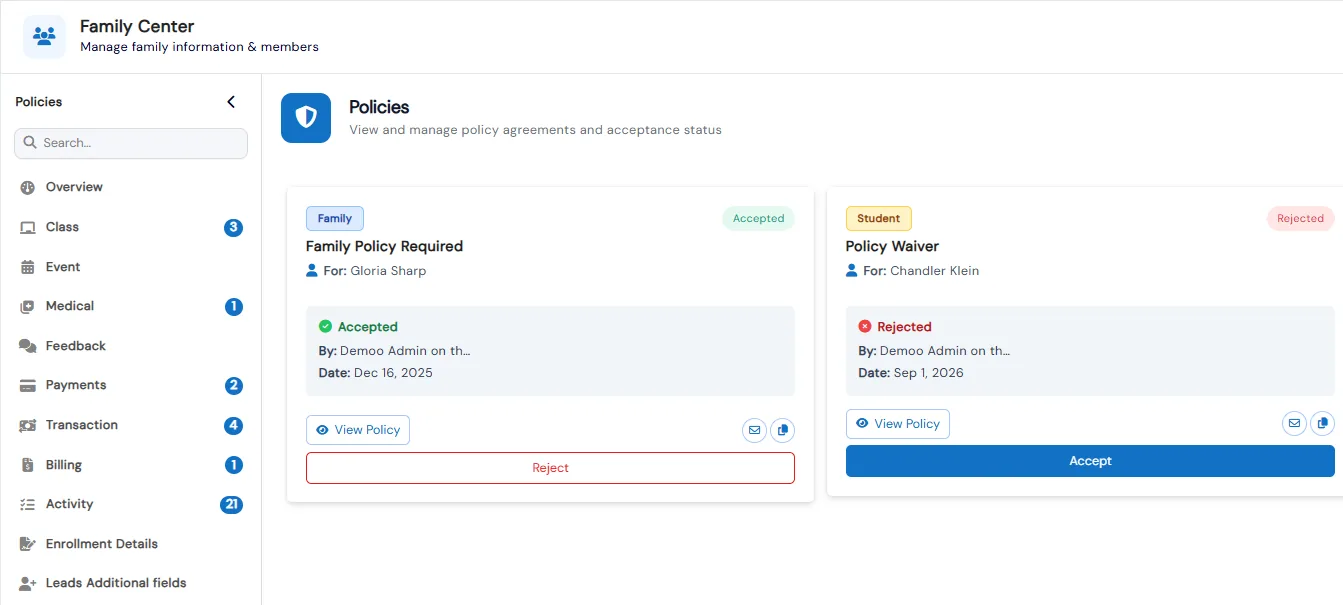
See which policies each family accepted, accept on their behalf, or email them a request. Required policies must be accepted before the portal opens.
  • Each policy gets a name, a free-text type and a rich-text description, tied to specific enrollment forms
  • Families see unanswered required policies as an Accept or Reject dialog when they log in
  • Every response shows its status, who responded and when, in Card or List view
  • Copy or sync policies to franchises; ones already sent are updated rather than duplicated
Family Center Policies tab showing an accepted family policy and a rejected policy waiver with Accept and Reject buttons

Keep your data clean

Merge duplicate families, convert inactive families back into leads so nothing is lost, and share student details with another franchise.
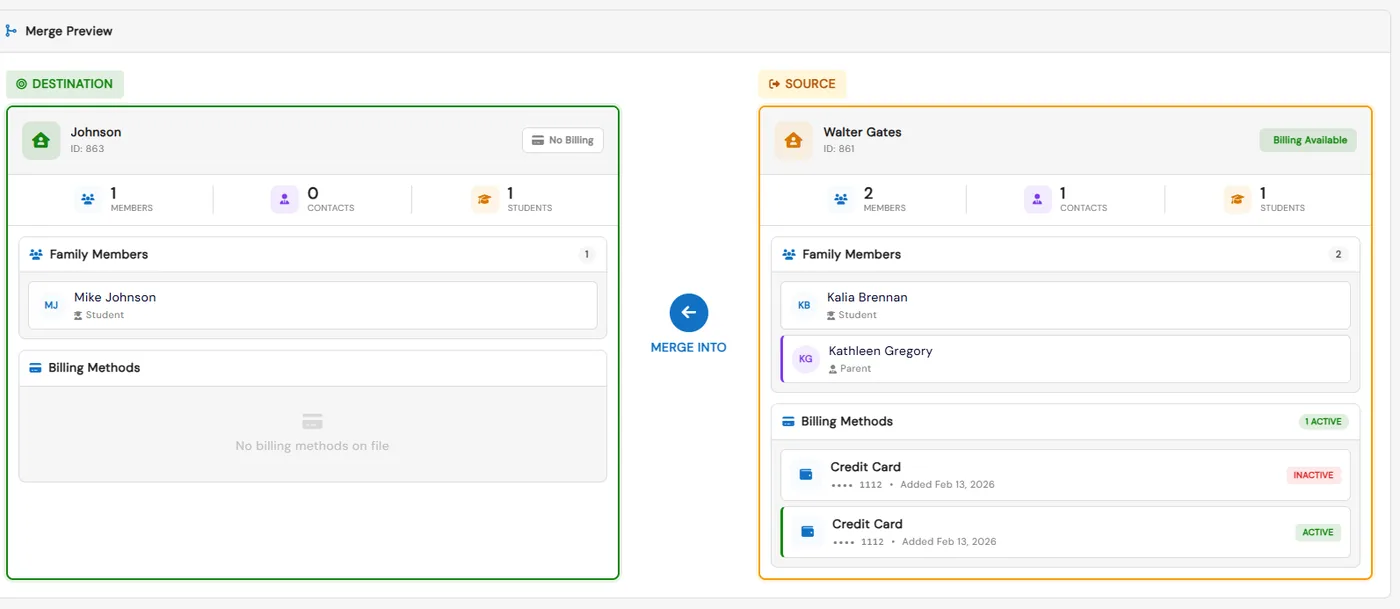
  • Merging combines all students and contacts from the selected families into one family record
  • A merge preview shows members, contacts, students and billing methods for both families first
  • Share Details emails the selected students' details to the franchise you choose
  • Export family data one row per family or one row per contact
Merge preview comparing a destination family and a source family with their members, contacts, students and billing methods

Self-service parent portal

Parents add children, register for activities, see upcoming payments and statements, manage payment methods and message staff with files or voice notes.
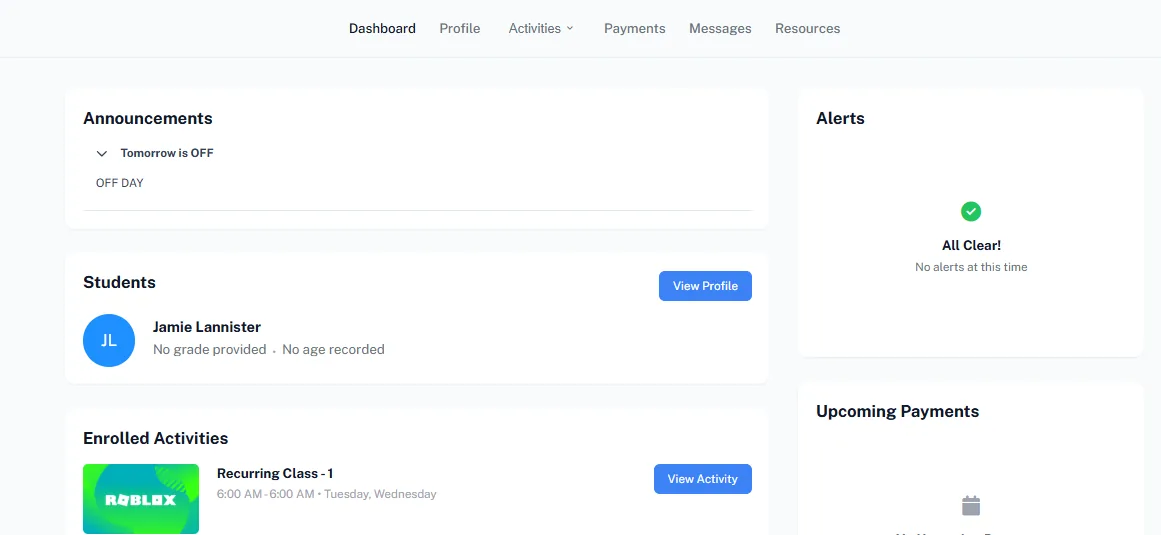
  • Dashboard shows announcements, alerts, enrolled activities, upcoming payments and loyalty points
  • Parents update family details and add or edit students and contacts from the Profile page
  • Activity Finder and a calendar view help families register for and track classes, camps and events
  • A Store tab lets families buy products, including with earned loyalty points
  • Students and parents take assigned assessments without leaving the portal
  • Families check in and out and upload documents to Drive from the portal
Parent portal dashboard with announcements, students, enrolled activities, alerts and upcoming payments

Benefits for Your Institution

1

Single source of truth for student data

2

Reduce administrative paperwork

3

Improve communication with families

4

Ensure compliance with data regulations

Student Information System: FAQs

Common questions about Calimatic Student Information System.

Ready to use Student Information System?

Start your free trial today and experience the full power of Calimatic.

No credit card required
14-day free trial
Cancel anytime