Family Account Management Software with Student Records for Learning Centers
One record per family, with every child, contact, class, payment, policy and message in it. Find duplicates before they happen, merge the ones that slip through, and see who changed what.
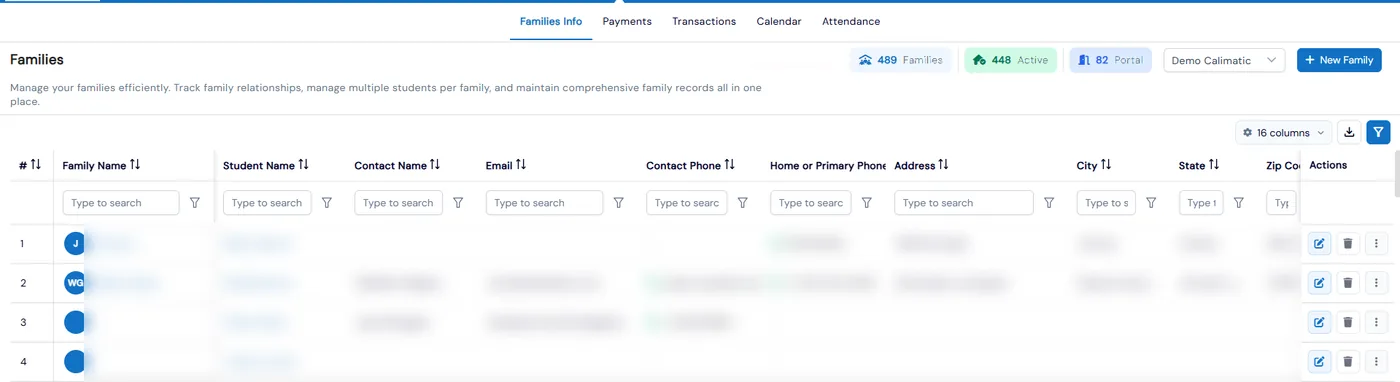
Family accounts in Calimatic keep all of a household’s records together: the parents and other contacts, every child, their class and event enrollments, payments, transactions, medical details, notes, policies and files. Families Info shows one row per family, Student Info shows one row per child, and both open the same profile with a tab for each part of the record.
Families are added for you when they enroll from your website, and a returning parent who logs in gets the form filled in from their profile. Calimatic checks whether an email is already in use, so the same family is not created twice. When duplicates do appear, you merge the families or the students and keep their history.
How it works
- 1
Build each family once
Enrollments from your enrollment pages add the family and students to Families Info automatically, and each student is tagged with where they came from. Staff can also add a family with its students and contacts by hand. If someone registers with an email that already exists, they are asked to log in to that account instead of creating a new one.
- 1
- 2
Everything about a family in one profile
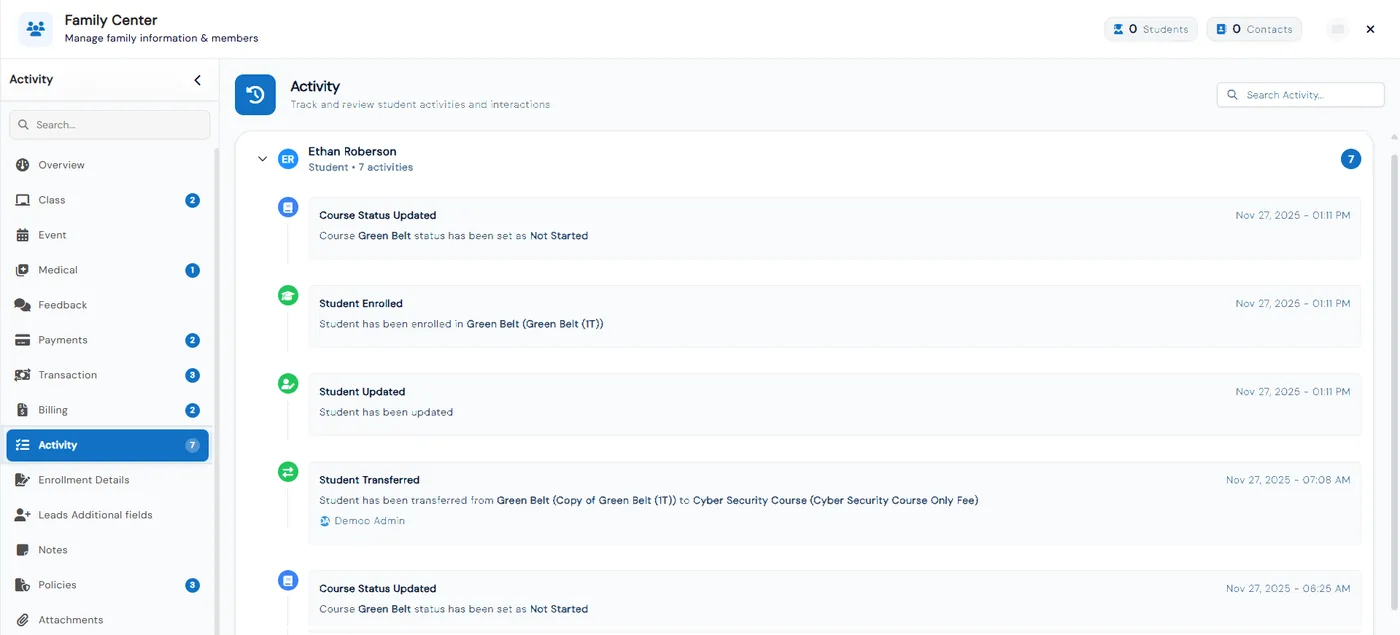
The profile has tabs for Class and Event enrollments, Medical, Feedback, Payments, Transactions, Billing, Activity, Enrollment Details, Lead Additional Fields, Notes, Policies and Attachments. Enroll each child separately, pay now, invoice or start on a future date. Activity keeps an audit trail of new students, enrollments, fee assignments, transfers and profile updates.
- 3
Work student by student when you need to
Student Info lists every child on their own row, even siblings, with counters for students, active, enrolled and inactive. Archive a student to keep the list clean, or transfer them to another class and choose how the money is handled, from a full refund and new charge to a swap with no financial change.
- 3
- 4
Merge duplicate families and students
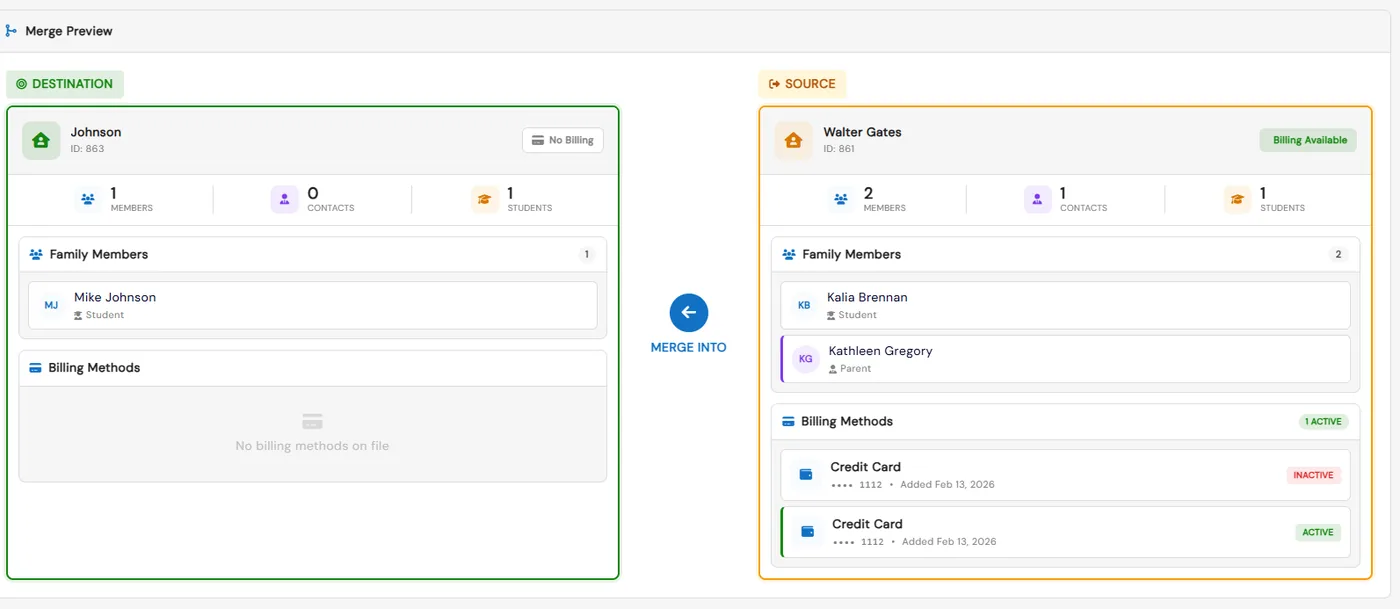
From a family’s Actions menu, choose Merge Families, pick the family to merge with and click Merge. All students and contacts are combined into one family, and each student’s enrollment activity history moves across. You choose which grade, email and phone to keep, and can merge two student profiles with their enrollments, payments and transactions, or keep both.
- 5
Reach, share and export family records
Email or text a family’s contacts from their profile, and read every email and text they have been sent in Communication History. Export families with all contacts on one row or one contact per row. Share a student’s details with another franchise by email, or convert a family that has left back into a lead.
- 5
What's included
- One family record linking parents, contacts and every child
- Families Info grid with total, active and portal-access counters
- Student Info grid with one row per child and active, enrolled and inactive counts
- Families and students added automatically from website enrollments
- Email checked at enrollment to stop duplicate family accounts
- Source of each student recorded when they are created
- Tabs for enrollments, medical, feedback, payments, transactions, billing, policies, notes and attachments
- Activity audit trail of enrollments, transfers, fee assignments and profile changes
- Internal notes that parents never see
- Merge Families and merge students, keeping enrollment history and chosen fields
- Family-level or contact-level export, and sharing student details with another franchise
- Archive students or convert a family back into a lead
Part of Calimatic Student Information System, in one white-labeled platform with enrollment, billing and the parent app.
Who uses it
Tutoring centers
Keep every child’s enrollments, payments and notes under one family, and generate a statement of all their charges, payments and refunds.
After-school programs
Store medical details, accept policies on a family’s behalf and keep internal notes the parents never see.
Swim schools
Enroll each sibling in their own level from one family profile, and move a child to another class without redoing the family record.
Learning center franchises
Filter families by franchise from the business account, and share a student’s details with another location when a family moves.
See Family Accounts in a live demo
Get a personalized demo. We'll show Calimatic running your programs, under your brand.
- 14-day free trial, no credit card
- White-labeled under your brand
- Live product walkthrough
Family Accounts: FAQs
Common questions about Family Accounts in Calimatic.
From the Blog
Franchise Operations Manual: How to Create One for Your Education Business
A section-by-section guide to writing an operations manual for an education franchise: what to include, how to make standards measurable, and how to keep franchisees actually using it.
Read articleSpotting At-Risk Families Before They Quit: Warning Signs, Scoring, and Scripts
Families drift for weeks before they cancel. Learn the warning signs to watch, a simple risk score, check-in scripts, and a 30-minute weekly routine to keep more of them.
Read articleHow Dance Studios, Swim Schools & Martial Arts Centers Streamline Operations
Activity centers waste 15+ hours weekly on admin tasks. Discover proven strategies dance studios, swim schools, and martial arts centers use to automate operations and increase revenue.
Read article