Online Store for Dance Studio Merchandise, with Print-on-Demand and Enrollment Add-Ons
Give families one place to buy your merchandise, inside the same portal they use to enroll and pay. Connect Printify for print-on-demand products, and offer T-shirts, lunch or materials as add-ons when families enroll.
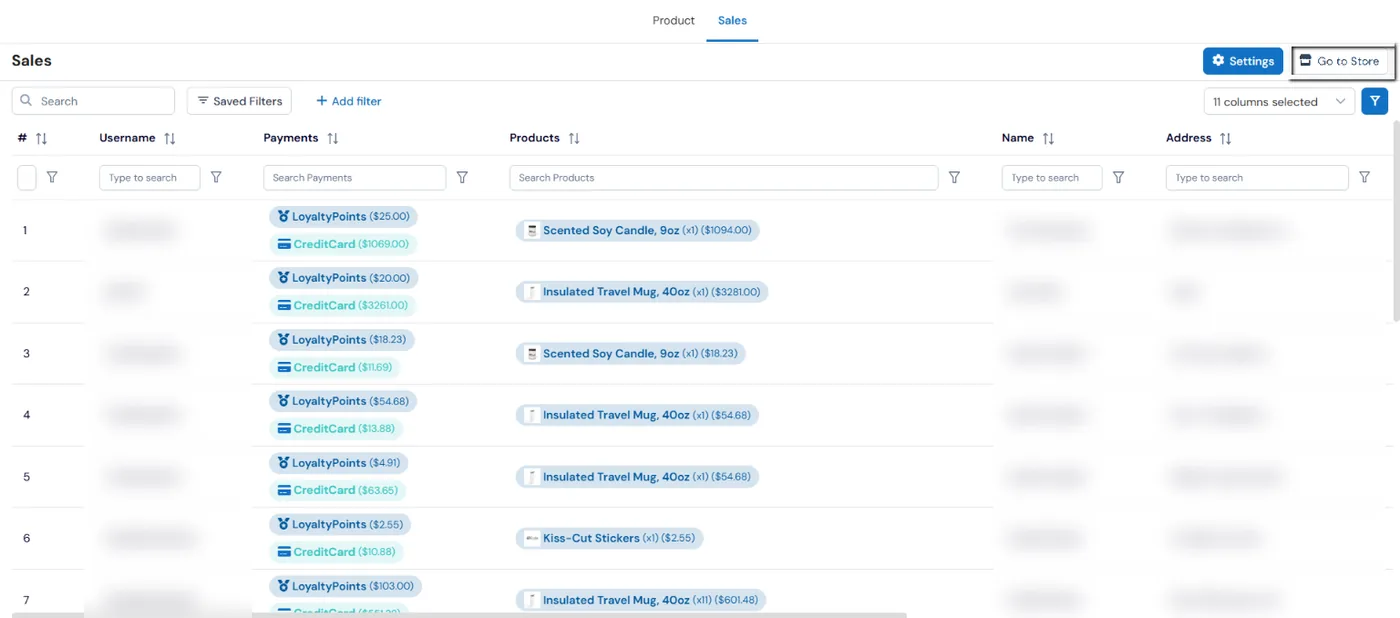
The Calimatic online store is a shop for your students and parents. They open it from the Store link on their dashboard or the Store tab in the parent portal, add products to a cart and check out by card, with loyalty points, or both. You connect a Printify store so your print-on-demand products show up in the store, and every order appears under Store, Sales in your admin.
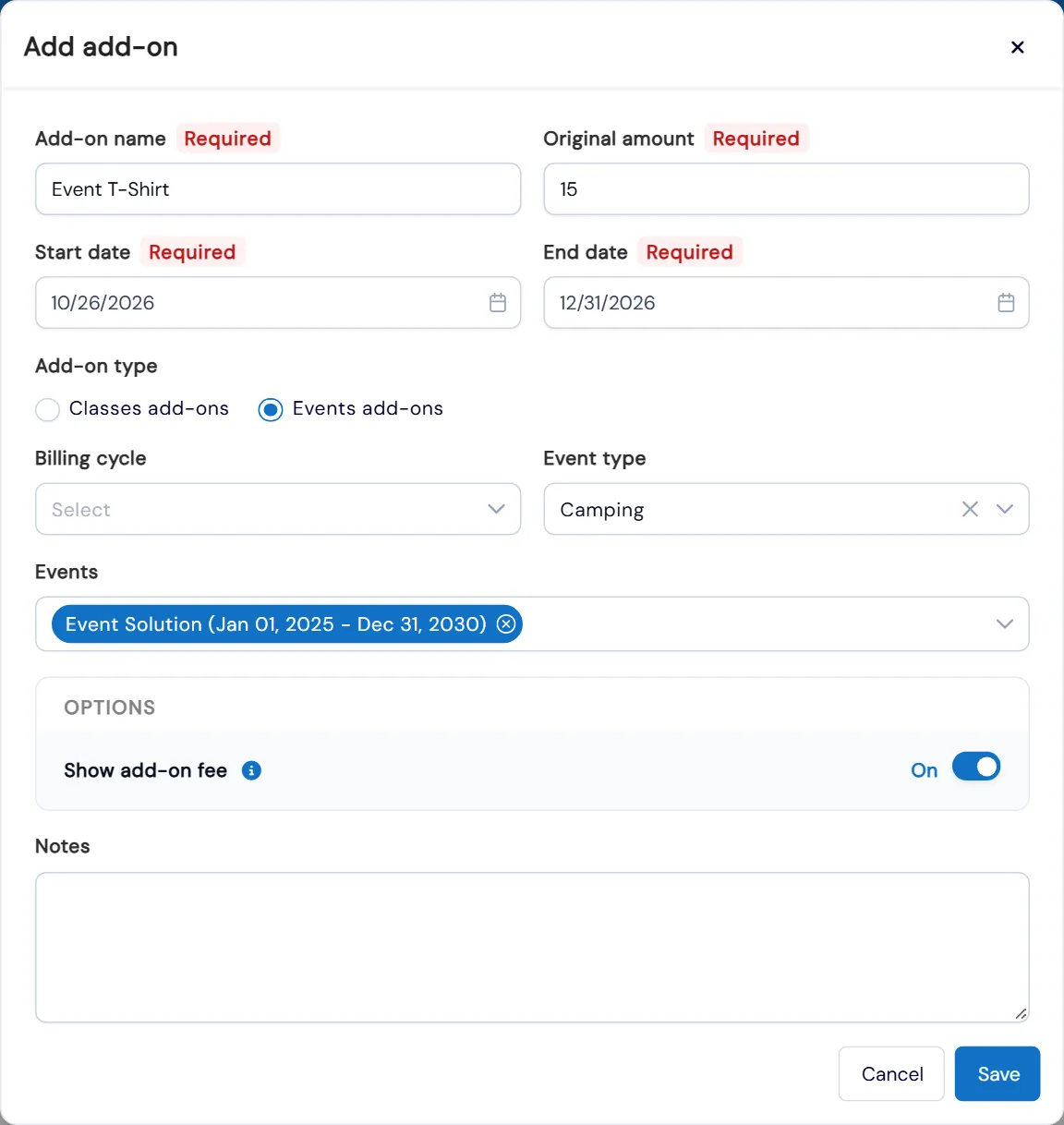
Some things are easier to sell at the moment a family enrolls. Add-ons let you offer extras such as T-shirts, lunch or materials with a class or event, priced and dated however you like. Families pick them per student on your enrollment form, in the Activity Finder or in the portal, and pay for them with the enrollment.
How it works
- 1
Connect your Printify store
In your Printify account, open Connections and generate a new store and token. In Calimatic, go to Store, Sales, click Settings and choose Configure Printify. Paste the token, select the store and save. Go To Store then opens your store, with all the products synced from Printify.
- 2
Families shop from the portal
Students and parents open Store from the dashboard, or the Store tab in the parent portal, and sign in. Their points balance shows at the top. They open a product, add it to the cart, keep shopping or view the cart, then enter their state and postal code so tax is worked out and added to the total.
- 3
Pay with points, a card or both
At checkout, points are applied first. If they cover the total, the family places the order with no other payment. If not, the remaining balance is shown and paid by card. Once the order is confirmed, an invoice appears on screen for the family to keep. You choose how many points equal a dollar in Points Conversion.
- 1
- 4
See every order under Sales
Store, Sales lists each order with the buyer, how it was paid, split into loyalty points and card amounts, the products and quantities bought, and the buyer’s name and address. Search and filter any column, save filters and choose which columns to show.
- 4
- 5
Sell T-shirts and extras with enrollment
In Manage Add-Ons, give an add-on a name, price, start and end date, an optional billing cycle, and choose the classes or events it is offered on. Families choose add-ons and a quantity for each student when they enroll. The add-on is charged with the enrollment, shown on the receipt and listed on the roster and in reports.
What's included
- Online store opened from the student and parent dashboard
- Store tab inside the parent portal
- Printify connection that brings your synced print-on-demand products into the store
- Cart with continue shopping and a cart review
- Tax worked out from the buyer’s state and postal code
- Checkout with loyalty points first and a card for any balance
- An on-screen invoice for every order
- Sales list of orders with payments, products, quantities and the buyer’s address
- Enrollment add-ons for classes and events, such as T-shirts, lunch or materials
- Add-on quantities chosen per student on the enrollment form, Activity Finder and portal
- Add-ons charged with the enrollment, shown on receipts, rosters and reports
- Drag-and-drop ordering of add-ons on your website
Part of Calimatic Student Information System, in one white-labeled platform with enrollment, billing and the parent app.
Who uses it
Dance studios
Connect Printify and sell studio-branded print-on-demand products to parents through the portal they already use for classes and payments.
Martial arts schools
Let students spend the points they earn in class on products in your store, and pay the rest by card when points don’t cover it.
Summer camps
Offer a camp T-shirt or lunch as an add-on so families add it, with a quantity, for each child at enrollment.
Coding academies
Reward students with points and give them a store to spend them in, with an invoice for every order.
See Online Store in a live demo
Get a personalized demo. We'll show Calimatic running your programs, under your brand.
- 14-day free trial, no credit card
- White-labeled under your brand
- Live product walkthrough
Online Store: FAQs
Common questions about Online Store in Calimatic.
From the Blog
How Dance Studios, Swim Schools & Martial Arts Centers Streamline Operations
Activity centers waste 15+ hours weekly on admin tasks. Discover proven strategies dance studios, swim schools, and martial arts centers use to automate operations and increase revenue.
Read articleSpotting At-Risk Families Before They Quit: Warning Signs, Scoring, and Scripts
Families drift for weeks before they cancel. Learn the warning signs to watch, a simple risk score, check-in scripts, and a 30-minute weekly routine to keep more of them.
Read articleHow Tutoring Companies Use Branded Apps to Stand Out
Discover how leading tutoring businesses leverage custom mobile apps to increase enrollment, improve parent satisfaction, and differentiate from competitors.
Read article