Student Reward Points System for Kids Classes and Learning Centers
Give students points for what they buy, the families they refer, the posts they share and the badges they earn. Families spend those points on class fees or in your store, and you see every point earned and redeemed.
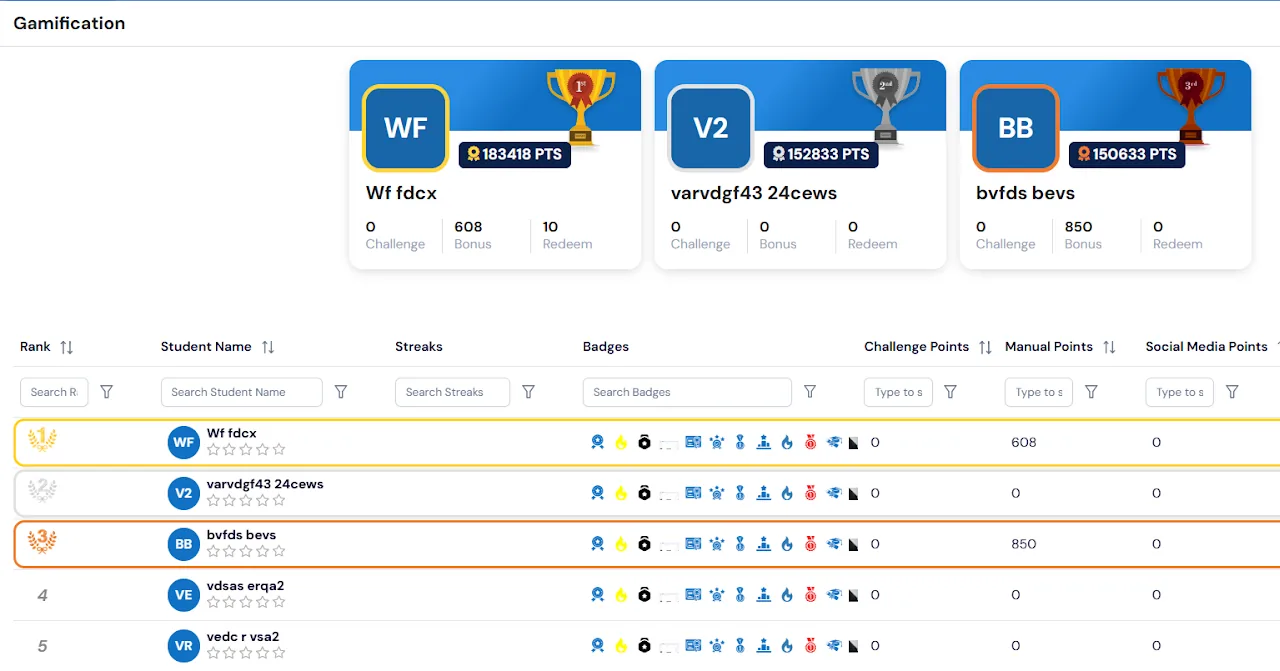
Reward points in Calimatic are a loyalty program for your students: they earn points for money spent, family referrals, social media posts that use your hashtag, bonuses and badges, and families redeem those points for money off enrollments or for products in your store. You set how many points each action is worth, what a point is worth in dollars and when points expire.
Staff see every student’s points on the Gamification page, can award or redeem points by hand with a note, and can open each student’s full history of earned and redeemed points. Parents see their children’s points in the parent portal, and franchise admins export a Loyalty Program report for their location.
How it works
- 1
Decide what earns points
Go to Students, then Gamification, then Points Calculation. Set how many points students earn for each dollar spent, for example 3 points per $1. Under Family Reward Points, set the points the referring family gets and the points the new family gets when a referral code is used at enrollment.
- 1
- 2
Reward posts that use your hashtag
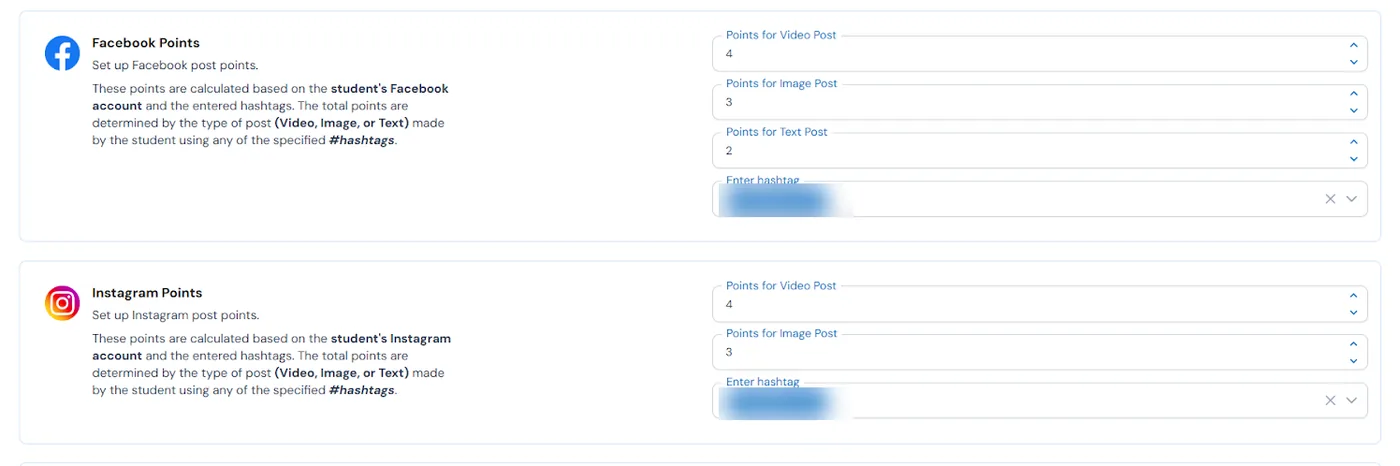
Set points for Facebook video, image and text posts, Instagram video and image posts, TikTok videos and public YouTube videos, and the hashtag students must use. Parents connect their child’s accounts from the portal. When a YouTube video is public and uses the exact hashtag, the points are added automatically once the video is validated.
- 3
Create streaks, badges and bonuses
Under Manage Items, create streaks, named bonuses with a set number of points, and badges with their own point values for achievements and milestones. Staff award a bonus to a student from Manual Points, and teachers can view and manage a student’s points from the menu on their Student Board.
- 4
Set the value and expiry of points
In Points Conversion, choose how many points equal a dollar in your store, for example 3 points = $1. In Set Point Expiration, enter the number of days after which earned points expire, such as 90 days from the date they were earned.
- 3
- 5
Let families spend their points
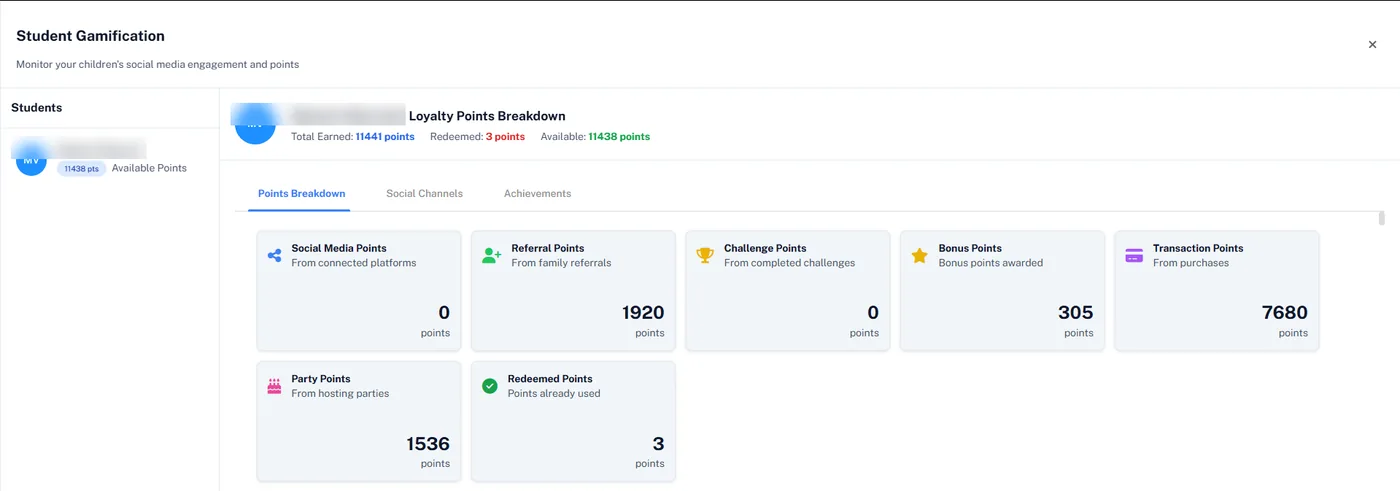
Parents see each child’s total earned, redeemed and available points in the portal, broken down by where they came from. They redeem points for money off when enrolling on your website or in the parent portal, or spend them in your store, where points cover the order first and any balance is paid by card.
What's included
- Points for every dollar spent, at a rate you choose
- Referral points for both the family that shared its code and the new family
- Points for Facebook, Instagram, TikTok and YouTube posts that use your hashtag
- Streaks, named bonus points and badges with their own point values
- A points-to-dollar rate for redemption and an expiry period in days
- Manual awards and redemptions with a reason, and a full earned and redeemed history for each student
- Families redeem points for money off at checkout on your website or in the parent portal
- Staff redeem points for a student while adding them to a class
- An online store where points pay first and a card covers the rest, with an invoice for each order
- Printify store connection to show your synced print-on-demand products in the store
- Loyalty Program report of spent, unspent, manual and converted points, with Excel, CSV and PDF export
- Permission controls for actions on the Gamification page
Part of Calimatic Student Information System, in one white-labeled platform with enrollment, billing and the parent app.
Who uses it
Coding academies
Students post the projects they build to YouTube with your hashtag, earn points automatically once the video is validated, and spend them in your store.
Tutoring centers
Give families points for every dollar of tuition and for each new family they refer, then let them redeem those points for money off their next enrollment.
Martial arts schools
Create badges and streaks for milestones, add bonus points for effort in class, and let students see their points grow toward something they can buy in your store.
Learning center franchises
Franchise admins redeem points for a student when adding them to a class, and export a Loyalty Program report for their location to see points spent, unspent and converted.
See Reward Points in a live demo
Get a personalized demo. We'll show Calimatic running your programs, under your brand.
- 14-day free trial, no credit card
- White-labeled under your brand
- Live product walkthrough
Reward Points: FAQs
Common questions about Reward Points in Calimatic.
From the Blog
How to Manage Memberships, Drop-ins, and Class Packs at Your Activity Center
Learn proven strategies to handle multiple pricing models, reduce administrative headaches, and maximize revenue at your enrichment center.
Read articleHow Tutoring Companies Use Branded Apps to Stand Out
Discover how leading tutoring businesses leverage custom mobile apps to increase enrollment, improve parent satisfaction, and differentiate from competitors.
Read articleParent Engagement Strategies That Boost Retention at Enrichment Programs
Discover proven parent communication and engagement tactics that increase renewal rates and reduce churn at activity centers and enrichment programs.
Read article