Summer Camp Registration Software with Online Payment
Put every camp week on your website, let parents book several weeks for several children in one checkout, and take a deposit or the full fee online.
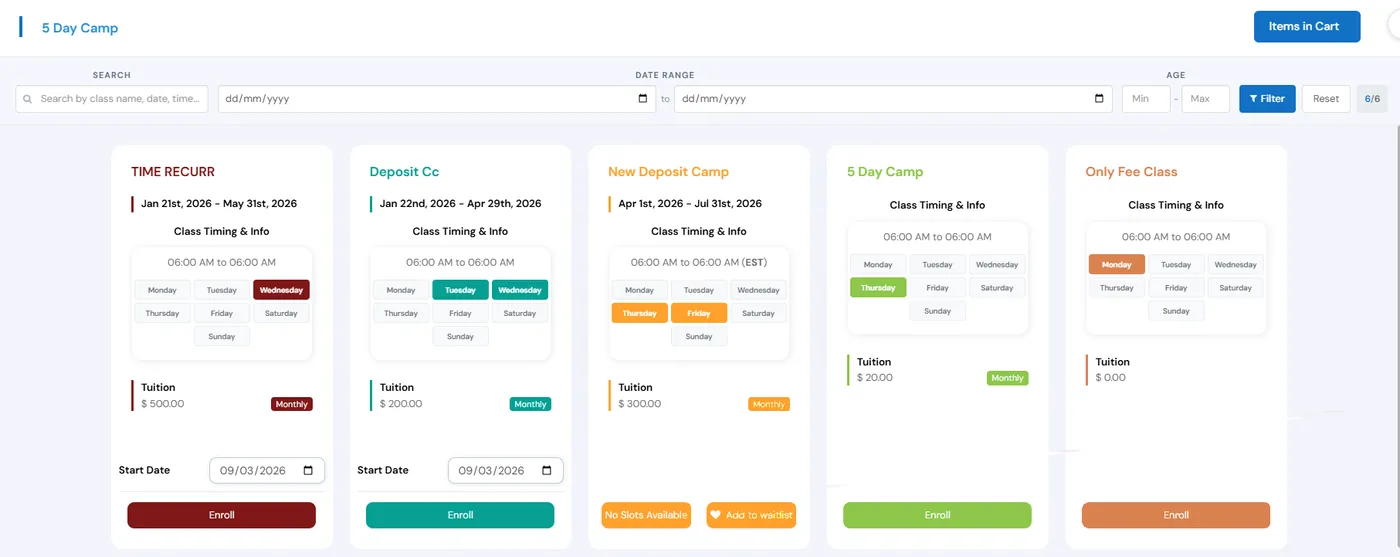
Camp registration in Calimatic puts your camps on your website, lets families sign up and pay online, and keeps every camper’s details, payments and roster in the same system as your classes. Camps are set up as a Camps class type with categories such as Summer Camp and Winter Camp, and programs with set dates can also run as events with their own schedules, slots and price.
Parents add several camps and several children to one cart and pay once. A multi-camp discount applies on its own when a child books enough camps, sibling coupons apply when brothers and sisters enroll together, and a full camp can take waitlist sign-ups instead of turning families away.
How it works
- 1
Set up your camps and weeks
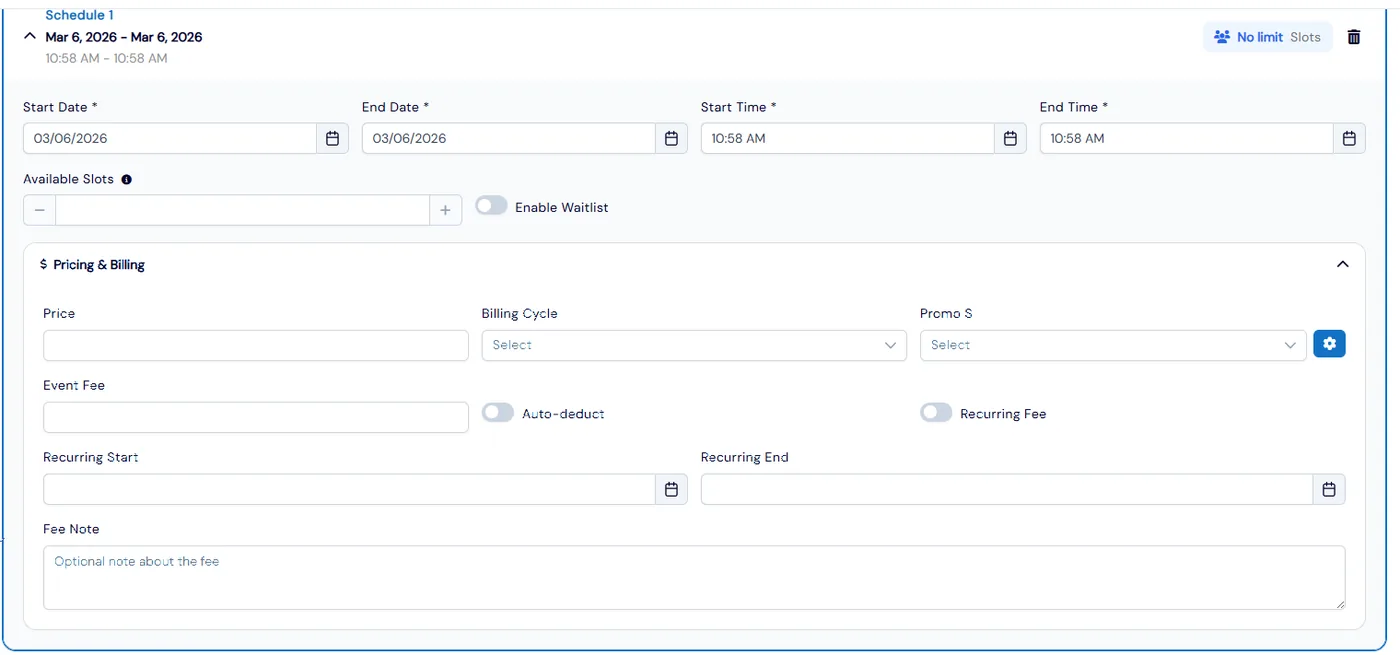
Create a Camps class type, add categories such as Summer Camp and Winter Camp, and create each camp with its start and end dates, age range, slots, days and times. For a camp run as an event, add a schedule for each run with its own dates, times and slots. Copy a camp to set up the next week with the same settings.
- 1
- 2
Price it and choose what to collect up front
Set the price, billing cycle and any fee for each camp. You can collect only the registration fee or a deposit at enrollment and collect the rest when you are ready, and events can take a deposit too. Turn on recurring billing for camps that bill by cycle.
- 3
Publish camps on your website
Each class type and category has a list view link, a calendar view link and an embed script, and the Activity Finder can give camps their own tab. Families search and filter by date range and age, see each camp’s dates, days, times and tuition, and open All Available Dates to see every date a camp runs, not just one week.
- 4
Let families pick weeks, days and extras
Families add several camps and children to one cart. With day selection, they choose exactly which days they’ll attend, and checkout waits until each camp has the right number of days. Add-ons you set up, each with its own price and dates, are offered at enrollment.
- 3
- 5
Discounts that apply themselves
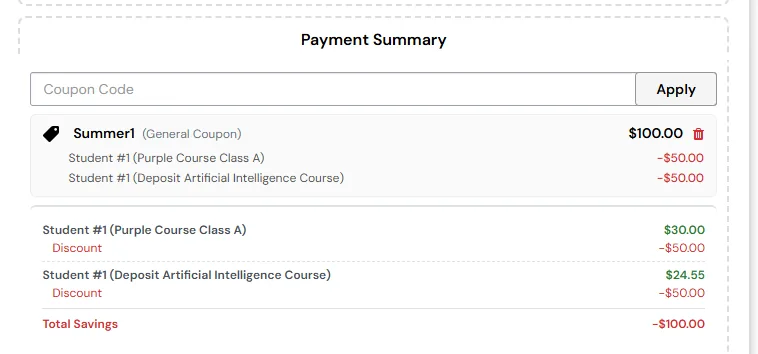
Give a class coupon a minimum number of camps, and once a child has that many qualifying camps in the cart the discount applies with no code and is split evenly across them. Sibling coupons apply automatically when several children from one family enroll on your website.
What's included
- Camps class type with categories such as Summer Camp and Winter Camp
- Dates, age range, slots, days and times on every camp
- Events with several schedules, each with its own dates, times, slots and price
- List view, calendar view and embed script for each camp type and category
- A camps tab in the Activity Finder, with All Available Dates across every week
- Registration forms with custom questions, attachments, e-signature and email verification codes
- One cart for several camps and several children
- Day selection, so families choose which days they attend (enabled on request)
- Registration fee only or a deposit at enrollment, with the balance collected later
- Multi-camp discounts that apply automatically and split across qualifying camps
- Sibling coupons, enrollment add-ons and waitlists for full camps
- Copy last season’s camps from the archive and email past campers
Part of Calimatic Classes & Events, in one white-labeled platform with enrollment, billing and the parent app.
Who uses it
Summer camps
List every week of summer on one page, let parents book several weeks for each child in one checkout, and reward families who book more weeks with an automatic multi-camp discount.
After-school programs
Run school-break camps next to your term classes, with day selection so families book only the days they need.
STEM enrichment
Offer camps by age group with an age range on each one, so parents filter by their child’s age and find the right camp.
Learning center franchises
Head office copies enrollment forms to every location or keeps them in sync, and pushes the same Activity Finder tabs to each franchise.
See Camp Registration in a live demo
Get a personalized demo. We'll show Calimatic running your programs, under your brand.
- 14-day free trial, no credit card
- White-labeled under your brand
- Live product walkthrough
Camp Registration: FAQs
Common questions about Camp Registration in Calimatic.
From the Blog
How to Run Summer Camps Alongside Year-Round Activity Programs
Learn proven strategies to successfully operate profitable summer camps while maintaining your year-round enrichment programs without overwhelming your staff or resources.
Read articleGrowing Your STEM Program: From After-School Club to Full Activity Center
Learn the exact steps successful STEM educators took to transform small after-school programs into thriving full-time activity centers generating 6-figure annual revenue.
Read articleScheduling Software for Activity Centers: Eliminate Double-Bookings and No-Shows
Learn how modern scheduling systems help activity centers eliminate double-bookings, cut no-shows, and increase revenue through better resource utilization.
Read article