Sibling Discount and Coupon Software for Class Registration
Create coupon codes for classes and events, give families a discount for a second child or a second class without a code, keep a discount on every monthly payment, and reward families who refer new ones.
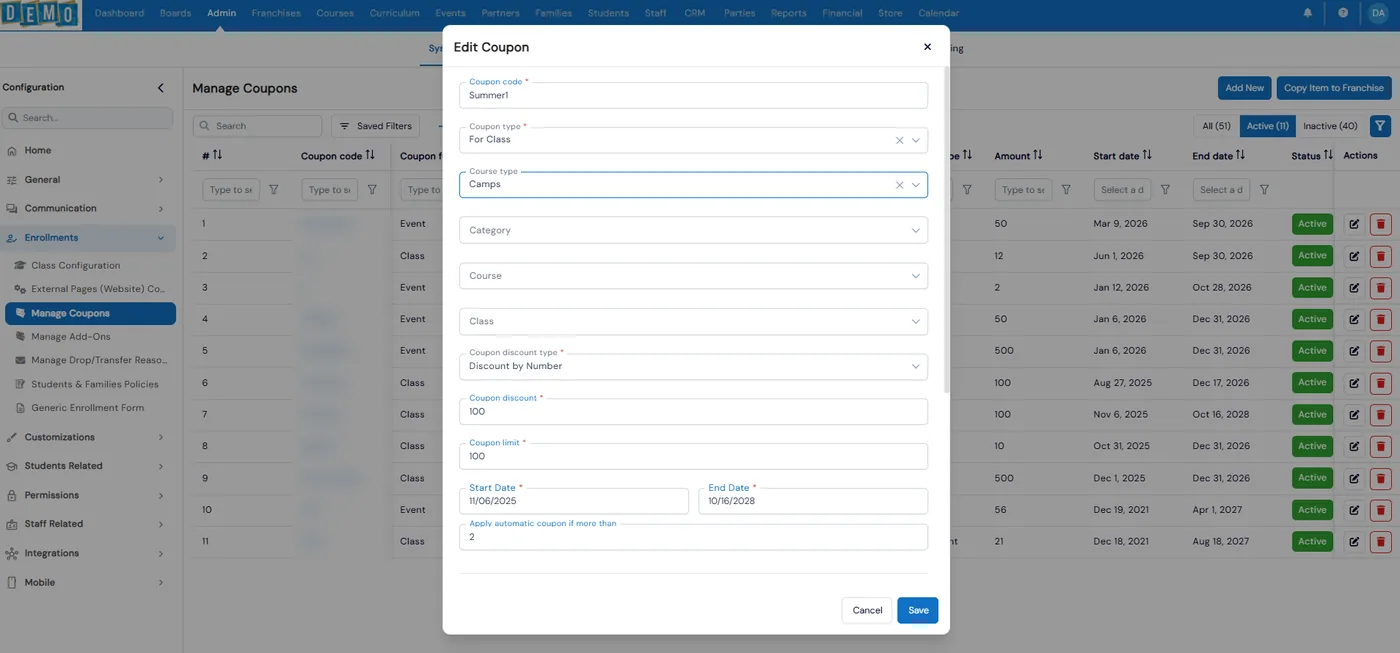
Coupons in Calimatic are discounts you set up once under Manage Coupons and families use when they enroll in a class or event. A coupon can take off a set amount, a percentage or a fixed amount, be limited to certain classes or open to all of them, apply on its own for siblings or for a second class, and stay on every recurring payment until it expires.
Families see a coupon tag on your website classes and paste the code at checkout. Staff can add or change a coupon on any enrollment payment in the portal, and the Coupon Usage report shows which coupons were used, by which students and at which locations. Every family also gets a referral code that earns points for both families when a new family uses it.
How it works
- 1
Create the coupon and set the discount
Go to Admin, System Config, Enrollments, Manage Coupons and click Add New. Enter a code, choose For Class or For Event and the course type, then pick a discount type: Discount by Number, Discount by Percentage or Fixed Amount. Set how many times it can be used and the start and end dates. The coupons list shows how many times each one has been used.
- 1
- 2
Choose which classes it covers and how it behaves
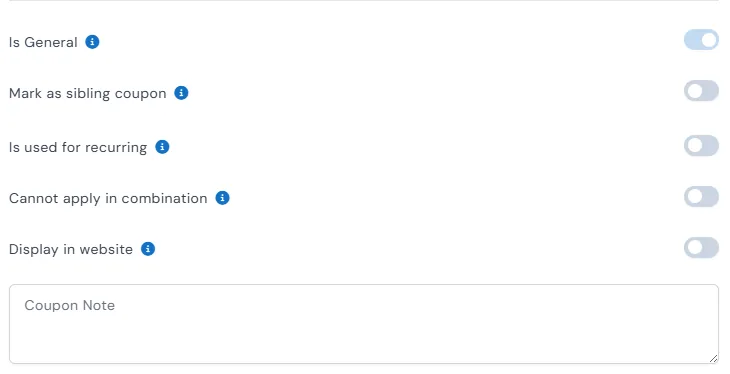
Use the Category, Course and Class selects to limit a coupon to the classes you choose, or turn on Is General so it works on any class or event of that type. Then switch on the rules you want: sibling coupon, recurring, cannot be combined with other coupons, shown on your website, or one use per family.
- 3
Give a multi-class or multi-camp discount with no code
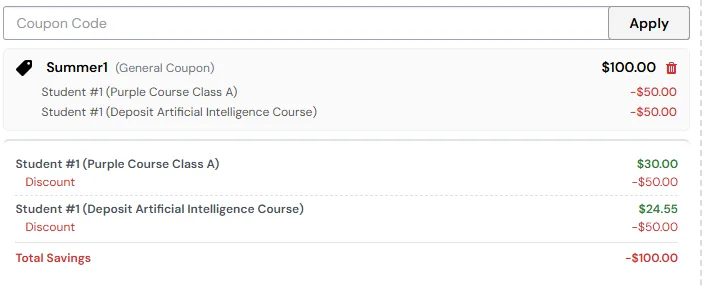
On a general class coupon, fill in Apply automatic coupon if more than with the number of classes a student needs, for example 2. Once a student has that many qualifying classes in the cart, the discount applies by itself and is split evenly across them, so $100 over two classes is $50 off each, shown under Total Savings.
- 4
Let families redeem coupons at checkout
When a class or event has an active coupon, a coupon tag shows on it on your website. Families click the tag, copy the promo code and paste it into Apply Coupon at checkout. Sibling coupons apply on their own when several children from one family enroll on the website, and enrollment emails list the sibling discount and coupon discount separately.
- 5
Apply discounts from the portal and track usage
In Payments, Enrollment Payments, use Add/Update Coupon on an unpaid or recurring payment to apply a coupon for a family you enroll yourself, and Add Additional Discount for an extra discount on a scheduled recurring plan. The Coupon Usage report shows total usage, top coupons and general, sibling, auto-applied and recurring counts, by location.
- 4
What's included
- Coupons for classes or events, by number, by percentage or as a fixed amount
- Usage limit and start and end dates on every coupon
- Limit a coupon to chosen categories, courses and classes, or make it general
- Sibling coupons that apply on their own when several children enroll on your website
- Multi-class and multi-camp discounts that apply with no code once a student has enough classes in the cart
- Recurring coupons that stay on every scheduled payment
- Cannot apply in combination, so a coupon cannot be stacked with others
- Restrict to one use per family
- Coupon tag on website classes and events, with a promo code families paste at checkout
- Add or update a coupon on any enrollment payment, and an additional discount on recurring plans
- Copy coupons to your franchises
- Coupon Usage report with usage by coupon, student and location
Part of Calimatic Billing & Payments, in one white-labeled platform with enrollment, billing and the parent app.
Who uses it
Summer camps
Set a camp coupon to apply automatically once a child is booked into two or more camp weeks, split evenly across each week, with no code for parents to find.
Dance studios
Give families a sibling discount that applies on its own when they register two children on your website, and keep it on every monthly tuition payment with a recurring coupon.
Tutoring centers
Show a coupon tag on a new program to fill it, limit the code to that course, and cap how many families can use it.
Learning center franchises
Create a promotion once at head office, copy it to every franchise, and compare how each location uses it in the Coupon Usage report.
See Discounts & Coupons in a live demo
Get a personalized demo. We'll show Calimatic running your programs, under your brand.
- 14-day free trial, no credit card
- White-labeled under your brand
- Live product walkthrough
Discounts & Coupons: FAQs
Common questions about Discounts & Coupons in Calimatic.
From the Blog
How Dance Studios, Swim Schools & Martial Arts Centers Streamline Operations
Activity centers waste 15+ hours weekly on admin tasks. Discover proven strategies dance studios, swim schools, and martial arts centers use to automate operations and increase revenue.
Read articleBuilding a Referral Program That Grows Your Enrichment Center Enrollment
Learn how to design and implement a referral program that turns satisfied parents into your most powerful enrollment channel.
Read articleActivity Center Marketing: Local SEO & Community Strategies That Work
Discover proven local SEO tactics and community engagement strategies that help activity centers fill classes, increase enrollments, and build lasting relationships with families in their neighborhoods.
Read article