
Admissions & Enrollments

Online Class Registration and Enrollment Software

From inquiry to enrollment, create a seamless experience. Online applications, document collection, and automated workflows reduce friction.

yourbrand.com/enroll
Y

Find a class

ClassesCampsEvents
Almost Full

Robotics Level 2

Mon & Wed · 4:30 PM · Ages 8–11

$180/moEnroll
Most Popular

Junior Coders

Tue · 3:30 PM · Ages 6–8

$140/moEnroll

Spring Break Camp

Mar 16–20 · Pick your days

$65/dayEnroll

Chess Club

Thu · 5:00 PM · Ages 7–12

$110/moEnroll

Your cart

Aarav · Robotics L2$180.00
Anaya · Junior Coders$140.00
Registration fee$35.00
Sibling discount 10%−$14.00
Due today$341.00

Then $306/mo on autopay. Prorated for March.

Waiver signed
Complete enrollment
Powerful Features

Key Capabilities

Everything you need to make the most of Admissions & Enrollments.

Online registration

  • Custom online registration and application forms
  • Activity Finder: a class and event finder for your website
  • Multi-child cart and checkout
  • Email verification codes and pre-filled forms for returning families
  • E-signatures, document upload and verification

Fees, deposits and discounts

  • Collect a registration fee, a deposit or full tuition at checkout
  • Prorated tuition for mid-session enrollments
  • Sibling, recurring and auto-apply coupons
  • Family referral program with reward points
  • Enrollment add-ons
  • Families redeem loyalty points for money off at checkout, on your website or in the parent portal

Enrollment management

  • Application and enrollment status tracking
  • Waitlist management
  • Class transfers with five ways to handle payments and refunds
  • Drop and transfer reason codes
  • Age and grade enrollment restrictions

Conversion and insight

  • Automated email sequences
  • Abandoned cart tracking
  • Enrollment analytics dashboard
  • Share registration forms from head office to every franchise
  • Thank-you page passes purchase value, item quantity and transaction ID to Google Tag Manager for GA4 tracking
What's inside

A closer look at Admissions & Enrollments

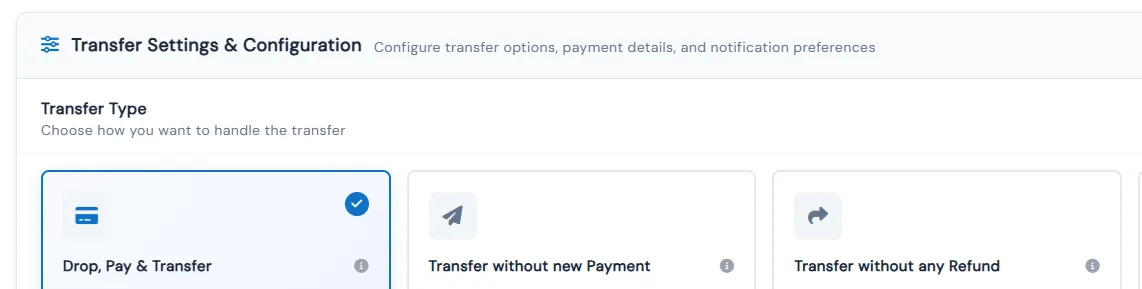
Five ways to transfer a student

Move a student between classes in one step and choose how money is handled: drop and pay, transfer without a new payment, transfer without a refund, collect only the difference, or a straight swap.

  • See the current and target class side by side, and pick a reason from one shared list
  • Balance Collection nets the two classes and says up front what will be charged or refunded
  • Adjust a refund within the valid range instead of using the calculated amount
  • Student, parent and admin emails are on by default and include old and new class details
Transfer Type cards: Drop, Pay & Transfer selected, Transfer without new Payment, Transfer without any Refund

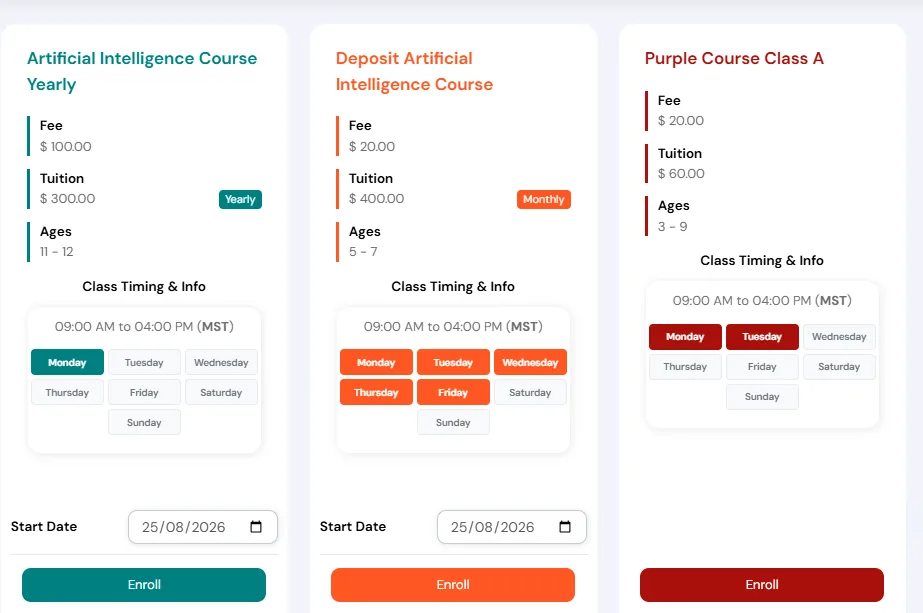
Fee-only or deposit at enrollment

Collect just the registration fee or a deposit up front and the remaining tuition later. Families see exactly what they pay today on the card, the cart and the review screen.

  • Turn it on per class in the Fees & Billing section when creating or editing the class
  • Collect the remaining tuition later from Payments, with the balance pre-filled and adjustable
  • Recurring billing options become available once the remaining tuition is collected
  • Fee-only and deposit collection are mutually exclusive, so each class uses one or the other
Family-facing class cards listing Fee and Tuition separately with Yearly and Monthly tags and Enroll buttons

Recurring plan control

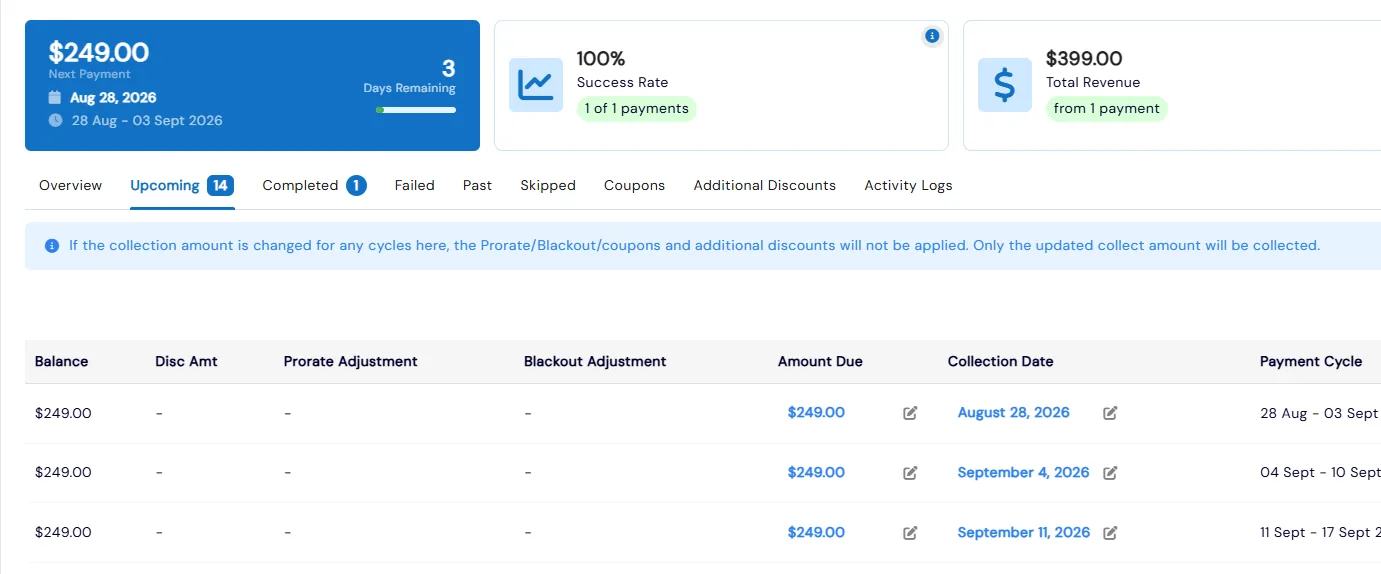
See each plan’s next payment, success rate and revenue. Edit a cycle’s date or amount, hold or cancel cycles, and shift many upcoming payments at once with a preview.

  • Enrollment and fee payments each get filters for unpaid, scheduled, manual and future collections
  • Overriding a cycle's amount skips prorate, blackout and discount adjustments for that cycle only
  • Completed cycles are read-only, so collected payments can't be changed
  • Undo reverts an edited date or amount, and Activity Logs keep a full change history
Recurring Payments view with next payment, success rate and revenue stats above upcoming cycles

Activity Finder on your website

A branded, tabbed catalog of classes and events with calendar or list views. Embed the whole widget or a single tab on your website, and it appears in the parent portal too.

  • Choose which classes and events appear on each tab by type, category and partner
  • Style tab colors, fonts and borders, and hide tabs automatically when they're empty
  • Choose what each card shows, such as instructor info and class dates, and set enroll button colors
  • Preview the widget full-screen exactly as families will see it

Coupons that apply themselves

Sibling coupons apply automatically for multiple children, recurring coupons apply to every future payment, and coupons can kick in once a family adds enough classes. Active coupons show as a tag on website cards.

  • Discount by number, by percentage or by a fixed amount, with a usage limit and start and end dates
  • Limit a coupon to chosen categories, courses or classes, or make it general
  • Turn on 'Cannot apply in combination' so a coupon can't stack with others
  • Copy coupons down to your franchises from the coupons list

Family referral codes

Every family gets a referral code. When a new family uses it at enrollment, both families earn reward points.

  • Set separate reward points for the family that shared the code and the family that used it
  • Every new family is assigned a unique code automatically, shown in Families Info
  • New families enter the code in a referral field while signing up on your website

Benefits for Your Institution

1

Convert more inquiries to enrollments

2

Reduce manual data entry

3

Provide better applicant experience

4

Track conversion funnel metrics

Admissions & Enrollments: FAQs

Common questions about Calimatic Admissions & Enrollments.

Ready to use Admissions & Enrollments?

Start your free trial today and experience the full power of Calimatic.

No credit card required
14-day free trial
Cancel anytime