
Billing & Payments

Tuition Billing and Autopay Software for Classes and Studios

Process payments, generate invoices, and track finances effortlessly. Support for multiple payment methods and automated billing cycles.

yourbrand.com/billing/recurring

Recurring payments

Autopay · March cycle

Search families, classes…

Collected this cycle

$38,640

Success rate

98.2%

Upcoming

214 payments

FamilyPlanAmountDateStatus
Shah familyRobotics L2 · Monthly$180.00Mar 1Paid
Rossi familyCoding + Chess · Sibling 10%$297.00Mar 1Paid
Park familySpring Camp · Deposit$150.00Mar 2Paid
Cole familySwim Level 1 · Monthly$120.00Mar 3Retrying
Kim familySAT Math · 4 installments$225.00Mar 15Scheduled
Haddad familyArt Studio · Prorated$84.00Mar 15Scheduled
Ruiz familyChess Club · Registration fee$45.00Mar 15Scheduled
Lee familyJunior Coders · ACH$160.00Mar 16Scheduled
Powerful Features

Key Capabilities

Everything you need to make the most of Billing & Payments.

Tuition and recurring billing

  • Automated recurring billing (tuition autopay): weekly, monthly or custom
  • Payment plans and installments
  • Proration and billing blackout dates for holiday closures
  • Registration, material and custom fees
  • Custom pricing and packages

Payment processing

  • Every payment method your gateway supports (card, ACH, PayPal and more)
  • Stripe, NMI, Razorpay, Plaid and PayPal payment gateways
  • Any currency and country your payment gateway supports
  • Saved payment methods families manage in the parent portal
  • Manual payments for cash and check
  • Add an external payment link from PayPal, Razorpay, Stripe or NMI to any invoice
  • One card transaction per checkout for every class and child in the cart, with separate records kept for refunds

Collections and receivables

  • Pending payments (accounts receivable) report
  • Failed payment recovery
  • Hold, skip or reschedule a recurring payment
  • Refunds and transaction history with receipts
  • Invoice generation and tracking, with payment links
  • Invoices overview with outstanding, overdue, collected this month and unsent drafts, plus filters and export

Invoices and prepaid classes

  • One invoice for a family's unpaid enrollments and fees, with a PDF and a payment link
  • Discount and tax on each invoice line, with default payment terms, currency and tax rate
  • Invoice PDFs with your logo, Tax ID, terms and bank details, and your own numbering, including financial-year numbering
  • Record part payments by cash, check or bank transfer, with proof of payment and an emailed receipt
  • Credit notes that reduce a balance, refund through the payment gateway, or credit the family wallet
  • Void, write off, reissue or duplicate an invoice, with a history of every email, reminder and change
  • Prepaid class balances per student, with credits, debits, transfers to a sibling and a full change history

Discounts, statements and accounting

  • Discount and coupon management, including sibling discounts
  • Family financial statements
  • Financial reporting and analytics
  • Integration with accounting software (QuickBooks)
What's inside

A closer look at Billing & Payments

Blackout dates in billing

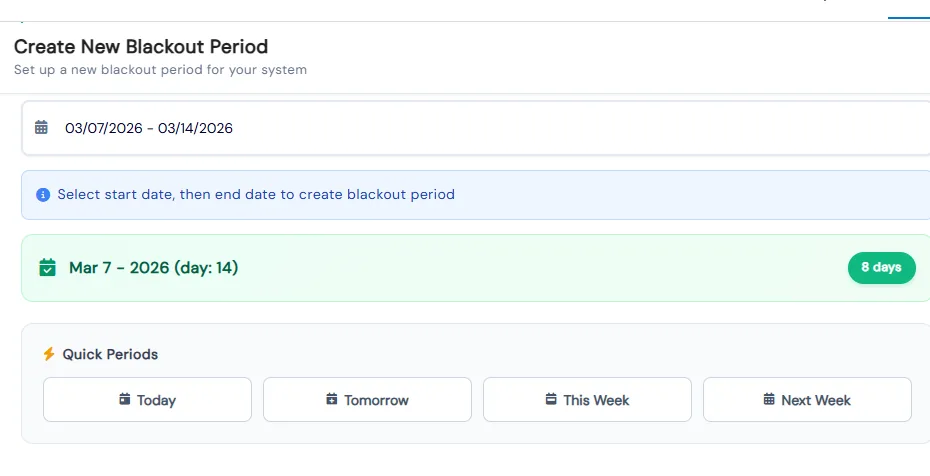
Mark holidays and breaks once. Those sessions drop out of future recurring charges automatically, and a fully blacked-out period is skipped.

  • Name each blackout period with quick title suggestions and pick start and end dates
  • Quick Periods set Today, Tomorrow, This Week or Next Week in one click
  • Choose a color theme so blackout periods stand out on the calendar
  • Requires the Prorate setting to be on for blackouts to affect future recurring intervals
Create New Blackout Period form with a selected date range, day count and quick period buttons

Full control of recurring payments

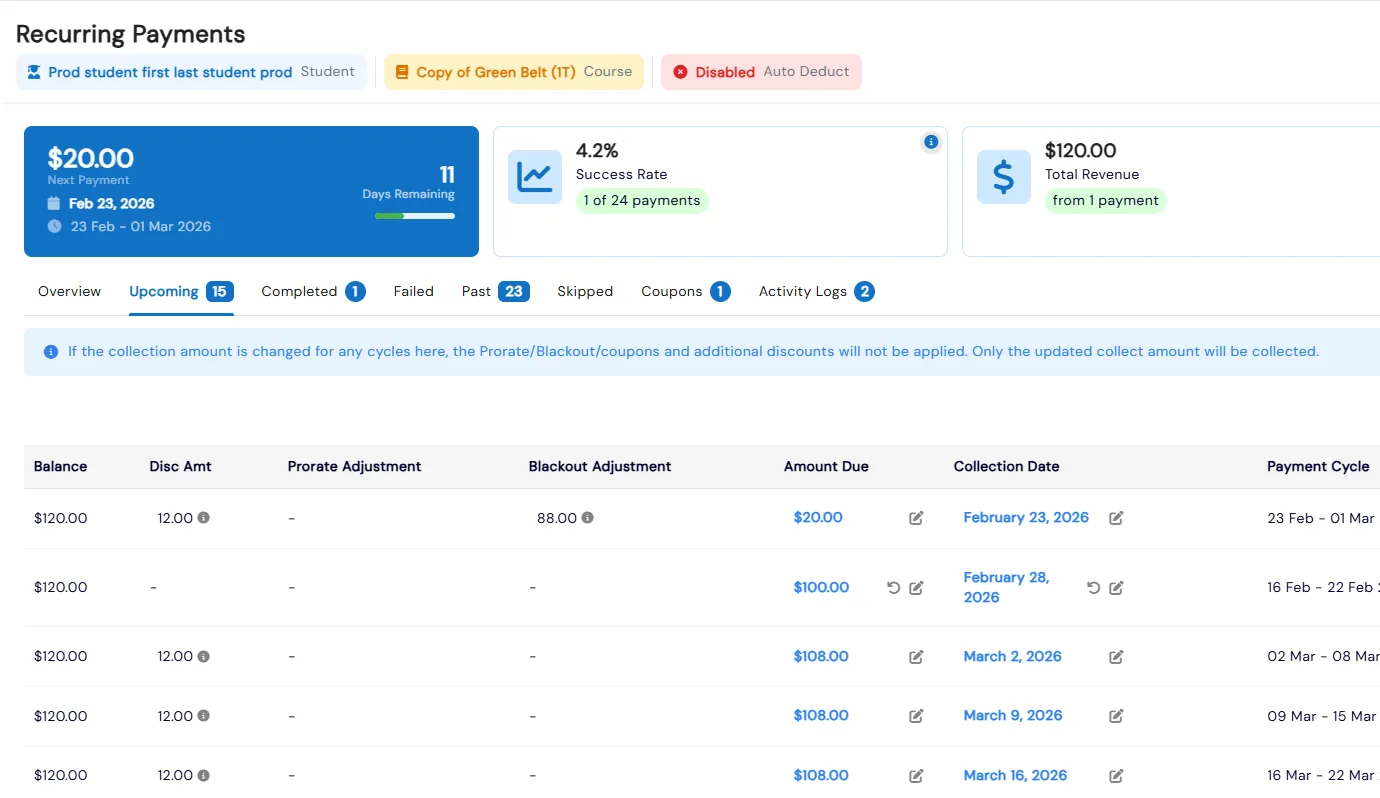
Hold payments for a date range, schedule one-time charges for later, convert them into recurring plans, or collect outside the schedule when needed.

  • Edit the amount or collection date of any upcoming cycle, or update cycles in bulk
  • Counters show the next payment, success rate, total revenue and upcoming payments
  • Failed cycles can be recollected, and Activity Logs record every date and amount change
  • Record offline payments such as cash, check or bank transfer, with an optional check image
Recurring Payments dashboard with next payment, success rate and revenue cards above editable upcoming cycles with blackout adjustments

Fees for anything

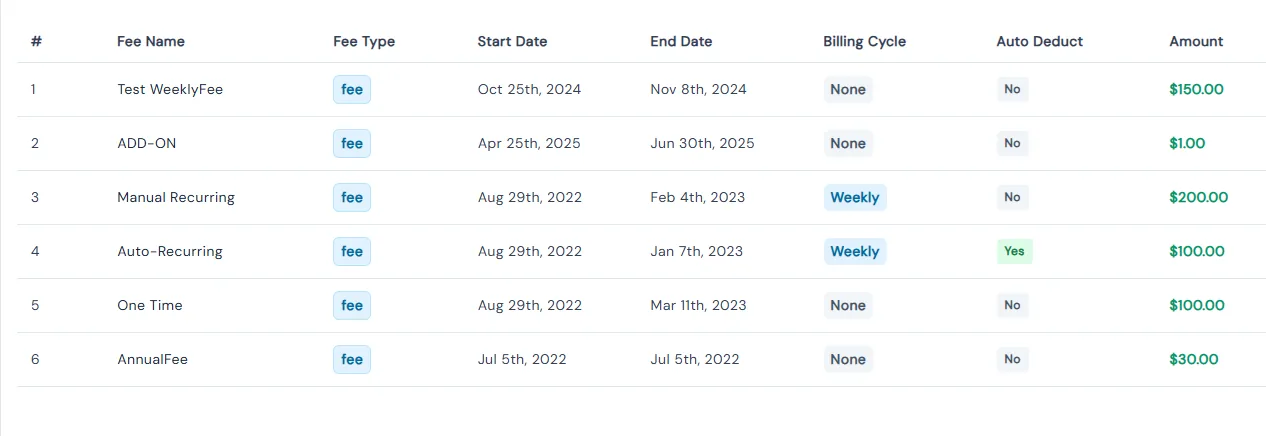
A fee catalog for add-ons, materials and special charges. Fees can be one-time or recurring, tied to a class or event, and charged now or later.

  • Group fees under fee types such as Add-Ons, Partnerships and Special Charges
  • Assign an existing fee to a student and link it to a course, class or event
  • Post Fee creates and charges a fee for a family or student without setting it up first
  • Unpaid fees can be scheduled for a future date or converted into a recurring payment
Manage Fees list showing fee names, types, start and end dates, billing cycle, auto deduct and amount

Family statements

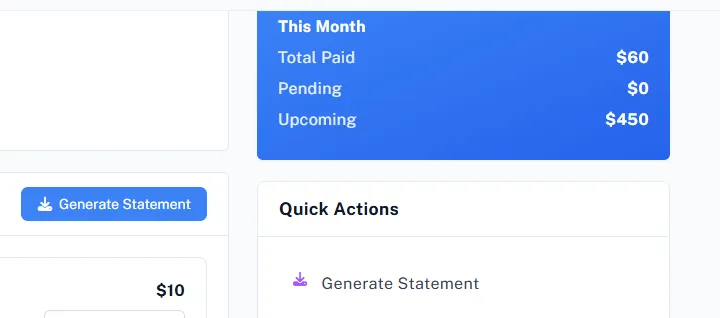
Generate a statement of every charge, payment and refund for a family. Staff create it from the family record and parents from the portal.

  • Statements include every transaction, charge, payment and refund for the family
  • Use them for record-keeping or to share with the family
  • In the portal, parents see this month's paid, pending and upcoming totals beside Generate Statement
  • Refunds can be processed from the same Transactions tab where staff generate statements
Parent portal payments page with this month's paid, pending and upcoming totals and Generate Statement buttons

Stripe, NMI, Razorpay, Plaid and PayPal

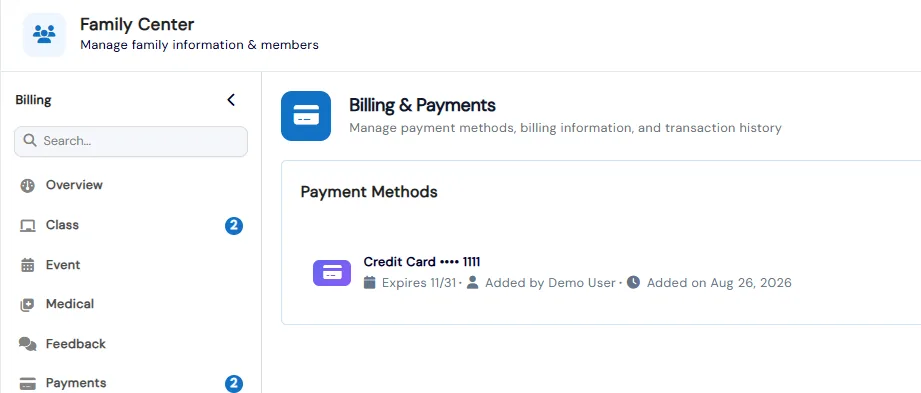
Connect Stripe (including Stripe Connect for franchises), NMI, Razorpay, Plaid or PayPal. Families save cards or bank accounts and choose a default.

  • Families can pay with any method, currency and country your gateway supports, and save a card or bank account
  • Each saved method shows brand, last four digits, who added it, when, and expiry date
  • Badges flag Default, Verified, and Expired or Expiring Soon methods at a glance
  • Families manage their own payment methods from the Payments tab in the Parent Portal
Family Center Billing & Payments tab showing a saved credit card with expiry date and who added it

Invoices with payment links and reminders

Bill a family for their unpaid enrollments and fees in one invoice, with a PDF and a payment link. Automatic reminders follow up before, on or after the due date.

  • Add unpaid enrollments and fees, or post a new fee, with a discount and tax on each line and payment terms that set the due date
  • Split an invoice into installments, each with its own due date and payment link
  • Reminders go out once a day by email, and by WhatsApp when it is on, and can be stopped per invoice
  • Record payments, void or write off an invoice, and issue credit notes that reduce a balance, refund through the payment gateway or credit the family wallet, with every action in an Activity tab

Prepaid classes with a class balance

Sell classes in advance and track what each student has left. Classes are added when the invoice that bills them is fully paid, and used when the student attends.

  • Bill classes on an invoice as number of classes times rate per class
  • Choose which attendance marks use a class, such as Present, Arrived late or Makeup
  • Credit, debit or transfer classes to another class or a sibling, with a reason on every change
  • Parents see each child's classes remaining in the parent portal

Benefits for Your Institution

1

Reduce late payments

2

Save time on manual invoicing

3

Offer flexible payment options

4

Track revenue in real-time

Billing & Payments: FAQs

Common questions about Calimatic Billing & Payments.

Ready to use Billing & Payments?

Start your free trial today and experience the full power of Calimatic.

No credit card required
14-day free trial
Cancel anytime