Camp Deposit Payment Software for Registration Fees and Remaining Balances
Let families hold a spot with a deposit or a registration fee, then collect the rest when you choose. Charge one-time fees, take partial payments and see every balance still owed.
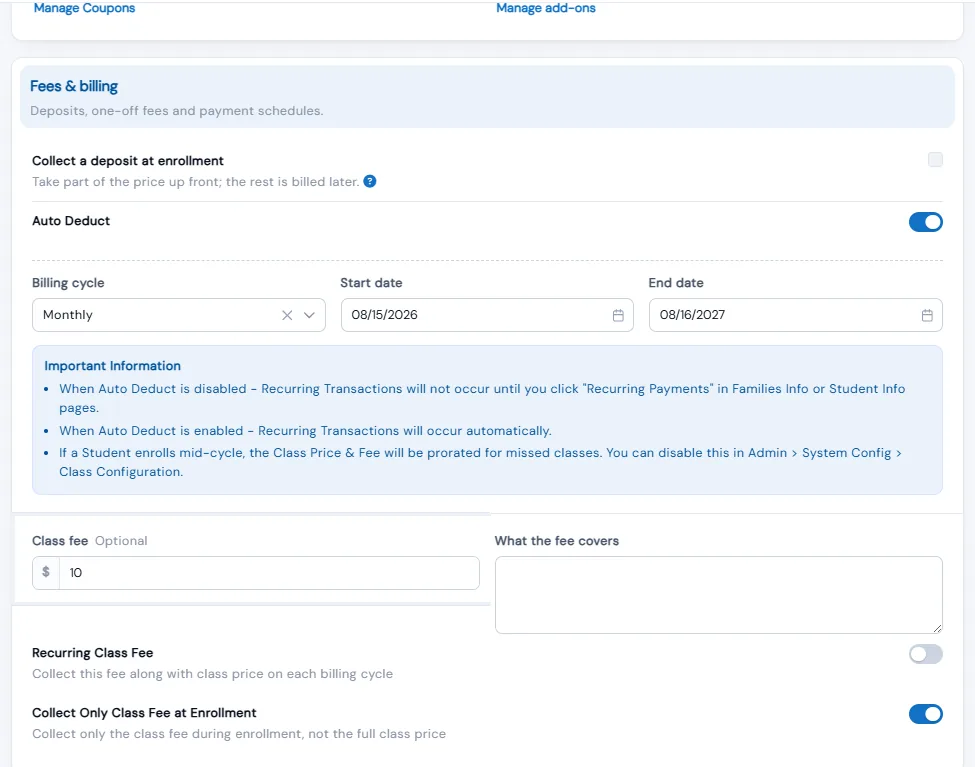
Deposits and fees in Calimatic let you decide how much a family pays when they enroll. For each class, camp or event you can take a deposit and bill the rest later, or collect only the registration fee and charge tuition when you are ready. Families see what they pay today on the class card, in the cart and on the review screen.
Fees work alongside tuition. Create registration, materials, add-on and partnership fees once, assign them to students, or post a one-off charge to a family on the spot. Every unpaid deposit balance and fee sits on the student’s Payments page with its amount paid and what is left, so staff can collect it, schedule it for a later date or split it into parts.
How it works
- 1
Choose what families pay at enrollment
In a class’s Fees & billing section, turn on Collect a deposit at enrollment to take part of the price up front, or Collect Only Class Fee at Enrollment to charge just the registration fee. Fee-only needs both a fee and a price above zero and works on regular billing classes. The two options cannot be on together, and the enrollment form must be set to Charge Immediately for deposits.
- 1
- 2
Show families exactly what is due today
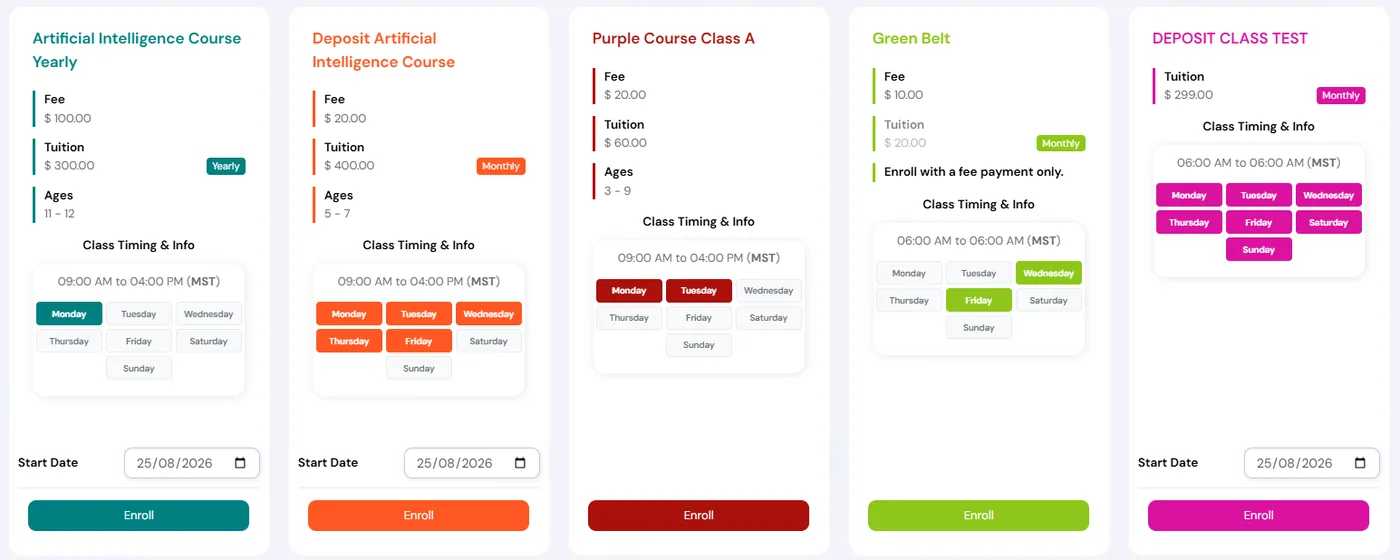
Class cards in the Activity Finder show the deposit amount, or the fee and tuition separately with the note “Enroll with a fee payment only.” For deposit classes, parents choose to pay the deposit or the full amount on your website and in the parent portal. A “Deposit is non-refundable” notice appears on the enrollment form, in the confirmation email and on the receipt.
- 3
Collect the remaining balance
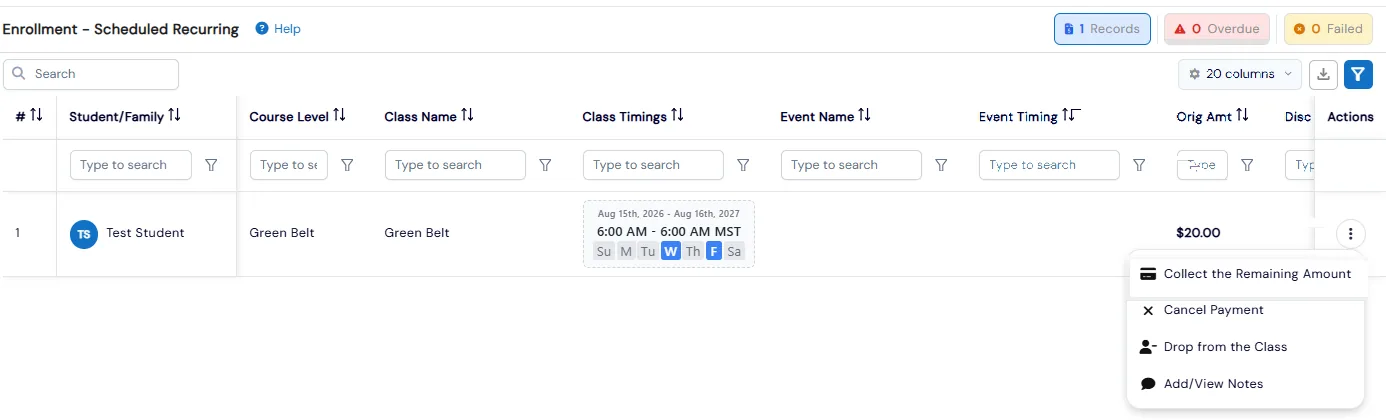
Open the student’s Payments, then the row’s Actions menu, and choose Collect the Remaining Amount. The payment opens with the outstanding balance filled in, and you can change it before charging the card on file. For a deposit class, Change Collection Date moves the balance date, as long as it is before the class starts and not in the past.
- 4
Charge one-time fees and partial payments
Under Fee Payments, Manage Fee holds your fees and fee types, such as Add-Ons, Partnerships and Special Charges. Assign Fee links a fee to a student’s course, class or event. Post Fee charges a family or student right away or saves it to collect later. To take a remaining camp balance in parts, post a fee for each payment, then cancel what is left on the enrollment without unenrolling the student.
- 5
Chase what is still owed
Each unpaid row can be paid by invoice with or without a payment link, by card on the spot, or recorded as cash, check or bank transfer with a photo of the check. Set a future collection date and it is charged on that day. Reports, Billing, Pending Payments/Fees breaks down the dashboard’s pending payments counter by status.
- 4
What's included
- Deposit at enrollment for classes, events and party packages, with the balance collected later
- Registration fee only at enrollment, with tuition collected when you are ready
- Deposit or full payment choice for parents on your website and in the parent portal
- Deposit amount, or fee and tuition shown separately, on Activity Finder class cards
- “Deposit is non-refundable” notice on the form, confirmation email and receipt
- Unpaid page showing amount paid, remaining balance and total remaining for deposits
- Collect the Remaining Amount with an adjustable, pre-filled balance
- Change the balance collection date for deposit classes
- Recurring deposit classes that create future billing cycles once the balance is paid
- Reusable fees and fee types, assigned to a course, class or event
- Post Fee for instant one-off charges to a family or student, now or later
- Pay by invoice link, card, cash, check or bank transfer, or schedule a future collection date
Part of Calimatic Billing & Payments, in one white-labeled platform with enrollment, billing and the parent app.
Who uses it
Summer camps
Hold each camp week with a deposit, show families the balance at checkout, and collect the rest before camp starts or in several smaller payments.
Martial arts schools
Charge a registration fee to join a monthly program and start tuition once the student has settled in, with recurring billing unlocking after the first collection.
Dance studios
Set up registration, materials and add-on fees once, assign them to the right class, and post a one-off charge to a family at the front desk.
Activity and party centers
Let families reserve a party slot with a deposit on the package, then collect the remaining balance from the portal.
See Deposits & Fees in a live demo
Get a personalized demo. We'll show Calimatic running your programs, under your brand.
- 14-day free trial, no credit card
- White-labeled under your brand
- Live product walkthrough
Deposits & Fees: FAQs
Common questions about Deposits & Fees in Calimatic.
From the Blog
How to Price Classes and Programs at Your Activity Center for Maximum Revenue
Stop leaving money on the table with random pricing. Learn strategic approaches to pricing your enrichment programs, camps, and classes for profitability.
Read articleHow to Automate Billing and Reduce Late Payments in Education
Education businesses lose thousands monthly to late payments and manual billing errors. Learn how automation can recover that revenue and save hours each week.
Read articleHow Activity Centers Streamline Operations and Boost Profitability
Dance studios, swim schools, and martial arts centers face unique operational challenges. Learn proven strategies to eliminate scheduling chaos and boost revenue.
Read article