Class Scheduling Software for Recurring Classes
Set when each class meets and who teaches it, see the whole week on one calendar, and let families know ahead of time when a class day is cancelled.
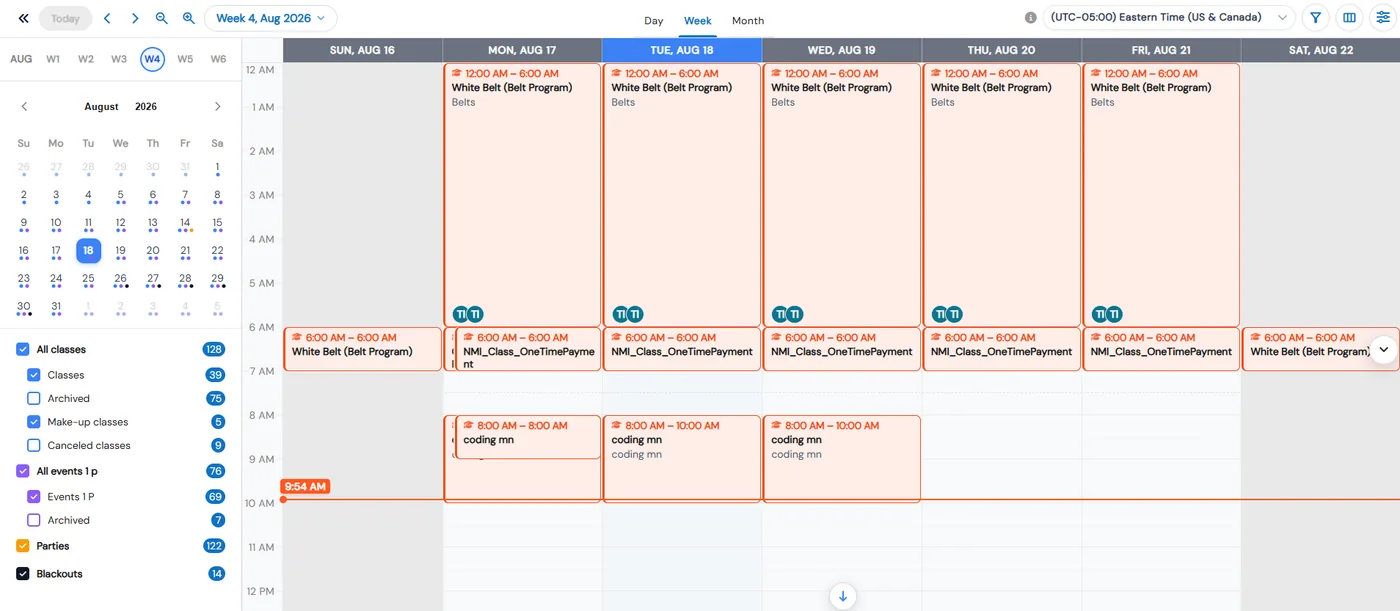
Class scheduling in Calimatic is where you set when each class meets, who teaches it and which days it does not run, and then see every class, event, party and blackout on one color-coded calendar. Staff and parents each see the calendar with the options that fit their role.
Each class has a date range and one or more time blocks with its days, times and instructors. Mark a holiday as a blackout date on the class, and a ready-made automation emails the enrolled students and their parents a few days before, so nobody turns up for a class that isn’t running.
How it works
- 1
Build the class schedule
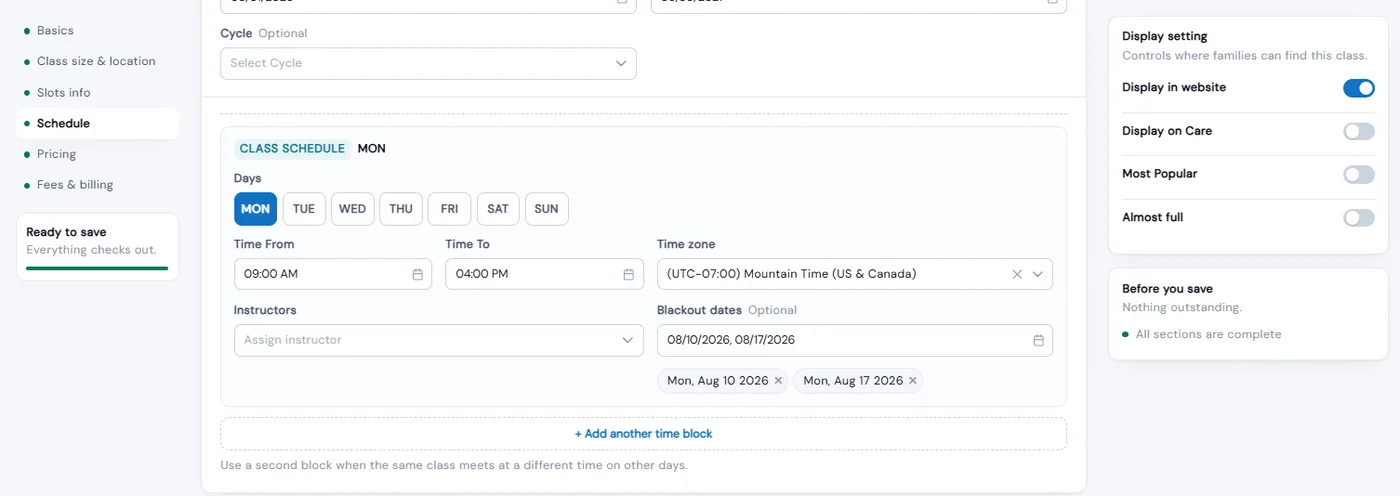
Create the class under its course with a start and end date, slots, age range and grade. In the Schedule section, pick the days it meets, the class timing and the instructor. Add another time block when the same class meets at a different time on other days.
- 2
Make it recurring
For classes that repeat weekly or monthly, turn on Recurring with a recurring start and end date and set the recurring fee. Recurring start and end dates show as columns on the Classes page and in its CSV export. With prorating on, a student who joins mid-cycle pays only for the classes or days left.
- 1
- 3
Mark the days a class won’t run
Pick blackout dates on any time block. The picker only offers days the class meets, within its date range, and leaving it empty never blocks saving. If you later change the class days or shorten the dates, Calimatic asks before removing blackout dates that no longer fit.
- 4
Warn families before an off day
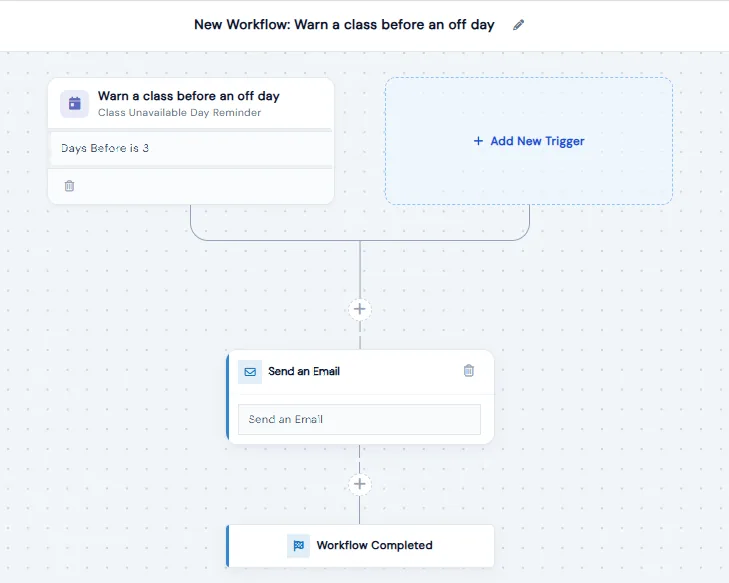
In Automation Studio, the ready-made “Warn a class before an off day” template builds the workflow for you: a trigger set to 3 days before, and a Send Email step to the enrolled student with parents included by default. Pick your email template, narrow it to a class, type or category if you like, and switch it to Active.
- 5
Run the week from one calendar
See classes, events, parties and blackouts in day, week or month view, and filter by class name, type, course, instructor or student. Click a class to see its schedule, instructors, enrollment and price, start an online class or edit it. Staff can cancel a session or add a make-up from the calendar.
- 5
What's included
- Start and end dates, slots, age range and grade on every class
- One or more time blocks with days, times and instructors
- Recurring classes with recurring start and end dates
- Assign one instructor to many classes at once
- Blackout dates on each time block, limited to days the class meets
- Ready-made automation that emails students and parents before a class off day
- Day, week and month calendar with classes, events, parties and blackouts in their own colors
- Calendar filters by class, type, course, instructor and student
- Warning when staff enroll a student in a class at the same time as one they already attend
- Classes go inactive automatically once their end date passes
- Copy a class, or copy it from the archive for the next term
- Day selection for classes that meet on more days than each student needs (enabled on request)
Part of Calimatic Classes & Events, in one white-labeled platform with enrollment, billing and the parent app.
Who uses it
Dance studios
Build a weekly timetable of recurring classes with instructors assigned, and mark holidays and breaks as blackout dates so families are emailed before each one.
Martial arts schools
Organize belt classes by type, category and course, and see every class for the week side by side in the calendar’s week view.
Tutoring centers
See regular classes and make-up classes in one calendar, filtered by instructor or student, and click any class to see its instructors and how many students are enrolled.
Music schools
Assign a teacher to all their classes at once, and get a warning before a student is booked into two lessons at the same time.
See Class Scheduling in a live demo
Get a personalized demo. We'll show Calimatic running your programs, under your brand.
- 14-day free trial, no credit card
- White-labeled under your brand
- Live product walkthrough
Class Scheduling: FAQs
Common questions about Class Scheduling in Calimatic.
From the Blog
How Dance Studios, Swim Schools & Martial Arts Centers Streamline Operations
Activity centers waste 15+ hours weekly on admin tasks. Discover proven strategies dance studios, swim schools, and martial arts centers use to automate operations and increase revenue.
Read articleHow to Manage Memberships, Drop-ins, and Class Packs at Your Activity Center
Learn proven strategies to handle multiple pricing models, reduce administrative headaches, and maximize revenue at your enrichment center.
Read articleStaff Scheduling and Payroll: Simplifying Workforce Management for Education
Education business owners struggle with scheduling conflicts, payroll errors, and staff communication. Learn how to streamline workforce management and reduce administrative headaches.
Read article